The Ultimate Guide to Documentation: How to Create User-Friendly and Effective User Documentation


The Ultimate Guide to Documentation: How to Create User-Friendly and Effective User Documentation
A frustrated user clicks away from your product. They needed help with a simple task, but after three minutes of searching through confusing documentation, they gave up. According to a study by Zendesk, 67% of customers prefer self-service over speaking to a company representative. Yet Microsoft research reveals that 91% of users who have a bad self-service experience will simply leave without complaining. The stakes have never been higher: your documentation is either a competitive advantage or a silent revenue killer.
This is not just about writing instructions. Documentation shapes how users perceive your product, influences whether they stick around, and directly impacts your bottom line. Companies with excellent documentation see 47% higher customer satisfaction scores, according to Forrester Research. This guide will show you exactly how to create documentation that users will not only read but actually appreciate.
Key Takeaways
Before diving deep, here are the essential insights you will gain from this guide:
- Documentation directly impacts revenue: Companies with strong documentation see 47% higher customer satisfaction and up to 50% reduction in support tickets.
- User-first approach wins: Write for your users, not your product. Focus on solving problems, not listing features.
- Structure matters as much as content: A well-organized documentation site with intuitive navigation beats comprehensive but chaotic content every time.
- Accessibility is not optional: Inclusive documentation design expands your audience and improves usability for everyone.
- Continuous improvement is essential: Documentation is a living resource that requires regular updates, feedback integration, and performance monitoring.
- Templates accelerate quality: Using proven frameworks ensures consistency and reduces the cognitive load on both writers and readers.
There's a ready-made version of this
Your documentation audit checklist is already live at yourcompany.dewstack.com, with 50+ checkpoints and a scoring matrix ready to work through. Edit it, don't start it.
Preview itNo credit card. Edit it, don't start it.
What is Documentation?
Documentation refers to any written, visual, or multimedia material that helps users understand how to use a product, service, or system effectively. This encompasses a wide range of content types:

- User manuals and guides: Comprehensive instructions for product usage
- Knowledge bases: Searchable repositories of articles and information
- FAQs: Quick answers to common questions
- Troubleshooting guides: Step-by-step problem-solving resources
- Product documentation: Technical specifications and feature explanations
- Standard Operating Procedures (SOPs): Internal process documentation
- API documentation: Technical references for developers
- Video tutorials and walkthroughs: Visual demonstrations of features and workflows
The primary goal of documentation is simple yet profound: empower users to achieve their objectives with minimal friction. Great documentation anticipates questions before they are asked and provides answers in the exact moment they are needed.
The Business Case: Why Documentation Matters
Effective documentation is not merely a nice-to-have; it is a strategic business asset that impacts multiple dimensions of organizational success.
Enhancing User Experience and Satisfaction
When users can find answers quickly and solve problems independently, their perception of your product improves dramatically. According to our research on documentation importance, companies that invest in user-friendly documentation see measurable improvements in Net Promoter Scores (NPS) and customer satisfaction metrics.
Self-service documentation creates a sense of empowerment. Users feel confident and capable when they can resolve issues without waiting for support. This psychological benefit translates directly into brand loyalty and positive word-of-mouth recommendations.
Reducing Support Costs and Scaling Efficiently
Every support ticket carries a cost. Industry averages suggest that a single support interaction costs between $15 and $40, depending on complexity and channel. Documentation that effectively addresses common issues can deflect thousands of tickets annually.
Consider the math: if your documentation prevents just 100 support tickets per month at an average cost of $25 each, you save $30,000 annually. For larger organizations, these numbers scale dramatically. This is why neglecting user guides can sink your product, as the hidden costs compound over time.
Accelerating User Onboarding and Adoption
First impressions matter. New users form opinions about your product within minutes of their first interaction. Documentation that guides them through initial setup and helps them achieve early wins creates momentum that drives long-term adoption.
Research from Userlane indicates that effective onboarding documentation can improve feature adoption rates by up to 300%. When users understand what is possible and how to achieve it, they explore more features and extract more value from your product.
Supporting Compliance and Reducing Risk
In regulated industries such as healthcare, finance, and manufacturing, documentation is not optional. It is a legal requirement. Proper documentation demonstrates due diligence, supports audit processes, and protects organizations from liability.
For guidance on industry-specific documentation requirements, explore our guides on SOPs in healthcare, SOPs in finance, and SOPs in manufacturing.
Documentation Statistics That Demand Attention
The data paints a compelling picture of documentation's impact on business outcomes:
User Behavior and Expectations
- 67% of customers prefer self-service over speaking with a representative (Zendesk)
- 91% of users will leave after a poor self-service experience without complaining (Microsoft)
- 89% of consumers have switched to a competitor following a poor customer experience (Harris Interactive)
- 73% of customers say valuing their time is the most important thing a company can do (Forrester)
Business Impact Metrics
- 47% higher customer satisfaction reported by companies with strong documentation (Forrester)
- 50% reduction in support tickets achievable with comprehensive self-service documentation (HDI)
- 23% lower customer service costs for organizations with mature knowledge management (TSIA)
- 15% boost in brand reputation for companies with excellent documentation resources (Forrester)
Adoption and Retention Effects
- 86% of buyers are willing to pay more for better customer experience (PwC)
- 3x higher user retention for products with excellent onboarding documentation (Wyzowl)
- 72% of customers will share positive experiences with six or more people (Esteban Kolsky)
- 26% of users abandon software due to poor documentation and support (Capterra)
These statistics underscore a fundamental truth: documentation is not a cost center but a revenue driver. For a deeper analysis of how poor documentation affects user experience, read 10 Reasons Why Your Documentation is Killing Your User Experience.
Core Principles of User-Friendly Documentation
Creating documentation that users actually use requires adherence to several foundational principles:
1. Know Your Audience
Before writing a single word, develop a clear understanding of who will read your documentation. Consider:
- Technical proficiency: Are they beginners, intermediate users, or experts?
- Goals and motivations: What are they trying to accomplish?
- Context of use: When and where will they access documentation?
- Preferred learning styles: Do they prefer text, video, or interactive content?
Create user personas that represent your primary documentation audiences. A first-time user setting up your product has vastly different needs than a power user troubleshooting an advanced feature. Your documentation should serve both effectively.
2. Write with Clarity and Simplicity
The best documentation uses simple language that anyone can understand. Follow these guidelines:
- Use active voice: Write "Click the Save button" instead of "The Save button should be clicked."
- Avoid jargon: Define technical terms when they must be used.
- Keep sentences short: Aim for 15-20 words per sentence on average.
- One idea per paragraph: Make content scannable and digestible.
- Use concrete language: Be specific rather than abstract.
Remember that clear writing reflects clear thinking. If you struggle to explain something simply, you may not fully understand it yourself. Learn more in our guide to mastering user manual creation.
3. Structure for Scanability
Users rarely read documentation linearly. They scan for relevant information, jumping between sections based on their immediate needs. Design your documentation accordingly:
- Use descriptive headings and subheadings
- Break content into short, focused sections
- Employ bullet points and numbered lists
- Include a table of contents for longer documents
- Add visual hierarchy through typography
- Use white space effectively to reduce visual clutter
4. Provide Context and Examples
Abstract instructions become concrete through examples. Whenever you explain a concept or procedure, illustrate it with:
- Real-world scenarios showing when and why to use a feature
- Step-by-step walkthroughs with screenshots
- Before-and-after comparisons demonstrating outcomes
- Code samples for technical documentation
- Video demonstrations for complex workflows
Documentation Templates and Frameworks
Using consistent templates accelerates documentation creation while ensuring quality and completeness. Here are proven frameworks for common documentation types:
How-To Article Template
Title: How to [Accomplish Specific Task]

Overview (2-3 sentences):
- What the user will accomplish
- Why this matters / when to use this feature
- Estimated time to complete

Prerequisites:
- Required access levels or permissions
- Prior knowledge assumed
- Required tools or setup

Steps:
1. First action [with screenshot if helpful]
2. Second action
3. Third action
   - Sub-step if needed
   - Additional detail
4. Verification step (how to confirm success)

Troubleshooting:
- Common issue #1 and solution
- Common issue #2 and solution

Related Articles:
- Link to prerequisite content
- Link to advanced topics
- Link to related features
Feature Documentation Template
Title: [Feature Name]

Overview:
- What the feature does
- Key benefits for users
- Common use cases

Getting Started:
- How to access the feature
- Basic configuration
- Quick start example

Detailed Usage:
- Comprehensive explanation of capabilities
- Options and settings
- Best practices

Examples and Use Cases:
- Scenario 1: [Description and walkthrough]
- Scenario 2: [Description and walkthrough]

Limitations and Considerations:
- Known limitations
- Performance considerations
- Security implications

FAQs:
- Common questions with concise answers

Related Features:
- Links to complementary functionality
Troubleshooting Guide Template
Title: Troubleshooting [Issue Category]

Symptom Description:
- What the user experiences
- Error messages they might see
- When the issue typically occurs

Quick Fixes:
1. Most common solution (try first)
2. Second most common solution
3. Third option

Detailed Diagnostics:
- How to identify the root cause
- Diagnostic steps and commands
- What each result indicates

Solutions by Cause:
Cause A: [Solution with steps]
Cause B: [Solution with steps]
Cause C: [Solution with steps]

When to Contact Support:
- Situations requiring human assistance
- Information to gather before contacting support

Prevention:
- How to avoid this issue in the future
For comprehensive guidance on creating effective troubleshooting resources, visit The Ultimate Troubleshooting Guide.
Knowledge Base Article Framework (AIDA)
Apply the AIDA framework to structure knowledge base content:
- Attention: Hook with the problem or need in the title and first sentence
- Interest: Explain why this matters and what the reader will gain
- Desire: Show the solution and its benefits with examples
- Action: Provide clear steps and next actions
This framework ensures every article immediately demonstrates value and guides users toward resolution.
Accessibility and Inclusive Design

Accessible documentation is not just ethical, it is practical. Designing for accessibility improves usability for everyone, not just users with disabilities. The Web Content Accessibility Guidelines (WCAG) provide the foundation for inclusive documentation design.
Core Accessibility Principles

Perceivable: Information must be presentable in ways all users can perceive.
- Provide text alternatives for images (alt text)
- Offer captions for video content
- Ensure sufficient color contrast (minimum 4.5:1 ratio)
- Do not rely solely on color to convey information
- Support screen readers with proper heading hierarchy
Operable: Interface components must be navigable by all users.
- Ensure keyboard navigation works throughout
- Provide skip links to main content
- Allow sufficient time for reading and interaction
- Avoid content that flashes more than three times per second
Understandable: Content must be readable and predictable.
- Write at an appropriate reading level (aim for 8th grade or below)
- Define abbreviations and technical terms
- Maintain consistent navigation and labeling
- Provide error identification and suggestions
Robust: Content must be interpretable by various user agents.
- Use semantic HTML markup
- Ensure compatibility with assistive technologies
- Validate code against standards
Inclusive Writing Practices
Beyond technical accessibility, inclusive documentation considers diverse audiences:
- Use gender-neutral language: Prefer "they" over "he" or "she" when gender is unknown
- Avoid idioms and colloquialisms: These may not translate across cultures
- Consider global audiences: Avoid region-specific references when possible
- Respect diverse abilities: Do not use ableist language or assume physical capabilities
- Provide multiple formats: Offer content as text, video, and downloadable PDFs when feasible
Accessibility Checklist for Documentation
Use this checklist when reviewing documentation for accessibility:
- All images have descriptive alt text
- Videos include captions or transcripts
- Color contrast meets WCAG AA standards
- Heading hierarchy is logical (H1 > H2 > H3)
- Links have descriptive text (not "click here")
- Tables have proper headers and structure
- Forms have associated labels
- Content is readable at 200% zoom
- Keyboard navigation is fully functional
- Reading level is appropriate for audience
Best Practices for Effective Documentation
Beyond the fundamentals, these best practices elevate documentation from adequate to exceptional:
Utilize Visuals and Multimedia Strategically
Visual content increases comprehension and retention. Research suggests people remember 65% of visual information after three days, compared to just 10% of text-only content.
Effective visual elements include:
- Screenshots: Annotate with arrows, highlights, and callouts
- Diagrams: Illustrate concepts, workflows, and relationships
- Videos: Demonstrate complex procedures and interactions
- GIFs: Show quick interactions without full video overhead
- Infographics: Summarize data and processes visually
However, visuals should complement text, not replace it. Every screenshot needs context, every video should have a transcript, and every diagram requires explanation.
Implement Contextual Help
The best help appears exactly when users need it. Contextual help includes:
- Tooltips: Brief explanations on hover
- Inline guidance: Help text within the interface
- Contextual links: Documentation links relevant to current task
- Chatbots: AI-powered assistance within the product
For insights on implementing AI-powered contextual help, explore our AI Knowledge Base guide.
Maintain Documentation as a Living Resource
Documentation is never truly complete. Establish processes for continuous maintenance:
- Regular audits: Review all content quarterly for accuracy
- Version tracking: Document what changed and when
- Feedback loops: Collect and act on user feedback
- Analytics review: Monitor search queries and page performance
- Product alignment: Update documentation with every product release
Consider using AI-based content creation tools to accelerate updates and maintain consistency.
Gather and Act on Feedback
User feedback reveals gaps and opportunities that internal review may miss:
- Enable article ratings and comments
- Monitor search queries that yield no results
- Track support tickets that could be addressed by documentation
- Conduct user testing and interviews
- Analyze documentation analytics for patterns
The most effective documentation teams treat feedback as a gift and prioritize addressing recurring issues.
Optimize for Search and Discovery
Users cannot benefit from documentation they cannot find. Optimize for discoverability:
- Use descriptive, keyword-rich titles
- Include relevant terms in headings and body text
- Implement robust search functionality with filters
- Create logical navigation and categorization
- Cross-link related content extensively
- Add FAQs that match natural language queries
Learn more about writing effective FAQs in How to Write FAQs Effectively.
Get this documentation audit checklist as a live site
Your documentation audit checklist is already live at yourcompany.dewstack.com, with 50+ checkpoints and a scoring matrix ready to work through. Edit it, don't start it.
Start free and get it liveNo credit card. Edit it, don't start it.
Measuring Documentation Success
What gets measured gets improved. Track these metrics to evaluate documentation effectiveness:
Engagement Metrics
- Page views: Which topics attract the most attention?
- Time on page: Are users finding and consuming content?
- Bounce rate: Are users finding what they need or leaving quickly?
- Search queries: What are users looking for?
- Zero-result searches: What content gaps exist?
Impact Metrics
- Support ticket deflection: Has ticket volume decreased?
- Customer satisfaction: Have CSAT or NPS scores improved?
- Time to resolution: Are users solving problems faster?
- Product adoption: Are documented features being used more?
- Onboarding completion: Are new users succeeding?
Quality Metrics
- Feedback ratings: How do users rate individual articles?
- Comment sentiment: What are users saying about your documentation?
- Content freshness: How recently was content reviewed and updated?
- Coverage: What percentage of features and processes are documented?
Set baseline measurements, establish targets, and review progress monthly. Use insights to prioritize documentation improvements.
Create Exceptional Documentation with Dewstack
Ready to put these documentation best practices into action? Dewstack provides everything you need to create, manage, and host user-friendly documentation that delights your customers.
Build docs as you work: Dewstack's browser extension lets you capture procedures with screenshots and annotations as you perform them. Create step-by-step guides without disrupting your workflow or relying on memory.
AI-powered intelligence: SmartDocs transforms your documentation into a dynamic knowledge engine. Users get instant, contextual answers in natural conversation, turning your content into a 24/7 expert that scales infinitely.
Import and organize effortlessly: Bring existing documentation from any platform into Dewstack's intuitive editor. Powerful search, logical categorization, and version control ensure users always find what they need. Discover the capabilities of our import tool.
Accessibility built in: Dewstack generates documentation that meets WCAG standards, with proper heading hierarchy, alt text support, and keyboard navigation out of the box.
Analytics and customization: Understand how users engage with your docs, identify gaps, and continuously improve. Custom domains, branding, and embedded chatbots create a seamless experience that reflects your brand.
Seamless integrations: Connect Dewstack with your existing tools, including Slack integration for notifications and collaboration.
Ready to create documentation your users will actually love? Try Dewstack for free and see the difference intelligent documentation makes.
Ready to Elevate Your Documentation?
Try Dewstack free for 7 days. Create AI-powered documentation that answers questions instantly.
Start a free trialANSWERS TO
Frequently Asked Questions
Here are some common questions that might provide the information you're seeking.
Related Blogs
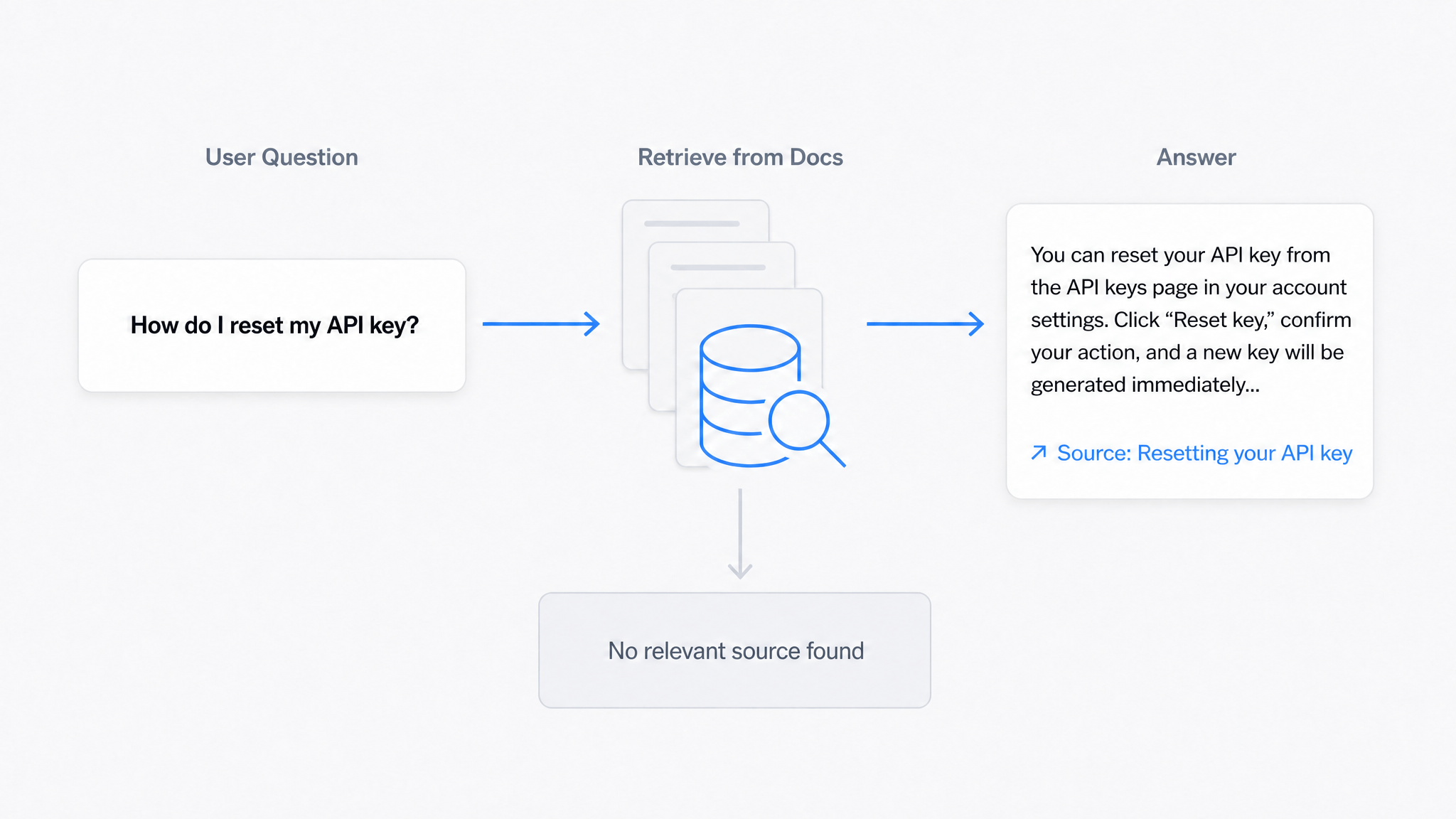
AI Answers From Your Docs: Grounded Answers, Citations & Hallucination Control
How an AI chatbot for technical documentation gives grounded answers with source citations, controls hallucinations, and turns unanswered questions into drafted pages.
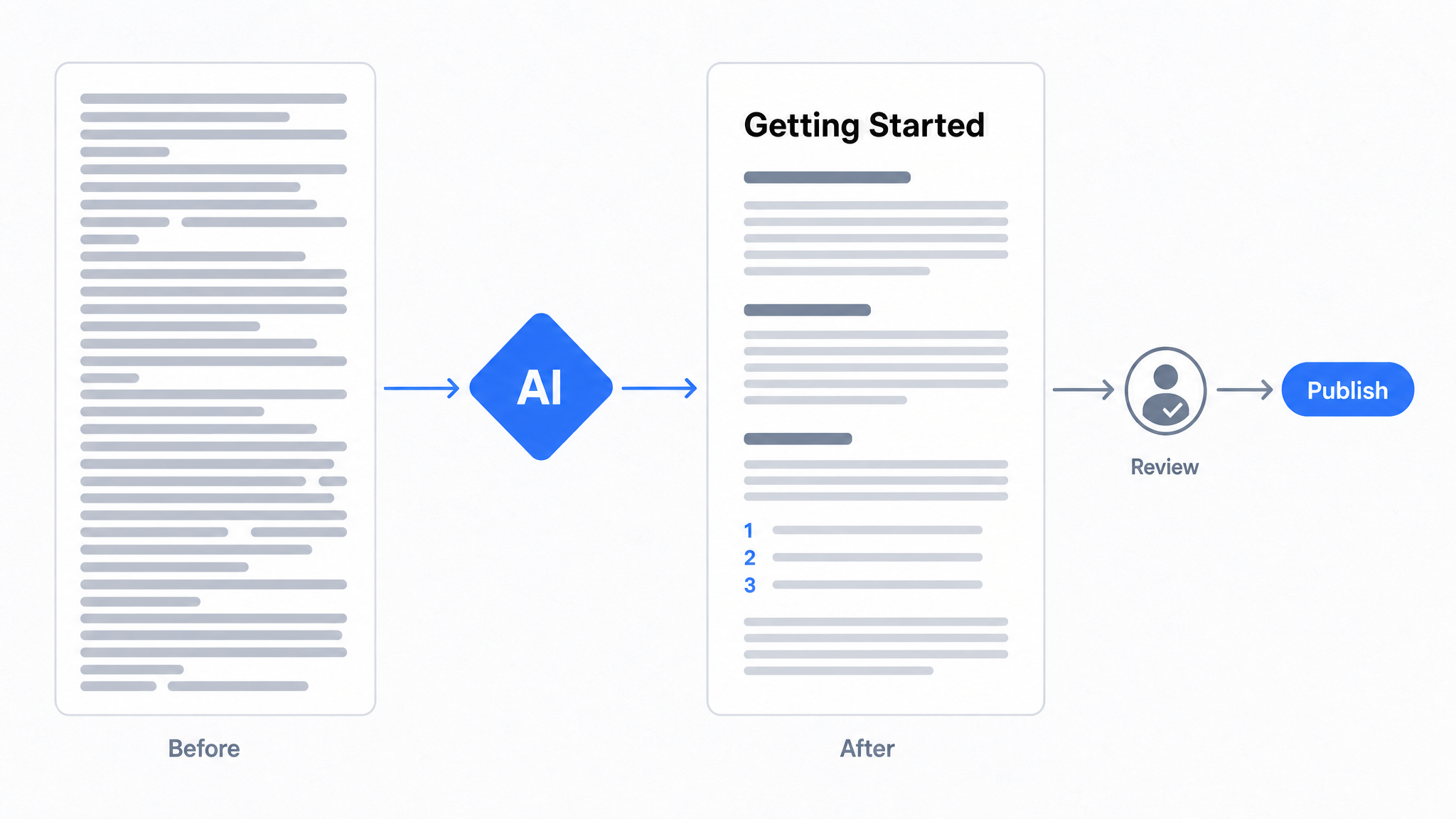
How to Use AI to Improve Existing Documentation
Use AI to audit, rewrite, and translate the documentation you already have, and let a connected agent draft improvements to stale pages for a human to publish.
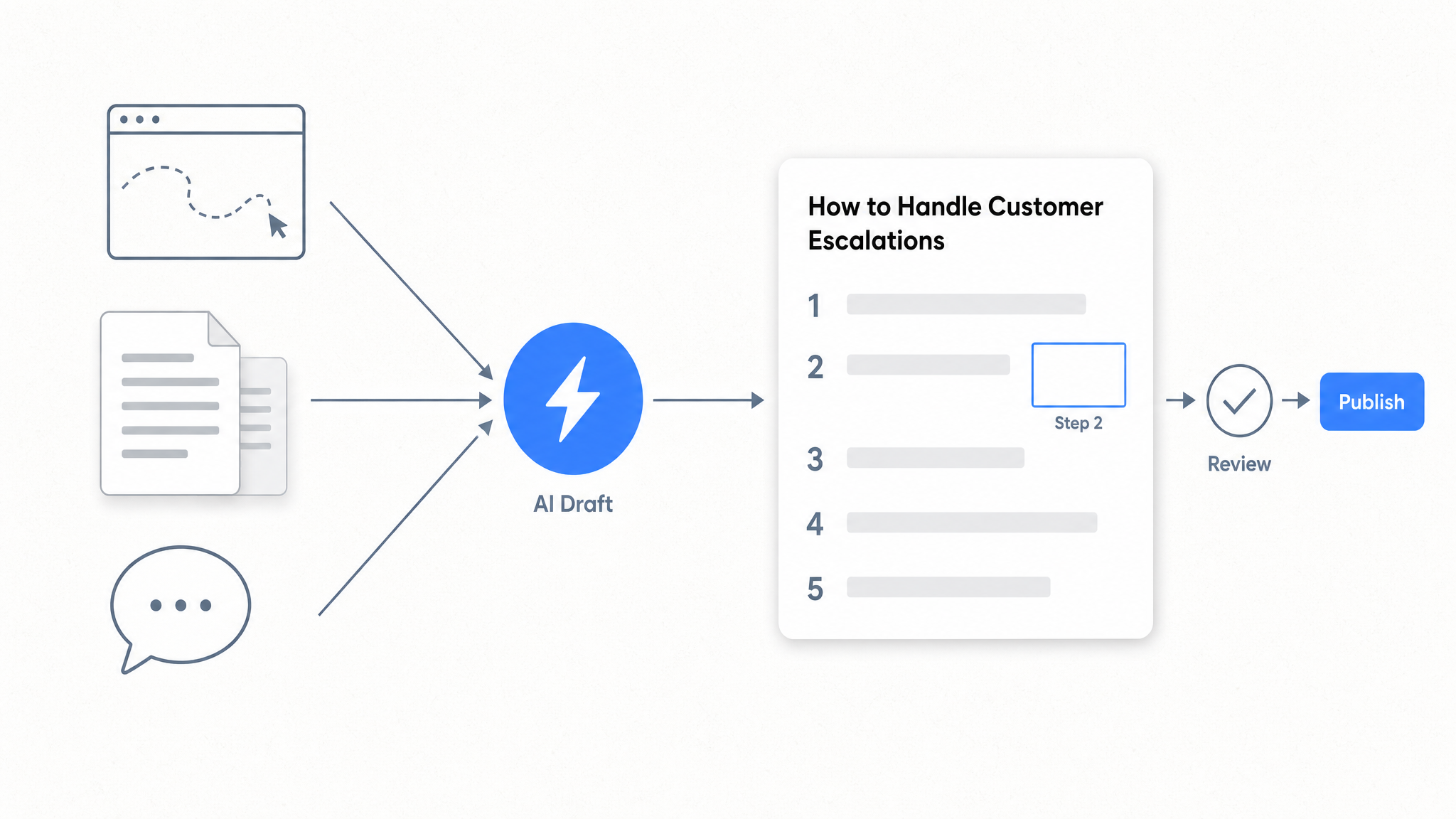
How to Automate SOP Creation with AI
Capture a workflow, let AI draft the SOP, review it, and publish it to a searchable knowledge base your team can query around the clock.
Ready to get started with Dewstack?
Try Dewstack free for 7 days. Create AI-powered documentation that answers questions instantly.
No credit card required.