How to Write FAQs That Actually Help Customers: A Complete Guide


How to Write FAQs That Actually Help Customers: A Complete Guide
Here is a truth that might surprise you: 81% of customers prefer to find answers themselves before contacting support. Yet most FAQ pages fail spectacularly at giving them what they need. They are buried in corporate jargon, organized by internal logic rather than customer needs, and filled with questions nobody actually asks.
The result? Frustrated customers who abandon your site, overwhelmed support teams fielding the same questions repeatedly, and missed opportunities to build trust with your audience.
But when FAQs are done right, they become one of your most powerful customer experience tools. They deflect support tickets, accelerate purchase decisions, improve SEO rankings, and demonstrate that you genuinely understand your customers. Companies with well-optimized FAQ sections report up to 70% reduction in repetitive support inquiries and significantly higher customer satisfaction scores.
This guide will show you exactly how to create FAQs that actually work. You will learn the psychology behind effective FAQ writing, see concrete before-and-after examples, understand how to leverage FAQs for SEO benefits, and discover the systematic process for building and maintaining an FAQ section that serves your customers and your business.
Key Takeaways
- Self-service is the new standard: Over 80% of customers attempt to solve problems themselves before reaching out to support, making well-crafted FAQs essential for modern customer experience.
- Quality over quantity: A focused FAQ section with 15-25 well-written answers outperforms a bloated page with hundreds of poorly organized questions.
- Write for humans first: Use conversational language, address emotional concerns, and write questions the way customers actually phrase them—not how your internal teams describe issues.
- Structure matters as much as content: Logical categorization, search functionality, and mobile-friendly design determine whether customers find answers or give up.
- FAQs drive SEO results: Properly implemented FAQ schema markup can earn rich snippets in search results, increasing visibility and click-through rates by up to 30%.
- Maintenance is non-negotiable: FAQs require regular updates based on customer feedback, product changes, and analytics data to remain effective.
There's a ready-made version of this
Your FAQ centre is already live at yourcompany.dewstack.com: categorised, written and searchable. Edit it, don't start it.
Preview itNo credit card. Edit it, don't start it.
Why FAQs Matter More Than Ever
The modern customer journey has fundamentally changed. Before making a purchase or reaching out for help, people research independently. They compare options, read reviews, and most importantly, they look for answers to their specific questions.
Research from Harvard Business Review found that customers who can resolve issues through self-service report 12% higher satisfaction scores than those who must contact support for the same resolution. Why? Because self-service respects their time and gives them control over their experience.
Consider these statistics that underscore the importance of effective FAQs:
- 67% of customers prefer self-service over speaking to a company representative
- 91% of customers would use a knowledge base if it met their needs
- Companies with robust self-service options see 25% lower support costs while maintaining higher satisfaction
- 40% of support tickets are questions that could be answered by a well-designed FAQ page
For businesses, this represents both a challenge and an opportunity. The challenge is creating FAQ content that genuinely helps customers. The opportunity is building a competitive advantage through superior self-service experiences.
Beyond customer satisfaction, FAQs directly impact your bottom line. Every question answered through self-service is a support ticket that does not need to be handled by your team. At an average cost of $15-25 per support interaction, the savings from an effective FAQ section can be substantial—potentially tens of thousands of dollars annually for mid-sized businesses.
The Psychology of Self-Service Support
Understanding why customers prefer self-service helps you create FAQs that actually get used. Several psychological factors drive this preference:
Autonomy and Control
People inherently value the ability to solve their own problems. When customers can find answers independently, they feel empowered rather than dependent. This sense of autonomy creates positive associations with your brand.
Time Sensitivity
In a world of instant gratification, waiting for support responses feels painful. Self-service offers immediate resolution, which aligns with modern expectations for speed. A customer at 11 PM with a billing question would much rather find the answer themselves than wait until business hours.
Social Anxiety Reduction
Some customers feel anxious about contacting support—whether from fear of asking a "stupid question" or discomfort with phone calls. FAQs provide a judgment-free zone where they can explore questions privately.
Information Processing Preferences
Many people are visual learners who prefer reading and scanning text over listening to explanations. FAQs cater to this preference by presenting information in a digestible, scannable format.
When you understand these motivations, you can design FAQs that feel helpful rather than frustrating. This means organizing content for quick scanning, using clear headers that match how customers think about their problems, and providing enough detail that customers feel confident they have found the right answer.
Essential Elements of High-Performing FAQs

Creating effective FAQ content requires attention to several critical elements. Each component contributes to the overall user experience and determines whether your FAQs actually help customers or simply take up space on your website.
Clarity and Accessible Language
The most common FAQ failure is writing for internal audiences rather than customers. Technical jargon, industry acronyms, and corporate speak create barriers to understanding.
Effective FAQs use plain language that a first-time visitor could understand. This does not mean dumbing down content—it means communicating clearly. Aim for an 8th-grade reading level for maximum accessibility.
Consider tone as well. FAQs should feel helpful and conversational, not clinical or defensive. Write as if you are explaining something to a friend, maintaining professionalism while being approachable.
Question Authenticity
The questions in your FAQs should reflect how customers actually ask things—not how your marketing team wishes they would phrase them. Study your support tickets, chat logs, and social media mentions to capture the authentic language customers use.
For example, customers rarely ask "What is your refund policy pursuant to consumer protection regulations?" They ask "Can I get my money back if I don't like it?" Your FAQ questions should match this natural phrasing.
Comprehensive Yet Concise Answers
Each answer should fully address the question without unnecessary padding. Aim to answer the direct question within the first sentence or two, then provide supporting details for those who want more information.
Structure longer answers with subheadings, bullet points, or numbered steps to improve scannability. Include links to more detailed resources when appropriate, allowing customers to dive deeper if needed.
Visual Enhancement
Text-only FAQs miss opportunities for clearer communication. Screenshots, diagrams, and short videos can dramatically improve understanding, especially for how-to questions or technical topics.
Visual elements also break up text walls and make the page feel more approachable. Even simple formatting like bold key terms and clear spacing improves the reading experience.
Mobile Optimization
Over 60% of web traffic now comes from mobile devices. Your FAQ section must work seamlessly on smartphones, with expandable/collapsible questions, readable text without zooming, and touch-friendly navigation.
Before and After: FAQ Transformations
Seeing concrete examples helps illustrate the difference between mediocre and effective FAQs. Here are three transformations that demonstrate key principles:
Example 1: The Refund Policy Question
Before (Problematic):
Q: What is your return policy?
A: Returns are subject to our standard return policy as outlined in the Terms of Service. Items must be returned within the applicable return window in accordance with the original condition requirements. Refunds will be processed pursuant to the original payment method within the standard processing timeframe. Some exclusions may apply.
After (Effective):
Q: Can I return something if I change my mind?
A: Yes! You have 30 days from delivery to return any item for a full refund. Here is how it works:
- Start your return from your account dashboard or email support@company.com
- Ship the item back in its original packaging (we provide a prepaid label)
- Receive your refund within 5-7 business days after we receive the item
Note: Final sale items marked on the product page cannot be returned. Electronics must be unopened for a full refund—opened electronics can be exchanged.
Why the after version works: It uses natural question phrasing, leads with "yes" to reassure the customer, provides specific timeframes, breaks the process into clear steps, and addresses common exceptions upfront.
Example 2: The Account Security Question
Before (Problematic):
Q: How do I secure my account?
A: Users should implement appropriate security measures including but not limited to strong password protocols. Two-factor authentication is available through the security settings interface. Please refer to our security documentation for additional information regarding account protection best practices.
After (Effective):
Q: How do I protect my account from being hacked?
A: We recommend three essential steps to keep your account secure:
1. Enable two-factor authentication Go to Settings, then Security, then click "Enable 2FA." You can use an authenticator app or receive codes via text message.
2. Use a strong, unique password Your password should be at least 12 characters with a mix of letters, numbers, and symbols. Don't reuse passwords from other sites.
3. Review connected devices regularly Under Settings and Security, you can see all devices logged into your account and remove any you do not recognize.
Concerned your account may already be compromised? Contact our security team immediately and we will help you regain access.
Why the after version works: It addresses the emotional concern (being "hacked"), provides specific actionable steps with exact navigation paths, and offers a clear next step for urgent situations.
Example 3: The Pricing Question
Before (Problematic):
Q: How much does your service cost?
A: Pricing varies based on selected tier and feature requirements. Please visit our pricing page or contact sales for a customized quote based on your organization's specific needs and implementation requirements.
After (Effective):
Q: How much does it cost? Is there a free option?
A: There are three tiers, and the difference between them is scale rather than features:
- Starter: for a solo owner or a very small team, with one member included
- Pro: for growing teams, adding direct integrations, analytics, and more members
- Enterprise: custom limits and contracts for large organisations
Every plan starts with a 7-day free trial and no credit card. See current prices and the full feature comparison.
Not sure which plan fits? Our team can help you choose: Schedule a quick call.
Why the after version works: It immediately provides concrete pricing information, acknowledges the free option that many visitors care about, clearly differentiates the tiers, and offers next steps for different customer needs.
The FAQ Writing Process
Creating effective FAQs requires a systematic approach rather than guessing what customers might ask. This process ensures your FAQs address real needs and continue improving over time.
Step 1: Gather Questions from Real Sources
Start by mining your existing customer interactions:
- Support tickets and chat logs: Your richest source of actual customer language and concerns
- Sales team feedback: Questions that arise during the buying process
- Social media mentions: How customers discuss your product publicly
- Search queries: What terms bring people to your site (via Google Search Console)
- User testing sessions: Questions that arise when new users try your product
- Competitor FAQs: Gaps they might be filling that you should address
Compile these questions without filtering initially. You will prioritize and refine in the next steps.
Step 2: Prioritize by Impact
Not all questions deserve FAQ treatment. Prioritize based on:
- Frequency: How often is this question asked?
- Support cost: Does answering this require significant support time?
- Business impact: Does this question relate to conversions or churn?
- Self-service potential: Can this be answered effectively in writing?
Questions that score high across these dimensions should form your core FAQ content. Highly specific or complex issues may be better handled through direct support.
Step 3: Write and Structure Answers
For each prioritized question:
- Lead with the direct answer in the first sentence
- Provide necessary context and details
- Include specific examples or steps when relevant
- Link to related resources for those wanting more depth
- Consider what follow-up questions this answer might generate
Use formatting to improve scannability: bold key terms, use bullet points for lists, and break longer answers into logical sections.
Step 4: Review and Test
Before publishing:
- Have someone unfamiliar with the topic read the answer and confirm understanding
- Check that questions match how customers actually phrase them
- Verify all links work and information is current
- Test the experience on mobile devices
- Ensure the reading level is accessible (tools like Hemingway Editor can help)
Step 5: Implement and Monitor
After publishing your FAQs:
- Track which questions get the most views
- Monitor whether related support tickets decrease
- Collect feedback through rating buttons or surveys
- Set calendar reminders for regular review cycles
Get this FAQ centre as a live site
Your FAQ centre is already live at yourcompany.dewstack.com: categorised, written and searchable. Edit it, don't start it.
Start free and get it liveNo credit card. Edit it, don't start it.
SEO Benefits and Schema Markup
Well-optimized FAQs serve double duty—helping customers while improving your search visibility. Understanding how to leverage FAQs for SEO can significantly increase your organic traffic.
How FAQs Improve Search Rankings
Search engines favor content that directly answers user questions. FAQ pages naturally align with this by matching the question-and-answer format that search engines increasingly prioritize.
FAQs help you:
- Target long-tail keywords: Natural question phrases match how people actually search
- Capture featured snippet positions: Google often pulls FAQ content for position zero results
- Increase time on page: Users who find relevant answers stay longer
- Reduce bounce rate: Meeting user intent prevents immediate exits
- Build topical authority: Comprehensive FAQ coverage signals expertise
Understanding FAQ Schema Markup
Schema markup is structured data that helps search engines understand your content. FAQ schema specifically tells Google that your page contains questions and answers, potentially earning you enhanced search results.
When properly implemented, FAQ schema can make your search listings show expandable question-and-answer pairs directly in the results page. This significantly increases visibility and click-through rates—studies suggest improvements of 20-30% compared to standard listings.
Implementing FAQ Schema
FAQ schema uses JSON-LD format embedded in your page. Here is an example structure:
{
  "@context": "https://schema.org",
  "@type": "FAQPage",
  "mainEntity": [{
    "@type": "Question",
    "name": "What is your return policy?",
    "acceptedAnswer": {
      "@type": "Answer",
      "text": "You have 30 days from delivery to return any item for a full refund..."
    }
  }]
}
Key guidelines for FAQ schema:
- Only use FAQ schema on pages primarily dedicated to FAQ content
- Each question must be unique on the page
- Answers should be complete (no "click here to learn more" endings)
- Do not use FAQ schema for advertising content or promotions
- Validate your markup using Google's Rich Results Test tool
Content Optimization Best Practices
Beyond schema markup, optimize your FAQ content by:
- Including relevant keywords naturally in questions and answers
- Matching search intent by understanding what users really want to know
- Providing comprehensive answers that fully address the query
- Linking to related pages to distribute authority throughout your site
- Keeping content fresh with regular updates (search engines favor current content)
Organizing FAQs for Maximum Usability
Even excellent individual answers fail if customers cannot find them. Organization and navigation determine whether your FAQ section gets used or ignored.
Category-Based Structure
Group questions into logical categories that match how customers think about their problems. Common category approaches include:
- By topic: Billing, Account Setup, Features, Troubleshooting
- By user journey: Getting Started, Using the Product, Managing Your Account
- By user type: For Individuals, For Teams, For Administrators
Choose the structure that best matches your customers' mental models. Test different approaches if uncertain—watch how users navigate and adjust accordingly.
Search Functionality
For FAQ sections with more than 15-20 questions, search becomes essential. Implement search that:
- Handles natural language queries (not just exact keyword matches)
- Provides autocomplete suggestions
- Shows relevant results even with typos or variations
- Highlights search terms in results
Effective search dramatically improves the user experience, helping customers jump directly to relevant answers without browsing through categories.
Progressive Disclosure
Not everyone needs the same level of detail. Design your FAQs with progressive disclosure:
- Show question list with expandable answers (accordion style)
- Lead with summary answers that satisfy most users
- Provide "learn more" links for those needing deeper information
- Use expandable sections within answers for technical details
This approach serves both quick-answer seekers and those wanting comprehensive information.
Navigation and Accessibility
Ensure your FAQ section is easy to navigate:
- Include anchor links for direct sharing of specific questions
- Provide a table of contents for longer FAQ pages
- Use clear visual hierarchy with consistent formatting
- Ensure keyboard navigation works for accessibility
- Test with screen readers to verify accessibility compliance
Common Mistakes to Avoid
Understanding frequent FAQ failures helps you avoid them. These mistakes undermine even well-intentioned FAQ efforts:
Writing Questions Nobody Asks
Creating FAQs based on what you want to tell customers rather than what they want to know produces useless content. "Why is our company so innovative?" is not a question any customer asks. Stick to questions sourced from real customer interactions.
Corporate Jargon and Legal Language
FAQs written by legal or PR teams often read like terms of service. While accuracy matters, impenetrable language defeats the purpose. Have customer-facing team members review and humanize the content.
Incomplete or Vague Answers
Answers that dodge the question frustrate users. "Contact support for details" is not an answer—it is an admission that you have not created useful self-service content. If something genuinely requires personalized support, explain why and make the contact process easy.
Outdated Information
Stale FAQs erode trust. If your pricing changed six months ago but the FAQ still shows old numbers, customers question what else might be wrong. Build regular review cycles into your content maintenance process.
Ignoring Mobile Experience
FAQ pages designed for desktop often fail on mobile. Tiny text, difficult navigation, and answers that require horizontal scrolling make mobile users give up. Design mobile-first or at minimum test thoroughly on actual devices.
Hiding the FAQ Section
FAQs that customers cannot find provide no value. Include links in your main navigation, footer, support pages, and contextually within relevant product pages. Make FAQs discoverable at the moments customers need them.
Too Many or Too Few Questions
Both extremes create problems. Too few questions leave common concerns unaddressed. Too many create overwhelming pages where customers cannot find relevant answers. Aim for comprehensive coverage of genuinely common questions—usually 20-50 for most businesses.
Continuous Improvement Strategies
Effective FAQs require ongoing attention, not one-time creation. Build these practices into your routine:
Analytics-Driven Refinement
Track metrics that reveal how well your FAQs perform:
- Page views: Which questions get the most traffic?
- Search queries: What are people searching for that is not covered?
- Time on page: Are users finding and reading answers?
- Click patterns: Which links within answers get clicked?
- Support ticket correlation: Do tickets decrease after FAQ updates?
Use this data to identify gaps, prioritize updates, and measure improvement over time.
Feedback Collection
Build mechanisms for direct user feedback:
- "Was this helpful?" voting buttons on each answer
- Option to request clarification or report problems
- Periodic surveys about the overall FAQ experience
- Monitoring social media for FAQ-related frustrations
Act on feedback promptly—it shows customers their input matters and improves content quality.
Regular Review Cadence
Schedule FAQ reviews at predictable intervals:
- Monthly: Quick scan for outdated information, review analytics
- Quarterly: Deeper analysis, add new questions based on support trends
- Annually: Comprehensive audit, reorganization if needed, competitive review
Assign clear ownership for FAQ maintenance. Without accountability, updates slip and content becomes stale.
Cross-Team Collaboration
FAQs benefit from input across your organization:
- Support teams know what customers actually ask
- Product teams understand feature details and changes
- Sales teams hear pre-purchase concerns
- Marketing teams ensure brand consistency
Create channels for these teams to flag needed updates and contribute content. The best FAQs reflect collective organizational knowledge.

Power Your FAQs with Dewstack
Creating and managing effective FAQs shouldn't be a struggle. Dewstack provides the intelligent platform you need to build FAQs that transform customer experience and turn knowledge into a competitive advantage.
Capture questions as they arise: With Dewstack's browser extension, teams can document answers in real-time—complete with screenshots and step-by-step guidance. Build your FAQ library naturally from actual interactions.
AI that anticipates user needs: SmartDocs transforms your FAQs into an intelligent knowledge engine. Users get instant, contextual answers in natural conversation—scaling your expertise to serve thousands simultaneously.
Organize and import effortlessly: Bring existing FAQs from spreadsheets, docs, or other platforms into Dewstack's organized structure. Powerful search and logical categorization ensure users find answers in seconds.
Analytics that reveal what users really need: See which questions are searched most, identify gaps in your FAQ coverage, and continuously improve based on real user behavior. Custom domains and branding make your FAQ portal feel like a natural part of your product.
Ready to build FAQs that actually get used? Try Dewstack for free and experience intelligent documentation that works for you and your users.
Ready to Elevate Your Documentation?
Try Dewstack free for 7 days. Create AI-powered documentation that answers questions instantly.
Start a free trialANSWERS TO
Frequently Asked Questions
Here are some common questions that might provide the information you're seeking.
Related Blogs
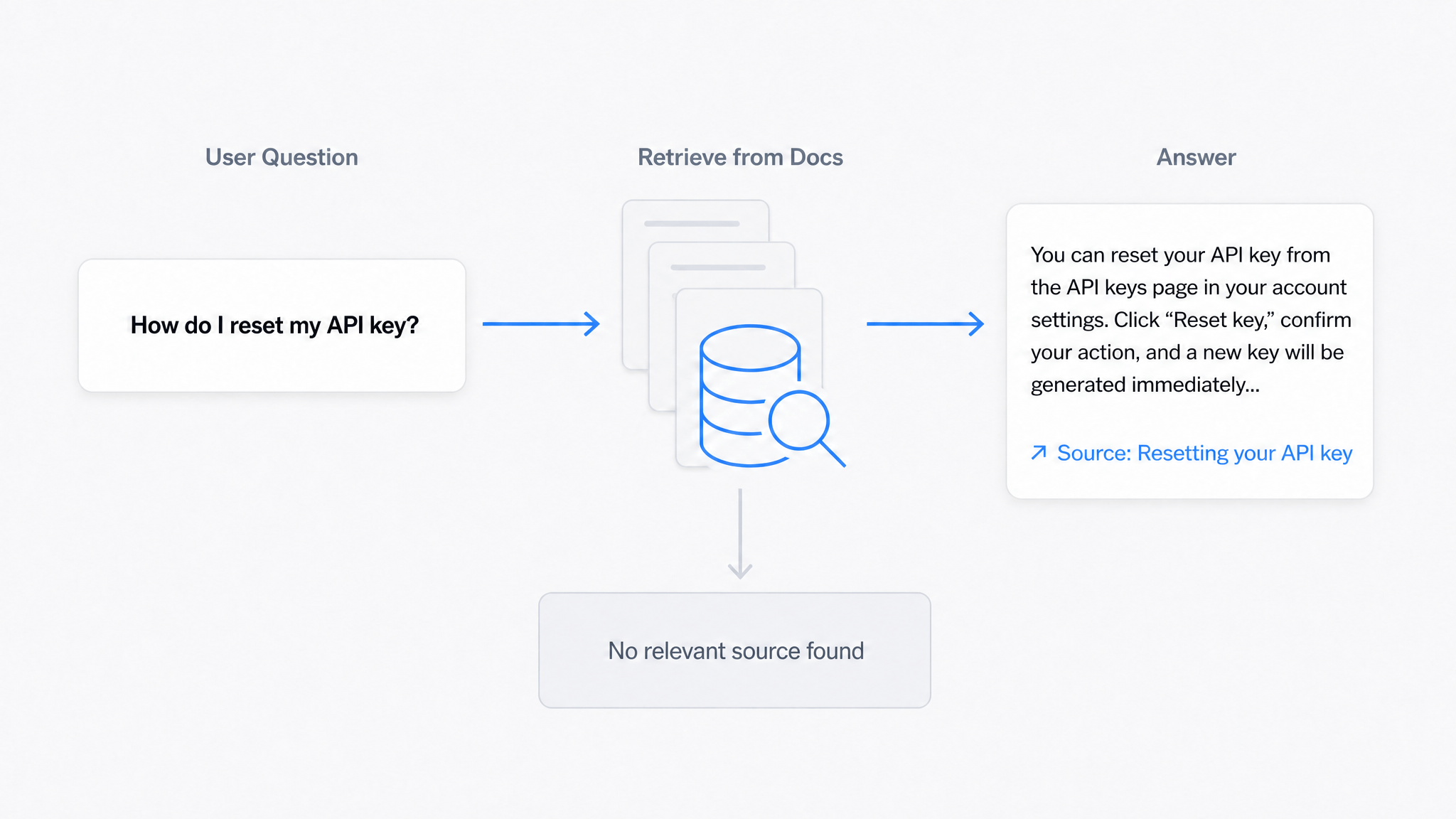
AI Answers From Your Docs: Grounded Answers, Citations & Hallucination Control
How an AI chatbot for technical documentation gives grounded answers with source citations, controls hallucinations, and turns unanswered questions into drafted pages.
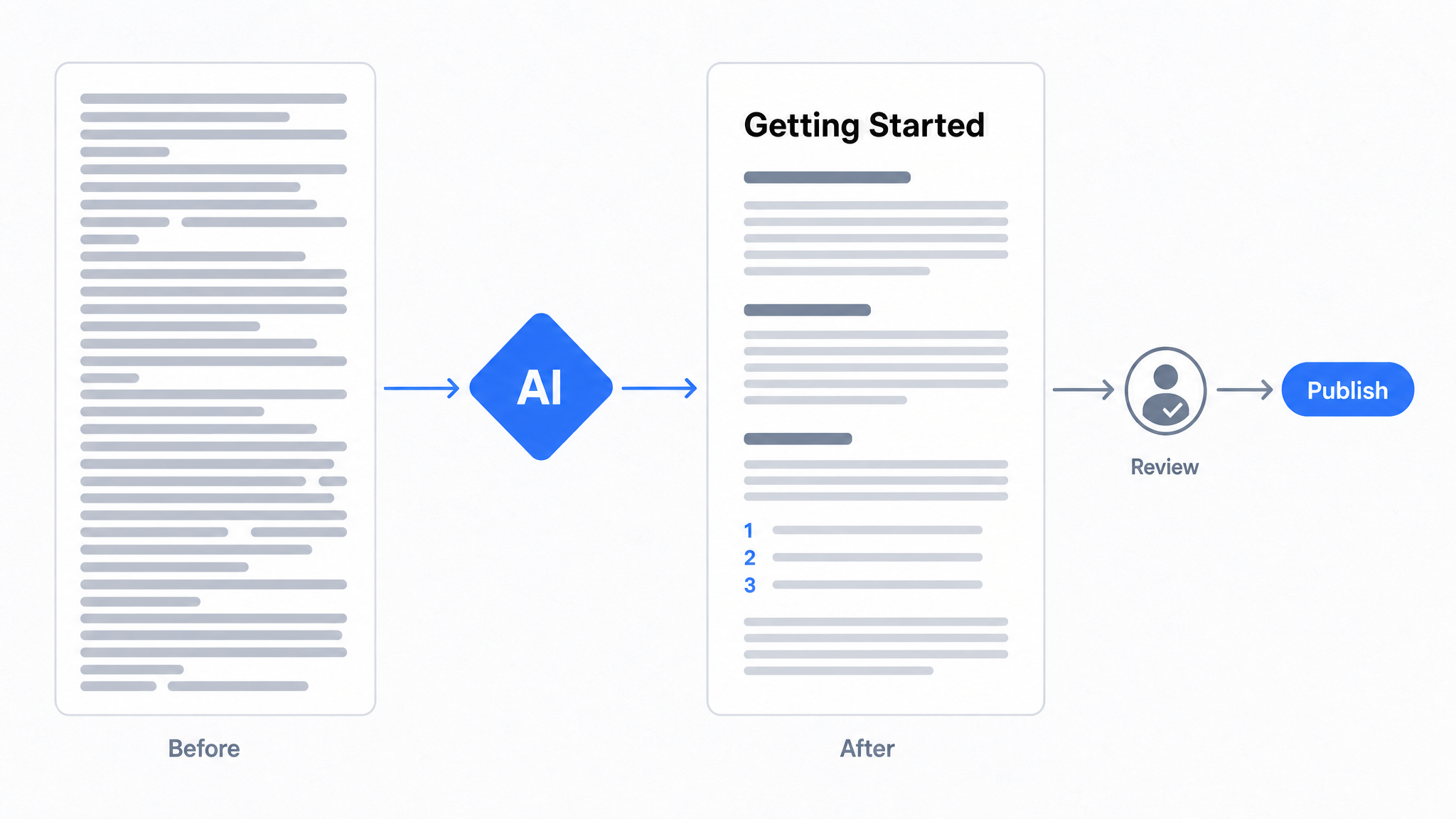
How to Use AI to Improve Existing Documentation
Use AI to audit, rewrite, and translate the documentation you already have, and let a connected agent draft improvements to stale pages for a human to publish.
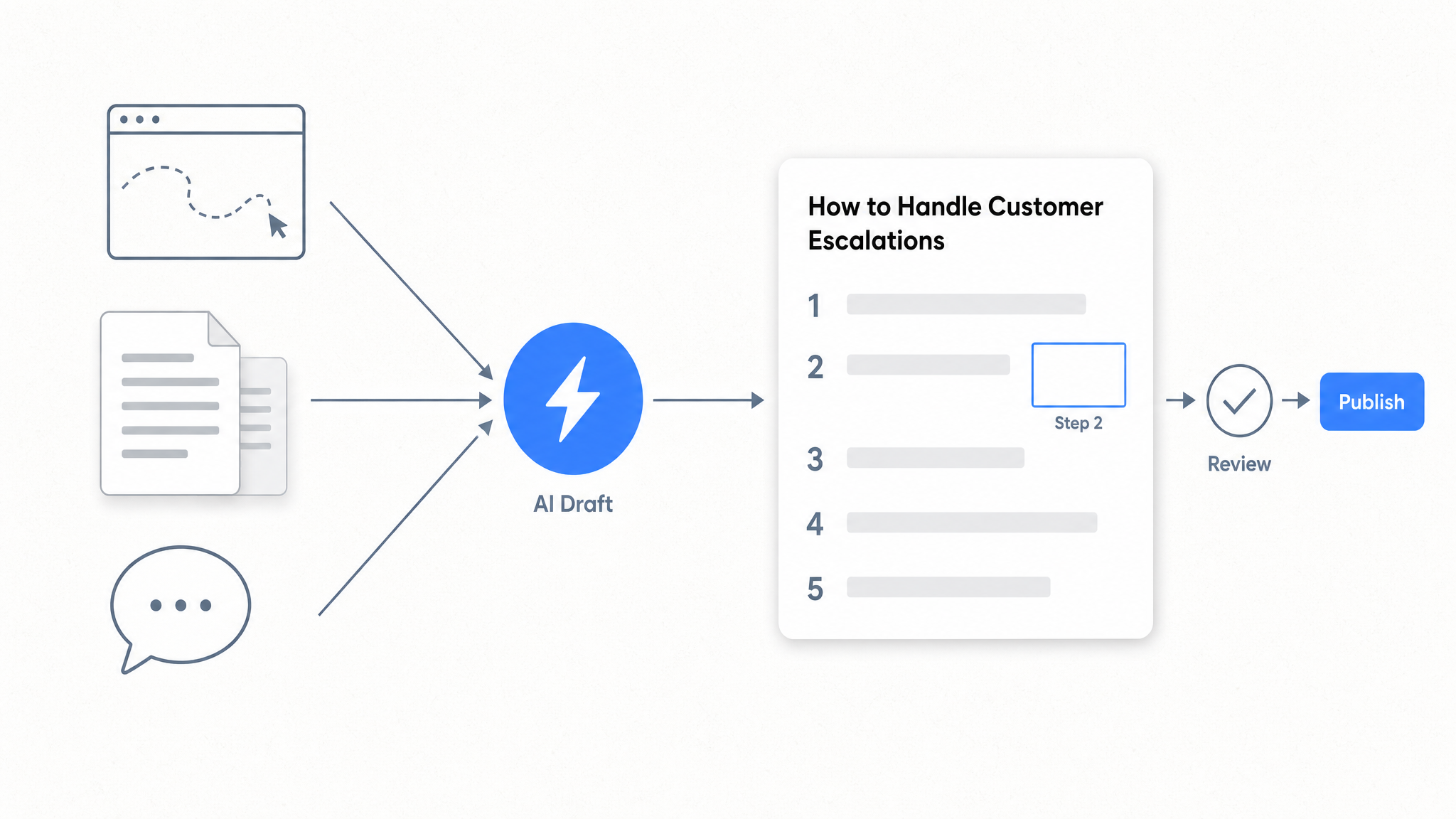
How to Automate SOP Creation with AI
Capture a workflow, let AI draft the SOP, review it, and publish it to a searchable knowledge base your team can query around the clock.
Ready to get started with Dewstack?
Try Dewstack free for 7 days. Create AI-powered documentation that answers questions instantly.
No credit card required.