How to Use AI to Improve Existing Documentation

How to Use AI to Improve Existing Documentation
Most documentation doesn't fail at creation, it fails at maintenance. Pages go stale. Terminology drifts. A product update ships, and three help articles still describe the old workflow. The result: support tickets that shouldn't exist, users who distrust the docs, and writers who spend more time firefighting than improving.
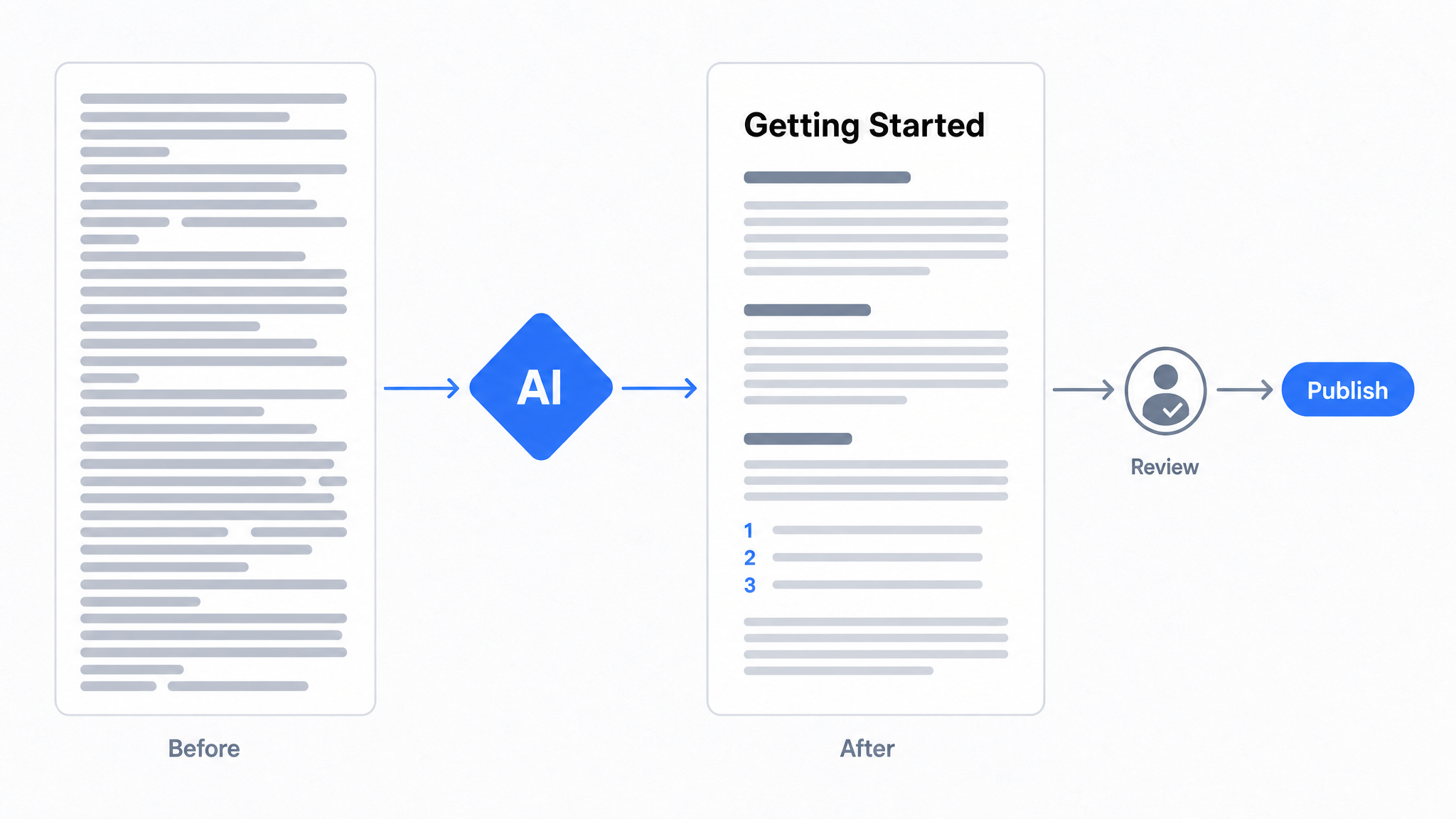
AI changes the economics of documentation maintenance. Used correctly, it audits content for gaps and stale information, rewrites dense or inconsistent prose into plain language, translates pages for global audiences, and surfaces which articles are actually failing readers, all without requiring a documentation team to start from scratch.
The practical workflow looks like this: import your existing content into a documentation platform, run an AI-assisted audit to identify low-quality or outdated pages, rewrite flagged content, hand the worst offenders to a connected agent that drafts improvements, review and publish, and use search and chatbot analytics to find the next round of gaps. The output is a living knowledge base that improves continuously, not a static archive that decays.
Key Takeaways
What You'll Learn in This Article
- Stale, inconsistent documentation is a support cost problem as much as a content quality problem. AI addresses both.
- An AI audit identifies low-traffic pages, unanswered search queries, and content health issues before readers hit dead ends.
- AI writing assistants rewrite, reformat, and retone existing pages, they work on your source material, not thin air.
- A connected agent such as Claude can read your gap and staleness signals and draft the fixes, but it produces drafts only. A human reviews and publishes. Always.
- Workflow documentation (SOPs, step-by-step guides) can be captured and auto-generated by recording the process directly in a browser extension.
- An AI chatbot trained on your documentation handles repetitive reader questions with source citations, reducing support volume without adding headcount.
- The improvement cycle is continuous: publish, measure, rewrite, repeat. AI compresses each step.
What Does It Mean to Use AI to Improve Existing Documentation?
Using AI to improve existing documentation means applying AI tools to content you already have: auditing it for gaps, rewriting unclear passages, translating it for new audiences, and deploying it in formats that answer reader questions automatically. It is not about generating documentation from scratch. AI cannot replace the domain expertise, institutional knowledge, and real-world context that your team has already encoded in your manuals, SOPs, and knowledge base articles. What it can do is analyze that material for quality issues and rewrite it for clarity and consistent tone.
The Three Core AI Actions: Analyze, Rewrite, Deploy
Most documentation improvement workflows reduce to three moves.
Analyze means running your existing content through an AI layer that flags outdated information, identifies pages with low engagement, surfaces search queries that return no results, and scores content health. This is gap analysis at scale, something that would take a technical writer weeks to do manually.
Rewrite means improving what already exists: plain language rewrites, tone adjustments, restructuring, and translation into other languages. The AI works on your material. You provide the source; it improves the surface.
Deploy means making the improved content accessible through channels that reduce friction: a branded documentation site, an AI chatbot trained on your docs, or a Slack integration that lets your team query the knowledge base directly.
Dewstack is built around exactly this workflow. AI Page Assist handles analysis and rewriting inside the editor. A connected agent can do the same work from outside the editor, in drafts. SmartDocs AI handles deployment, answering reader questions from your documentation with source citations, 24/7. The platform imports content from 20+ sources, Notion, Confluence, Google Docs, GitHub, and more, so you start with what you already have, not a blank page.
Why Your Existing Documentation Needs an AI Audit First
Before applying any AI writing tool to your documentation, you need to know what's actually broken. An AI audit treats your existing content as data, scanning for outdated procedures, terminology drift, pages readers land on and immediately abandon, and search queries that return nothing.
Documentation debt accumulates quietly: a product update ships, three help articles go stale, and no one flags them until a support ticket arrives citing the wrong steps. AI content health scoring changes that dynamic by surfacing low-performing pages automatically, ranking them by staleness signals, readability scores, and engagement drop-off. Dewstack's reader analytics layer goes further: it captures the exact search queries your readers type that return zero results, which is a direct map of your coverage gaps.
The Hidden Cost of Documentation Debt
Poor documentation isn't a minor inconvenience. Research across support operations consistently finds that inadequate self-service content drives between 20% and 70% more inbound support tickets, a range that reflects how much documentation quality varies across organizations. Every ticket that could have been answered by a well-written FAQ or an accurate troubleshooting guide represents a real cost: agent time, response delay, and reader frustration.
Surfacing Gaps with Search Analytics
Dewstack's search analytics show you which queries returned no results. Not which pages you think are incomplete, but which questions your readers actually asked and couldn't answer. That distinction matters when prioritizing what to fix.
Analytics data retention varies by plan: 30 days on Starter, 60 days on Pro, and 180 days on Premium. Longer retention windows let you identify seasonal patterns and recurring gaps that a 30-day snapshot would miss.
Using AI Recommendations to Prioritize the Fix List
Once the audit surfaces problem areas, AI-generated recommendations help triage them. Content health scoring assigns each page a signal based on engagement data, search performance, and structural completeness, so instead of manually reviewing 200 articles, you work from a ranked list. Pages with high traffic and low engagement get fixed first. Pages with zero traffic get evaluated for whether they're undiscoverable or simply obsolete.
Six Practical Ways AI Can Improve a Document
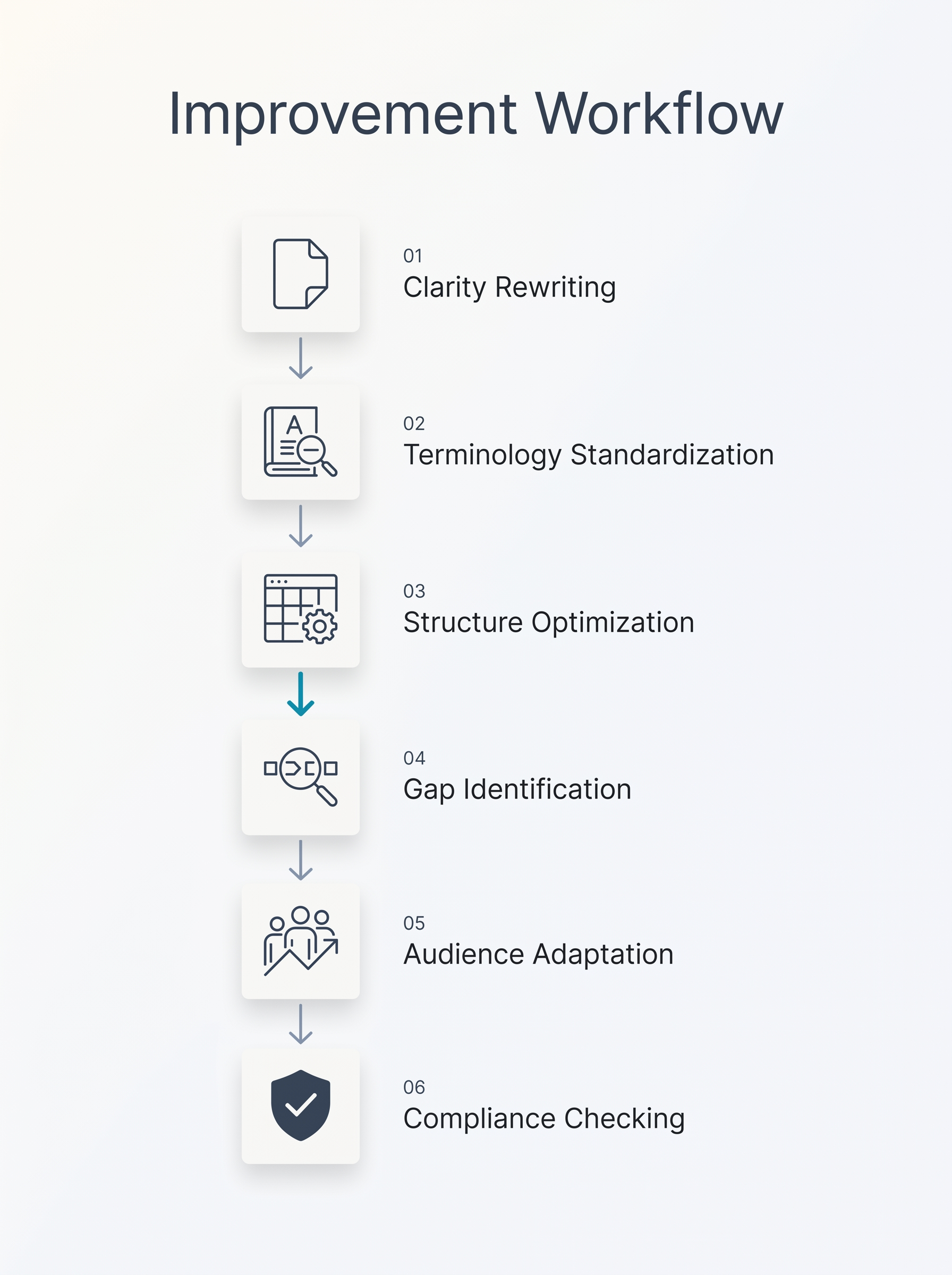 AI can enhance documentation across six distinct dimensions without starting from scratch.
AI can improve existing documentation across six distinct dimensions, and none of them require starting from scratch. The most immediate win is clarity rewriting: AI analyzes dense, jargon-heavy paragraphs and returns shorter sentences, plain-language substitutions, and a logical flow that readers can scan. Next is tone adjustment. The same technical content written for an internal engineering audience reads very differently from content written for a customer trying to solve a problem at 11 p.m. AI can shift that register without losing accuracy. Structure and metadata is a third lever: AI can audit heading hierarchies, flag missing descriptions, and suggest titles that match how readers actually search. Translation and localization let a single documentation team reach readers in multiple languages. Summarization condenses long reference pages into quick-start summaries that sit at the top of complex articles. And gap detection, arguably the most valuable, uses search analytics to surface the topics readers look for but the documentation never answers.
AI can enhance documentation across six distinct dimensions without starting from scratch.
AI can improve existing documentation across six distinct dimensions, and none of them require starting from scratch. The most immediate win is clarity rewriting: AI analyzes dense, jargon-heavy paragraphs and returns shorter sentences, plain-language substitutions, and a logical flow that readers can scan. Next is tone adjustment. The same technical content written for an internal engineering audience reads very differently from content written for a customer trying to solve a problem at 11 p.m. AI can shift that register without losing accuracy. Structure and metadata is a third lever: AI can audit heading hierarchies, flag missing descriptions, and suggest titles that match how readers actually search. Translation and localization let a single documentation team reach readers in multiple languages. Summarization condenses long reference pages into quick-start summaries that sit at the top of complex articles. And gap detection, arguably the most valuable, uses search analytics to surface the topics readers look for but the documentation never answers.
Where to Start
Documentation written by engineers for engineers rarely works for customers, so clarity and tone are usually the highest-return first pass. Gap detection is the highest-return second pass: the list of searches that returned nothing is a ready-made content brief.
How to Rewrite and Restructure Docs with AI Page Assist
AI Page Assist is Dewstack's built-in writing assistant. It operates on content you already have, a page you've imported, pasted, or drafted, and applies a specific action: rewrite for clarity, translate into another language, adjust the tone, restructure, or summarize. It doesn't generate documentation from a blank page. The source material is yours; AI Page Assist makes it better.
The workflow is four steps.
- Open any page in your Dewstack workspace.
- Select the content you want to improve, or work on the full page.
- Choose an action from the AI Page Assist menu.
- Review the output, make any edits, and publish.
The whole process takes minutes per page. AI Page Assist is available on every paid plan.
Practical example: dense SOP to plain-language guide. Take a 600-word internal SOP written in passive voice, full of jargon, with no numbered steps. Paste it into Dewstack, run a rewrite action with a plain-language instruction, and the output reorganizes the content into a numbered sequence, cuts the passive constructions, and replaces jargon with direct verbs. The underlying information stays intact. The structure and readability improve.
The same logic applies to tone adjustment. A troubleshooting guide written for engineers can be rewritten for end-users without starting over. A formal policy document can be softened for an internal knowledge base without losing accuracy.
Letting an AI Agent Improve Pages You Already Published
Editor-based rewriting still requires someone to open each page. Since August 2026, you can point an AI agent at your workspace instead, and it will read your documentation, see which pages are failing, and draft the fixes.
You connect Claude to a Dewstack workspace once. Open Settings > Connectors > Add custom connector, paste the Write connector URL, which ends in /mcp-rw, sign in, and press Allow on an approval screen that names the workspace. No keys, no code. Only account Owners and Admins can approve a connection. ChatGPT supports this as a developer mode connector only, because OpenAI limits write-capable connectors to developer mode; ChatGPT's regular connector surface can read your docs but cannot write to them. Coding agents such as Claude Code and Cursor use an API key with Read and write scope instead of OAuth.

The Tools That Matter for Existing Content
Two tools do the improving. create_article creates a new page as a draft. update_article edits a draft, and before it changes anything, the previous version is saved to Page History. create_collection sets up the section a new page belongs in.
Two more tools tell the agent where to look. list_content_gaps returns what readers searched for and did not find, plus the questions the assistant could not answer, with counts. list_stale_pages returns published pages that have gone untouched past a threshold you set. Those two are the whole audit, delivered to the agent as a work queue rather than a report you have to read.
For a post about improving what already exists, that pairing is the point. You ask the agent to list your stale pages, it comes back with the ones nobody has touched in a year, and you decide which of them are worth reworking.
How an Agent Touches a Live Page, Which Is To Say It Doesn't
This is the mechanic worth understanding before you connect anything.
An agent cannot touch a live page. It cannot publish, it cannot unpublish, and it cannot edit a page that is currently published. So improving a published page works one of two ways:
- A human unpublishes it first. The page becomes a draft, the agent reworks it, and a human publishes the result. Ask an agent to edit a live page without that step and it is refused.
- The improvement lands as a separate draft. The live page stays exactly as your readers see it while the rewrite sits beside it, waiting for review.
Either way, nothing your readers can see changes until a person decides it should.
Four Rules With No Exceptions
- Drafts only. An agent cannot publish, unpublish, or touch a live page.
- History first. The previous version is saved to Page History before any change.
- Sanitised on the way in. Script handlers and unsafe embeds are stripped from agent-supplied content.
- Visible and revocable. The connection appears under API keys, and revoking it disconnects the agent immediately.
Page History is what makes this safe to try on documentation you care about. Agent edits are attributed to the connection's key name, for example "Claude connector - agent update", so an agent revision is never confused with a colleague's. One click restores the previous version.
Limits Worth Knowing Before You Connect
Each connection or key is capped at 500 writes per day. Write access requires the workspace to be Public. Every write, and every refused write, is recorded against the key, so the audit trail includes the things the agent tried to do and wasn't allowed to.
Agents also receive Dewstack's docs dialect on connect, which is why the output arrives as callouts, numbered step blocks, tables, and video embeds rather than a wall of prose. An agent drafting a rewrite of your onboarding SOP returns something shaped like documentation, not an essay.
The Review Step Is Not Optional
None of this removes the human. An agent can read your gap list, draft six rewrites overnight, and save the old versions safely. It cannot decide whether the new steps are correct. That is still a subject-matter expert's job, and in regulated environments it is a compliance requirement rather than a preference. What the agent removes is the blank page and the tab-switching, not the judgment.
Capturing and Documenting Workflows You Never Wrote Down
Most organizations have a documentation problem they don't fully see: the processes that actually keep things running aren't written down anywhere. They live in the muscle memory of a senior support agent, in a Slack thread from eight months ago, or in the head of the one engineer who set up the integration. When that person leaves, or just goes on vacation, things break.
This is the tribal knowledge problem, and it's more common than most teams admit.
From Slack Thread to Published SOP
Dewstack FlowCapture is a browser extension available on the Chrome Web Store that converts any workflow, on any website, into a structured, step-by-step SOP. You install it, navigate through the process as you normally would, and FlowCapture captures a screenshot at each meaningful step. When you stop recording, Dewstack's AI writes the documentation: numbered steps, annotated screenshots, plain-language descriptions of what each action does and why.
It is not a screen recorder. No video is generated. The output is text-based documentation with embedded screenshots, the kind that's searchable, editable, and trainable for an AI chatbot.
What Gets Documented, and Where It Goes
The use cases are wherever institutional knowledge tends to hide:
- Onboarding SOPs, walk a new hire through your internal tools step by step, with every click captured
- Customer support runbooks, document how your team resolves the ten issues that generate 80% of tickets
- IT procedures, capture system configurations, access provisioning, or deployment steps without asking an engineer to write prose
Once FlowCapture generates the SOP draft, it lands directly in your Dewstack workspace. From there, you can edit it with AI Page Assist, hand it to a connected agent for a plain-language pass, publish it to your knowledge base, restrict access to internal team members, or train a SmartDocs AI chatbot on it.
Importing Your Scattered Docs into One Place Before AI Can Help
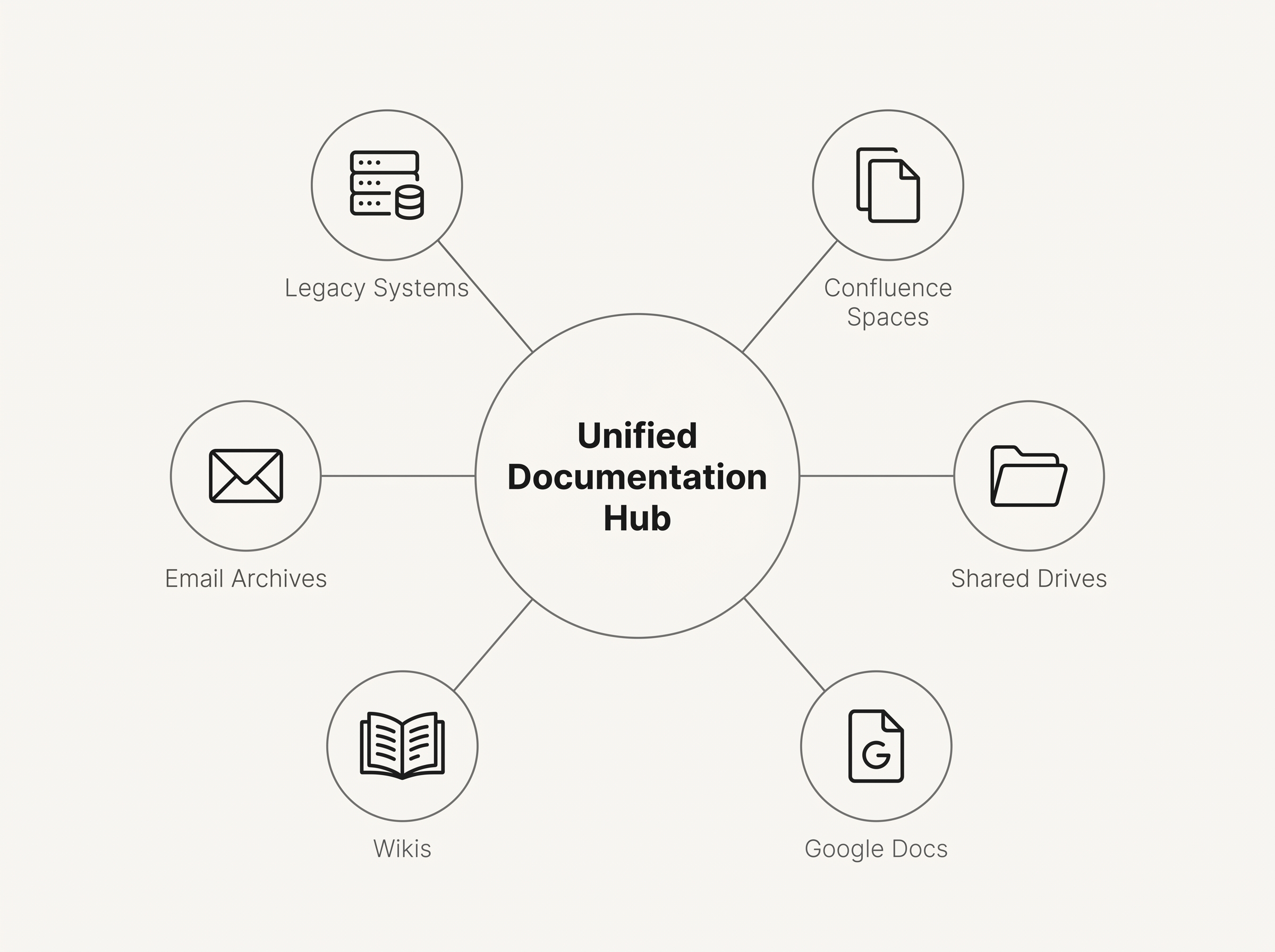 Fragmented docs across platforms must be unified before AI can audit and improve them.
Fragmented documentation is the first obstacle to any AI improvement effort. When your content lives in six different places, a Confluence space nobody's updated since last year, a Notion database with inconsistent structure, a shared Google Drive full of Word files, and a GitHub repo with Markdown nobody reads, AI tools have nothing coherent to work with. You can't audit what you can't see. You can't rewrite what you can't find. Consolidation isn't a nice-to-have step before AI improvement, it's the prerequisite.
Fragmented docs across platforms must be unified before AI can audit and improve them.
Fragmented documentation is the first obstacle to any AI improvement effort. When your content lives in six different places, a Confluence space nobody's updated since last year, a Notion database with inconsistent structure, a shared Google Drive full of Word files, and a GitHub repo with Markdown nobody reads, AI tools have nothing coherent to work with. You can't audit what you can't see. You can't rewrite what you can't find. Consolidation isn't a nice-to-have step before AI improvement, it's the prerequisite.
Dewstack imports from 20+ sources, including direct OAuth integrations with Notion, Google Docs, Confluence, GitHub, Jira, and Dropbox, plus file uploads in PDF, Word, Markdown, HTML, CSV, and ZIP formats. Once content is in a single workspace, content health scoring, gap analysis, AI Page Assist, and any agent you connect all have a complete picture to work from.
Migrating from Confluence or Notion Without Losing Structure
Direct integrations require Pro or above. On those plans, you can pull in entire spaces or repositories in one operation, with page hierarchy preserved. Nested pages stay nested. For large migrations, bulk import via ZIP, PDF, or CSV is also available on Pro and above.
If you're moving off Confluence specifically, Premium+ plans include migration assistance, so you're not navigating the export-and-reformat process alone.
File uploads (PDF, Word, Markdown, HTML) are available on every paid plan, including Starter. If your documentation currently lives in a collection of Word files or exported PDFs, you can start importing immediately without upgrading.
Deploying a SmartDocs AI Chatbot Trained on Your Improved Docs
SmartDocs AI is a chatbot trained exclusively on your documentation, nothing else. Once you've audited, rewritten, and structured your content, you point SmartDocs at that material and it learns from it. When a reader asks a question, the chatbot pulls answers directly from your docs and returns them with source citations, so readers can verify the response and navigate deeper. It does not draw on general internet knowledge. That constraint is the feature: every answer is grounded in what your team has actually written and approved.
Training SmartDocs on Your Documentation
After improving your docs, training an assistant takes minutes. Connect your workspace, select the content to include, and SmartDocs ingests it. Plan limits determine how much content each assistant can absorb: Starter supports 2 assistants with 4M training characters each and 2,000 AI queries per month; Pro raises that to 5 assistants, 20M characters, and 5,000 queries; Premium supports 10 assistants, 60M characters, and 10,000 queries monthly.
If you manage multiple products or audiences, say a customer-facing knowledge base and a separate internal SOP library, each gets its own trained assistant with its own scope.
Embedding the Widget
Deploy the chatbot as a script snippet or iframe on any website, product portal, or help center. It takes one line of code. No engineering sprint required.
On Premium and above, the widget can be white-labeled with your brand's colors, logo, and name, so readers interact with your documentation experience, not a third-party tool.
Using AI to Keep Documentation Current Over Time
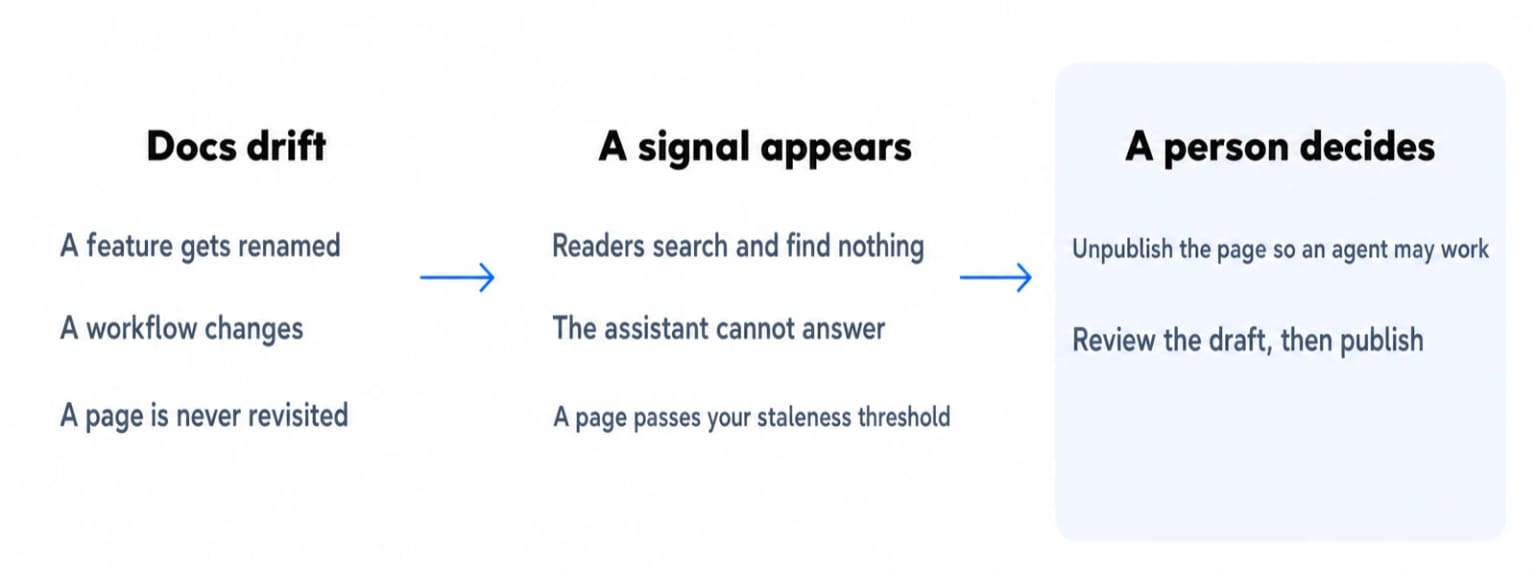 Drift produces a signal you can act on. The decision at the end is still a person's.
Documentation doesn't go stale all at once. It drifts. A feature gets renamed, a workflow changes, a pricing tier disappears, and the docs quietly become wrong. Readers follow the outdated steps and either open a support ticket or give up. By the time anyone notices, the damage is done.
Drift produces a signal you can act on. The decision at the end is still a person's.
Documentation doesn't go stale all at once. It drifts. A feature gets renamed, a workflow changes, a pricing tier disappears, and the docs quietly become wrong. Readers follow the outdated steps and either open a support ticket or give up. By the time anyone notices, the damage is done.
AI turns maintenance from a reactive scramble into a continuous signal.
Let Your Chatbot Tell You What's Missing
Every unanswered question is a documentation gap in plain sight. SmartDocs AI logs every conversation: what readers asked, whether the chatbot found a relevant source, and where it couldn't give a confident answer. Those failed queries are a prioritized backlog. The same information is what list_content_gaps hands to a connected agent, with counts, so the agent starts with the questions that came up most.
Let the Staleness Signal Find the Pages
list_stale_pages returns published pages untouched past a threshold. Run it monthly and you get a short list of candidates rather than a full-corpus review. Pick the ones that matter, unpublish them so the agent is allowed to work, and let it draft the updates. Then review, and publish the ones that are right.
Let Content Health Scoring Do the Auditing
Manually reviewing hundreds of pages for thin content, broken links, or outdated structure doesn't scale. Dewstack's content health scoring flags those pages automatically, so you can track whether fixes actually improved engagement over time.
Build a Review Cadence, Not a Rescue Mission
The goal is a rhythm, not a crisis response. Set a monthly or quarterly review cadence around the gap and staleness lists. Version history keeps every revision, the last 50 on Starter, 100 on Pro, unlimited on Premium, so rolling back a bad edit takes seconds, whether a person or an agent made it.
AI Documentation Improvement in Healthcare and Education
Healthcare and education teams share a documentation problem that general-purpose tools make worse: content scattered across shared drives, outdated SOPs buried in Confluence spaces, and no reliable way for patients or students to find accurate answers at 2 a.m.
Healthcare: Clinical SOPs, Patient FAQs, and Compliance Docs
Clinical environments produce dense, procedural content that rarely reads well for the people who need it most. AI Page Assist rewrites existing SOPs into plain language without altering the underlying steps: a compliance team writes the procedure, AI clears the jargon. Patient-facing FAQs get the same treatment. Upload a PDF of discharge instructions or medication guidance, and AI Page Assist restructures and simplifies the language for a general audience.
Multi-language support matters here. A patient portal serving diverse communities needs documentation in more than one language, and AI-assisted translation handles the first pass. Subject-matter experts review for clinical accuracy before anything goes live. That review step is non-negotiable in regulated environments. AI improves structure and readability; licensed professionals own accuracy.
The draft-only boundary is useful in exactly this setting. If you connect an agent to a clinical knowledge base, it cannot change what a clinician is currently reading. It can only prepare a version for review, and the version it replaced stays one click away in Page History.
For internal clinical documentation, credentialing guides, incident response protocols, HIPAA training materials, password-protected workspaces (available on Premium+ plans) keep sensitive content behind access controls without requiring IT to build a custom portal. Free SSL hosting and 99.9% uptime meet baseline reliability expectations for institutional use.
Education: Course Materials, Student Handbooks, and Institutional Policies
Universities and training organizations sit on years of course materials, policy documents, and procedural guides that students can't search effectively. Importing those files into Dewstack converts static archives into searchable knowledge bases with AI-powered search and typo tolerance. A SmartDocs AI chatbot trained on the full knowledge base answers enrollment, financial aid, or course-related questions with source citations, reducing the volume of repetitive queries hitting administrative staff. Multi-language support extends the same benefit to international student populations.
Choosing the Right AI Documentation Tool for Your Team
The best AI tool for improving existing documentation depends on five criteria: how flexibly it imports content you already have, what AI capabilities it applies to that content, how it publishes the result, whether non-technical team members can operate it without engineering help, and what it costs at realistic team sizes.
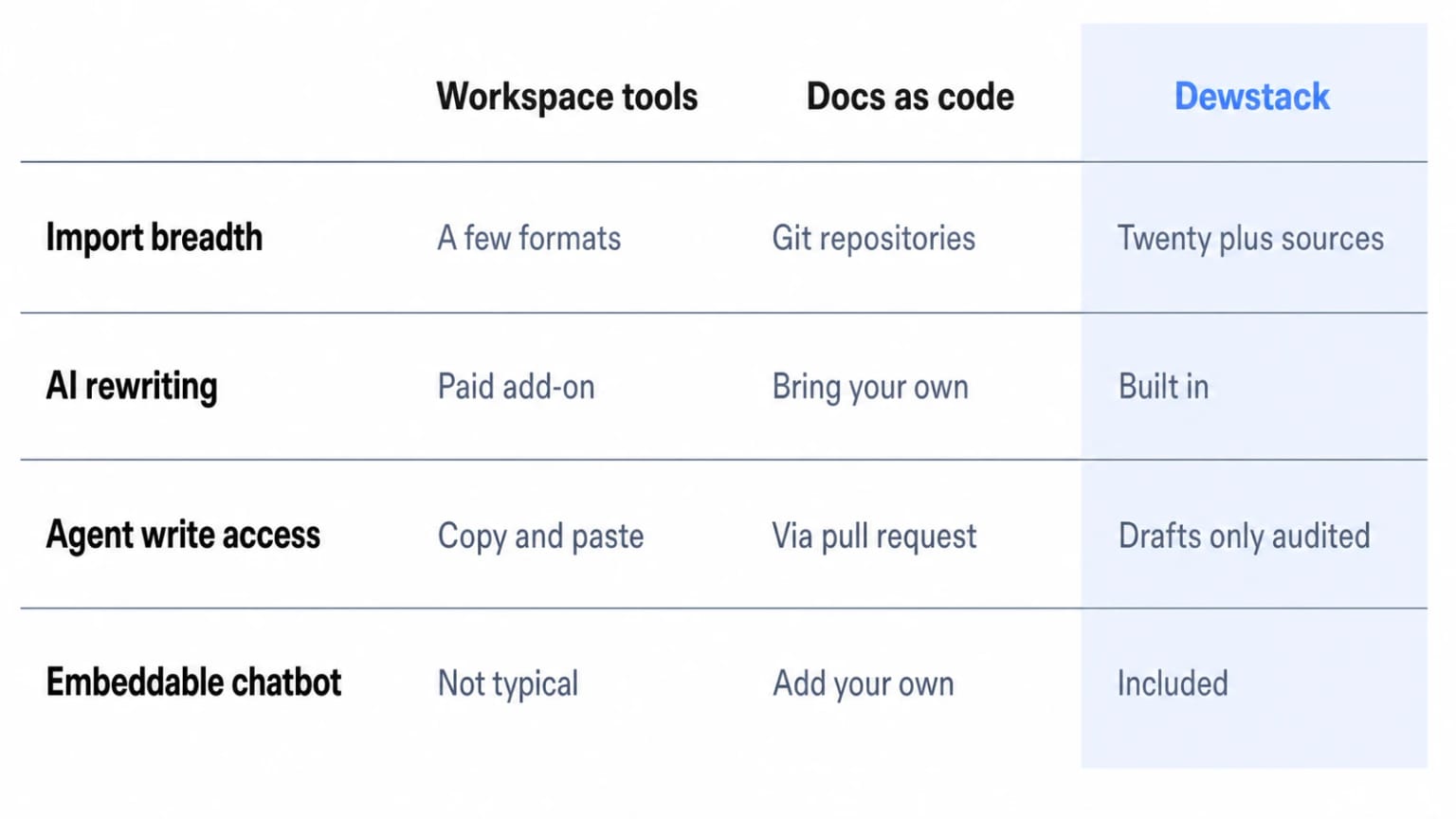
General-Purpose Tools vs. Purpose-Built Documentation Platforms
Notion and Confluence were built for internal collaboration first, so documentation is a secondary use case and their AI features reflect that priority. GitBook and ReadMe offer strong docs-as-code workflows but assume someone on the team is comfortable with Git and pull requests.
Adapting a workspace tool for public-facing documentation creates friction. Notion's permission model wasn't designed for granular collection-level access controls. Confluence prices per seat, so the bill grows with the team rather than with the documentation, and its AI features are licensed separately. Check Atlassian's current plan pages before comparing. Neither platform offers an embeddable AI chatbot trained on your specific docs.
Dewstack imports from 20+ sources, applies AI to rewrite, translate, and restructure content already in your knowledge base, accepts a connected agent that drafts improvements under a draft-only boundary, deploys SmartDocs AI chatbots that answer reader questions with citations, and publishes on a custom domain with free SSL, all without touching a terminal. Every plan starts with a 7-day free trial, no credit card required, and a 30-day money-back guarantee after first billing. More than 1,000 teams have already made the move.
Step-by-Step: Improve Your Existing Docs with Dewstack
Start a free trial at dewstack.com. No credit card required, 7 days to test the full platform. Setup takes under 3 minutes.
Step 1: Start Your Free Trial
Go to dewstack.com and create an account. You get 7 days to run the full workflow described below, and a 30-day money-back guarantee kicks in after your first billing if you decide to stay.
Step 2: Import Your Existing Documentation
Upload PDF, Word, or Markdown files directly, available on all paid plans. If you're on Pro or above, connect Notion, Google Docs, Confluence, GitHub, Jira, or Dropbox via OAuth and pull content in without manual copy-paste. Page hierarchy is preserved.
Step 3: Run AI Page Assist on Priority Pages
Open any imported page and trigger AI Page Assist. Choose what you need: rewrite for clarity, adjust tone, restructure, translate, or summarize. Work through your highest-traffic or highest-support-volume pages first. Those are where improvement returns the most.
Step 4: Connect an Agent and Work the Stale List
In Claude, open Settings > Connectors > Add custom connector, paste your Write connector URL ending in /mcp-rw, sign in, and approve the workspace. An Owner or Admin has to be the one who approves. Then ask the agent for your stale pages and your content gaps, unpublish the pages you want reworked, and let it draft. In ChatGPT this works as a developer mode connector only. In Claude Code or Cursor, use an API key with Read and write scope.
Step 5: Capture Undocumented Workflows with FlowCapture
Install Dewstack FlowCapture from the Chrome Web Store. Record any workflow on any website. The extension captures screenshots at each step and AI writes the step-by-step SOP automatically.
Step 6: Review, Then Publish
Read what the agent drafted. Check it against what you know to be true, and have a subject-matter expert check anything procedural or regulated. Compare it with the previous version in Page History if you want to see what changed. Then publish it yourself. The agent never does this part.
Step 7: Publish on Your Domain and Deploy SmartDocs
Point your domain to Dewstack, free SSL included on all paid plans. Then create a SmartDocs AI assistant, train it on your improved documentation, and embed it via script or iframe. It answers reader questions 24/7, citing the specific pages it draws from, and its conversation logs feed the next round of gaps.
Ready to Elevate Your Documentation?
Try Dewstack free for 7 days. Create AI-powered documentation that answers questions instantly.
Start a free trialANSWERS TO
Frequently Asked Questions
Here are some common questions that might provide the information you're seeking.
Related Blogs
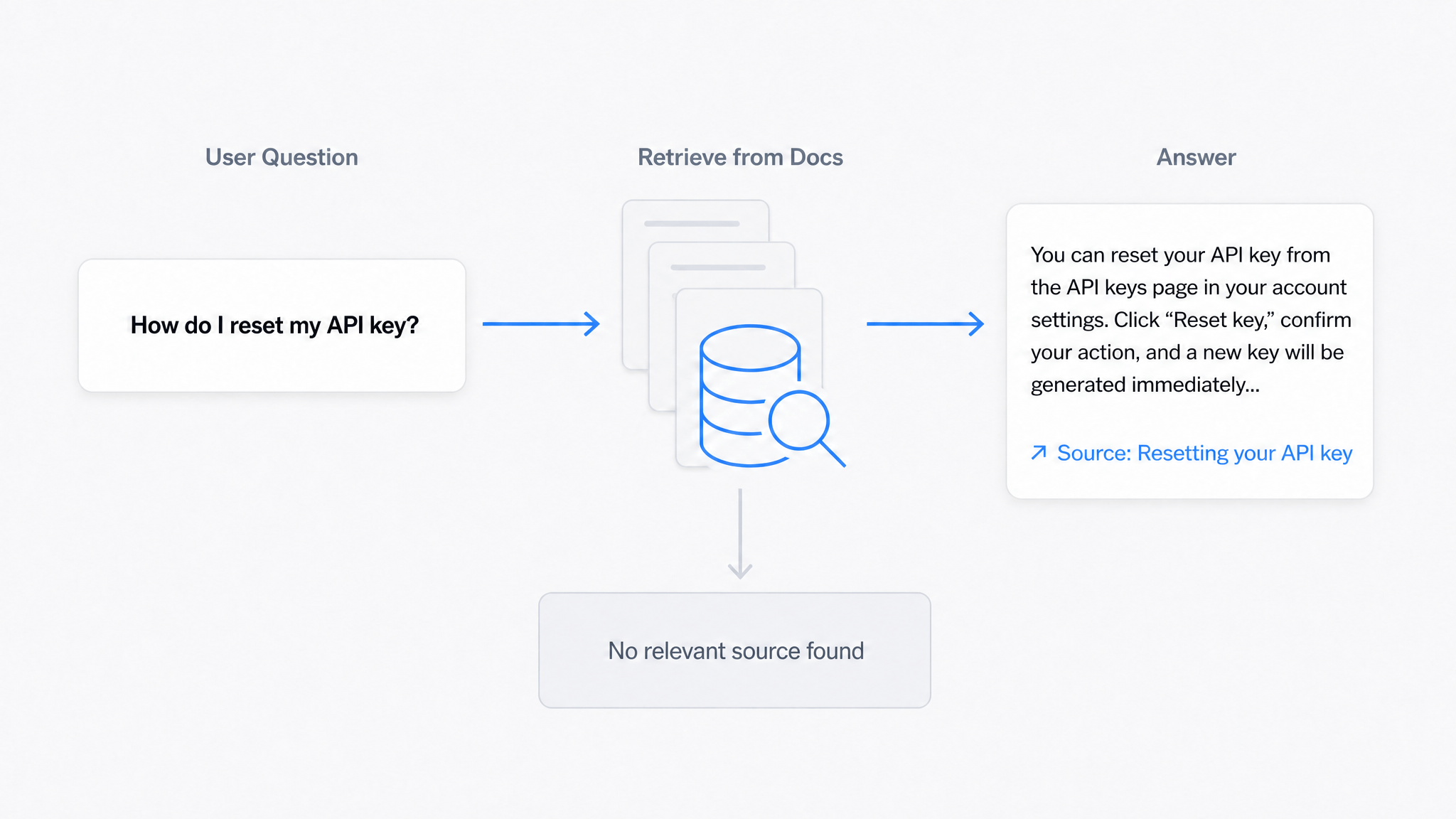
AI Answers From Your Docs: Grounded Answers, Citations & Hallucination Control
How an AI chatbot for technical documentation gives grounded answers with source citations, controls hallucinations, and turns unanswered questions into drafted pages.
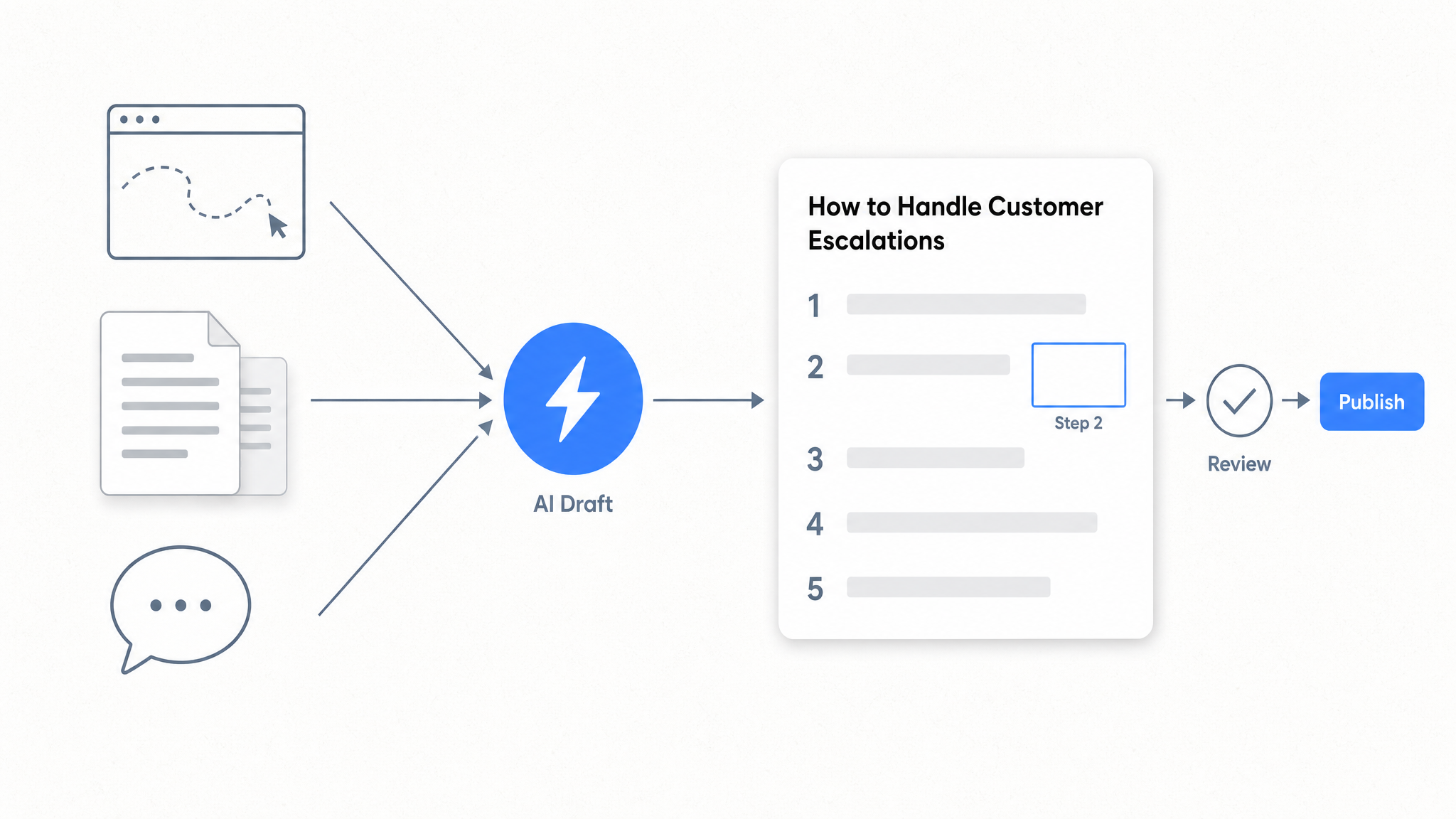
How to Automate SOP Creation with AI
Capture a workflow, let AI draft the SOP, review it, and publish it to a searchable knowledge base your team can query around the clock.
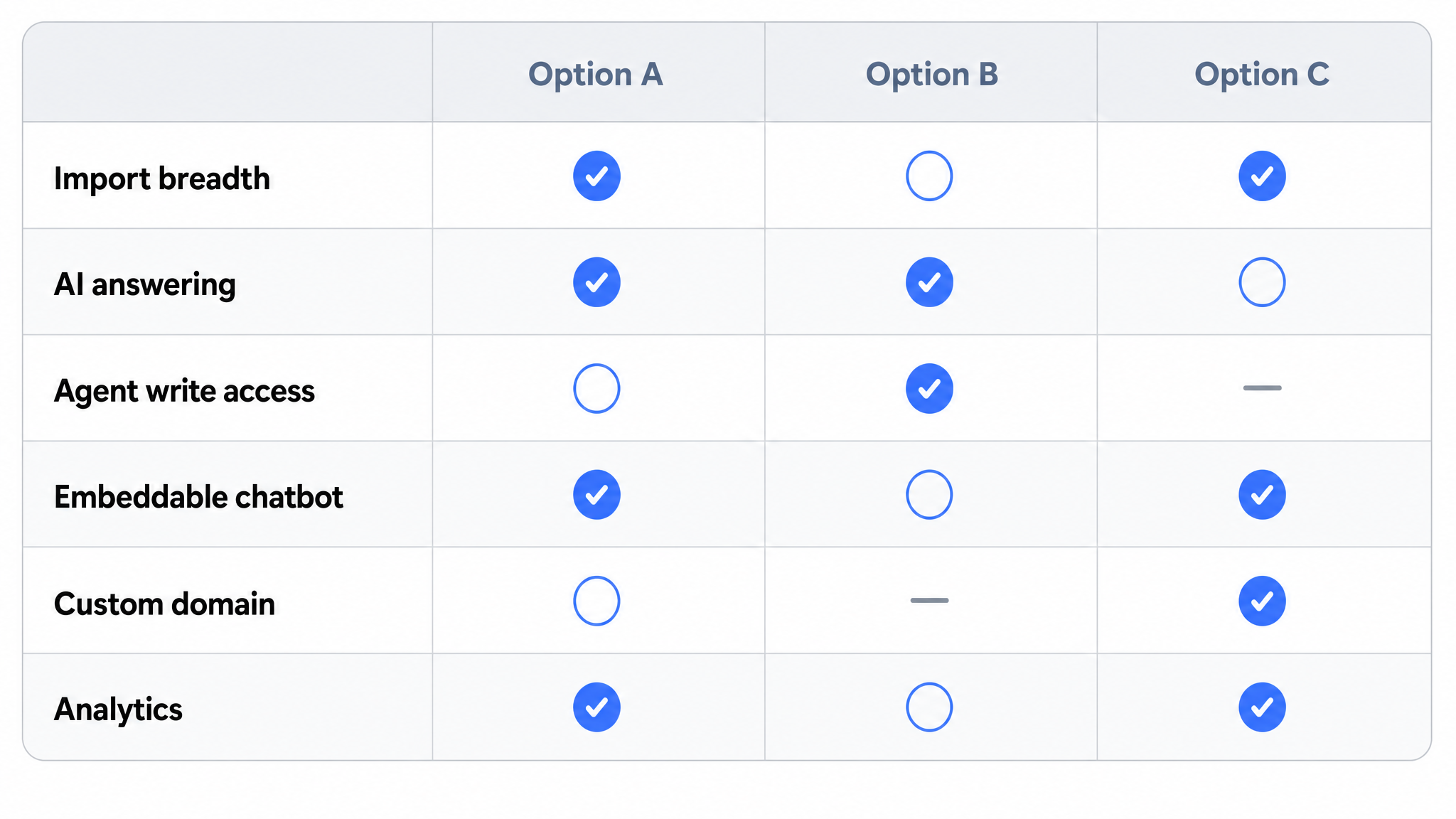
Best Documentation Platform for SaaS Companies in 2026
Compare documentation platforms for SaaS teams. See how Dewstack's agent write path, SmartDocs AI, and 20+ imports cut support tickets. Start free today.
Ready to get started with Dewstack?
Try Dewstack free for 7 days. Create AI-powered documentation that answers questions instantly.
No credit card required.