How to Automate SOP Creation with AI

How to Automate SOP Creation with AI
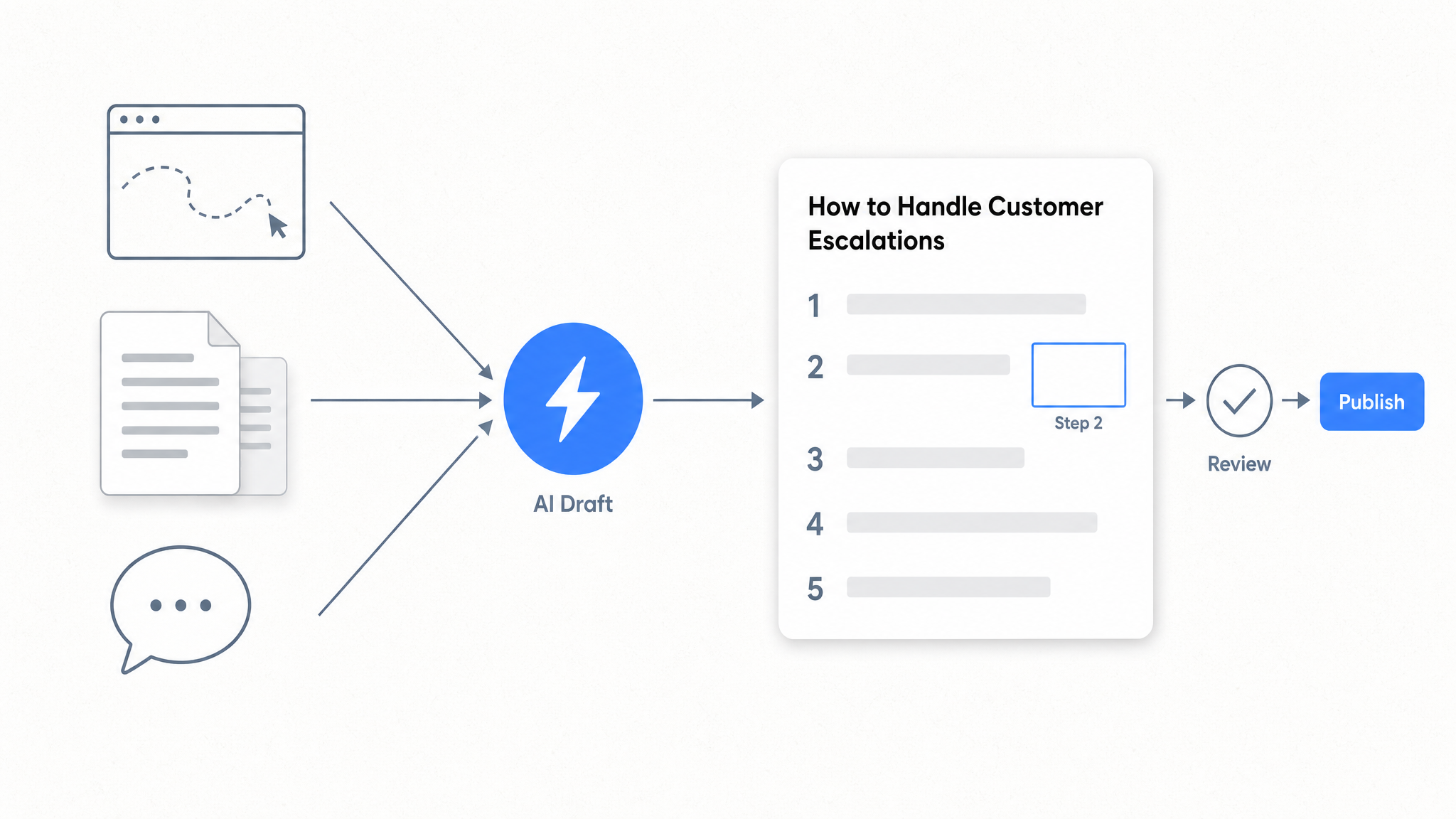
Automating SOP creation with AI means capturing a workflow once, letting software generate the written documentation, and publishing it to a searchable knowledge base your team can find instantly. The sequence: record the process with a workflow capture tool, let AI structure the raw steps into a formatted SOP, refine the language, then publish on your custom domain. Dewstack handles the whole pipeline. FlowCapture records any workflow by capturing screenshots at each step, AI writes the step-by-step text, and AI Page Assist rewrites, translates, or adjusts tone before you publish. As of August 2026 there is a fourth entry point: connect an AI agent such as Claude directly to your workspace and have it write the draft in place, so nothing gets copied out of a chat window by hand.
Key Takeaways
What You'll Learn in This Article
- Manual SOP writing is the bottleneck. Workflow capture tools remove the blank-page problem by generating a first draft from what you actually do, not what you think you do.
- Dewstack FlowCapture records any browser-based workflow as screenshots and AI converts them into structured, step-by-step SOPs.
- Connected agents can now write SOP drafts straight into your workspace. They cannot publish, and that boundary is the point for regulated procedures.
- AI Page Assist lets you rewrite, translate, or adjust tone on any SOP after it is generated, without starting over.
- SmartDocs AI chatbots trained on your SOPs answer employee or customer questions with source citations, reducing support tickets without adding headcount.
- Existing process documentation scattered across Notion, Confluence, Google Docs, or Dropbox can be imported into Dewstack and consolidated in one place.
- Version history with rollback means SOPs stay accurate as processes change, with a full audit trail.
There's a ready-made version of this
Your SOP handbook is already live at yourcompany.dewstack.com: written, structured, searchable. Edit it, don't start it.
Preview itNo credit card. Edit it, don't start it.
What Is AI-Powered SOP Creation (and Why Manual Docs Fall Behind)
A standard operating procedure tells a team member exactly how to complete a repeatable task: onboarding a new hire, processing a refund, deploying a release, handling a compliance audit. Without SOPs, those processes live in people's heads or buried in Slack threads, so every new employee reinvents the wheel and every departure takes institutional knowledge with it. AI-powered SOP creation means using software to capture how the process actually works and generate structured documentation from that capture, rather than asking a person to write it from memory. The output arrives faster, reads consistently across authors, and is far easier to update when the process changes.
The real cost of manual SOP writing
Writing SOPs by hand is slow by design. A process owner has to stop doing the work, recall every step in order, write it out, format it, add screenshots, and then hope a colleague reviews it before it goes stale. In practice, most teams skip the review. The SOP gets published once and never touched again, even after the underlying process changes three times.
The downstream cost is real. Tribal knowledge locked inside one person's workflow means a single departure can stall a team, new hires take longer to reach productivity, and support agents answer the same questions repeatedly because no one wrote the answer down.
Three AI approaches address this. The first is workflow capture: a tool records what you do on screen, step by step, and AI converts those steps into a formatted document. The second is AI-assisted writing: you provide rough notes or an existing draft, and an assistant restructures and polishes the content. The third, newest approach is agent write: you describe the procedure to a connected agent in conversation and the finished draft appears in your workspace. The best results come from combining them.
How AI Automates SOP Creation: The Core Methods
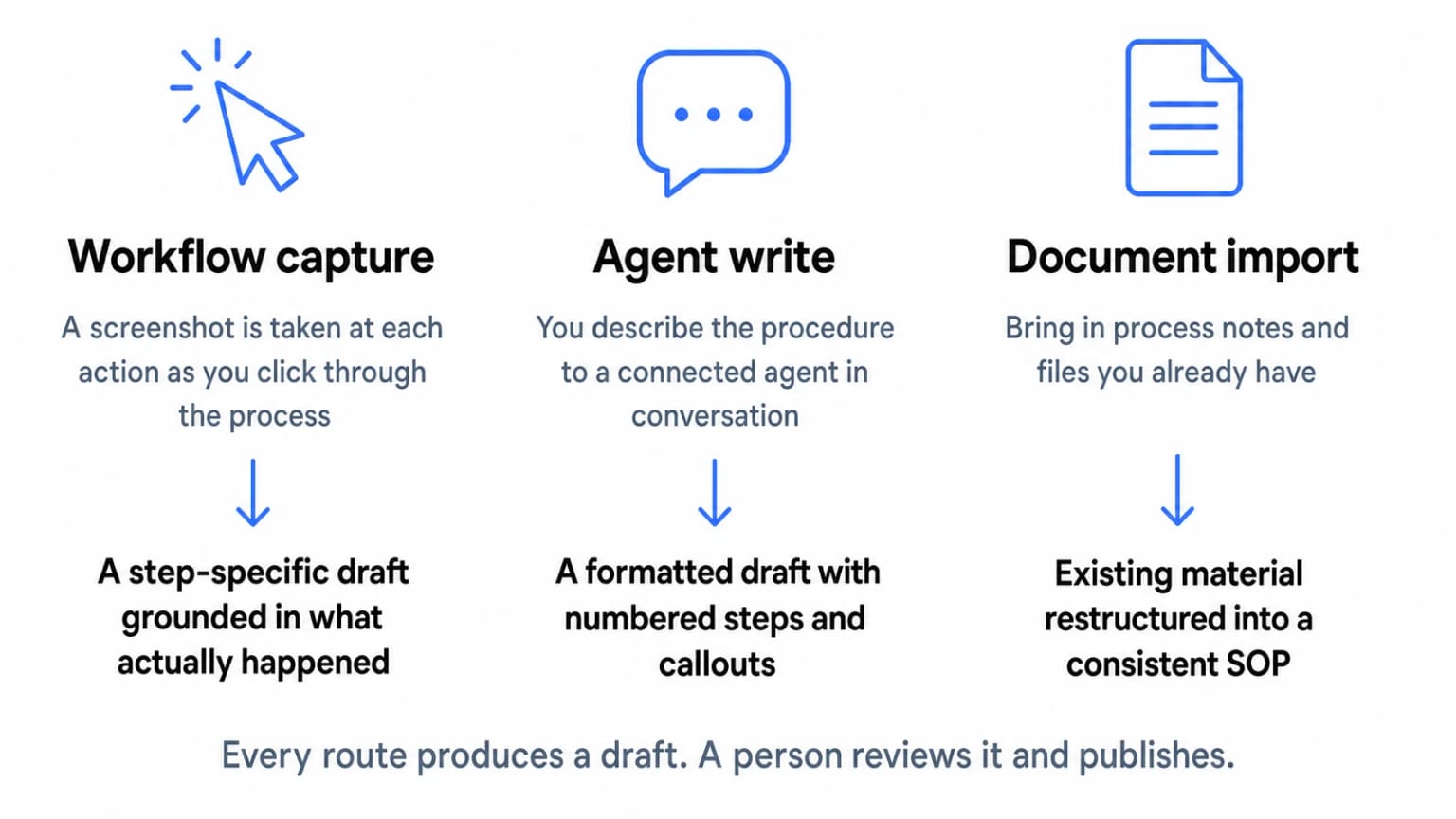 Three routes in, one way out: every route produces a draft, and a person publishes it.
Each method suits different source material and different accuracy requirements. Pick by what you already have.
Three routes in, one way out: every route produces a draft, and a person publishes it.
Each method suits different source material and different accuracy requirements. Pick by what you already have.
Method 1: Workflow capture (highest accuracy)
Dewstack FlowCapture, available on the Chrome Web Store, records any workflow on any website. At each step it captures a screenshot and logs the action. AI then generates a complete, step-specific SOP from that recording. Because the AI works from observed behaviour rather than a description of behaviour, the output is specific. The result is documentation grounded in what actually happened, not what someone remembered happening.
Method 2: Agent write from a conversation
Connect an agent such as Claude to your workspace, describe the procedure or hand over your notes, and the formatted draft lands in Dewstack with numbered step blocks and callouts already in place. Useful for processes that are hard to demonstrate in a browser, like phone protocols or physical workflows. Accuracy still depends on how precisely you describe the process.
Method 3: Import and restructure existing docs
Dewstack accepts PDFs, Word files, Markdown, HTML, and content from sources like Confluence or Google Docs. AI can then reformat and standardise that imported content into consistent SOP structure.
Method 4: AI Page Assist for refinement
Once a draft exists, AI Page Assist handles rewriting for clarity, translating into other languages, and adjusting tone for different audiences.
One constraint applies to all four methods: AI cannot generate a useful SOP from nothing. It needs source material, whether that is a recorded workflow, a written description, or an existing document.
Step-by-Step: Automate SOP Creation Using Dewstack FlowCapture
Setting up Dewstack FlowCapture takes under two minutes. No configuration is required beyond signing into your Dewstack account. The extension sits in your browser toolbar, ready to record any workflow on any website or internal tool, whether that is your CRM, your onboarding portal, or a third-party SaaS your team uses daily.
Step 1: Install FlowCapture. Open the Dewstack FlowCapture listing on the Chrome Web Store and add it to Chrome. Sign in with your Dewstack credentials.
Step 2: Navigate to the workflow you want to document. Open the tool or process you need to capture. This could be a multi-step approval flow in Jira, a customer onboarding sequence, or an internal admin task. Click the FlowCapture icon and start a recording session.
Step 3: Work through the process normally. As you click through each step, FlowCapture takes a screenshot at every action. This is not video recording. There is no screen capture file, no audio, no playback. Each screenshot maps to one discrete step in the workflow.
Step 4: Let AI generate the SOP. When you stop the recording, Dewstack's AI processes the screenshot sequence and produces a structured document with annotated screenshots and written instructions for each action. The output is a complete draft SOP, not a raw image dump.
Step 5: Refine with AI Page Assist. Open the draft inside your Dewstack workspace. AI Page Assist rewrites sections for clarity, adjusts the tone from technical to plain language, or translates the SOP into another language. You bring the process knowledge, the AI handles the structural and editorial work.
Step 6: Publish on your custom domain. Once the SOP is ready, publish it to your documentation workspace. Every paid Dewstack plan includes free SSL hosting and a custom domain, so your internal or customer-facing SOPs live at a branded URL with the right access controls.
Get this SOP handbook as a live site
Your SOP handbook is already live at yourcompany.dewstack.com: written, structured, searchable. Edit it, don't start it.
Start free and get it liveNo credit card. Edit it, don't start it.
Let an Agent Write the SOP Draft Directly Into Your Workspace
The step that survived every round of automation was the copy and paste. You would ask an assistant to draft a procedure, get a good answer in a chat window, then move it into your docs tool by hand and rebuild the formatting. That step is now gone.
Connect Claude to a Dewstack workspace once. Open Settings, then Connectors, then Add custom connector. Paste the Write connector URL, which ends in /mcp-rw, sign in, and press Allow on the approval screen that names the workspace. There are no keys to manage and no code to write. Only account Owners and Admins can approve a connection, so an individual contributor cannot quietly wire an agent into your procedure library.
ChatGPT supports this as a developer mode connector only. OpenAI limits write-capable connectors to developer mode, and ChatGPT's regular connector surface can read your docs but cannot write to them. Coding agents such as Claude Code and Cursor take a different route: they use an API key with Read and write scope rather than OAuth, which suits a terminal or an editor better than a browser sign-in flow.
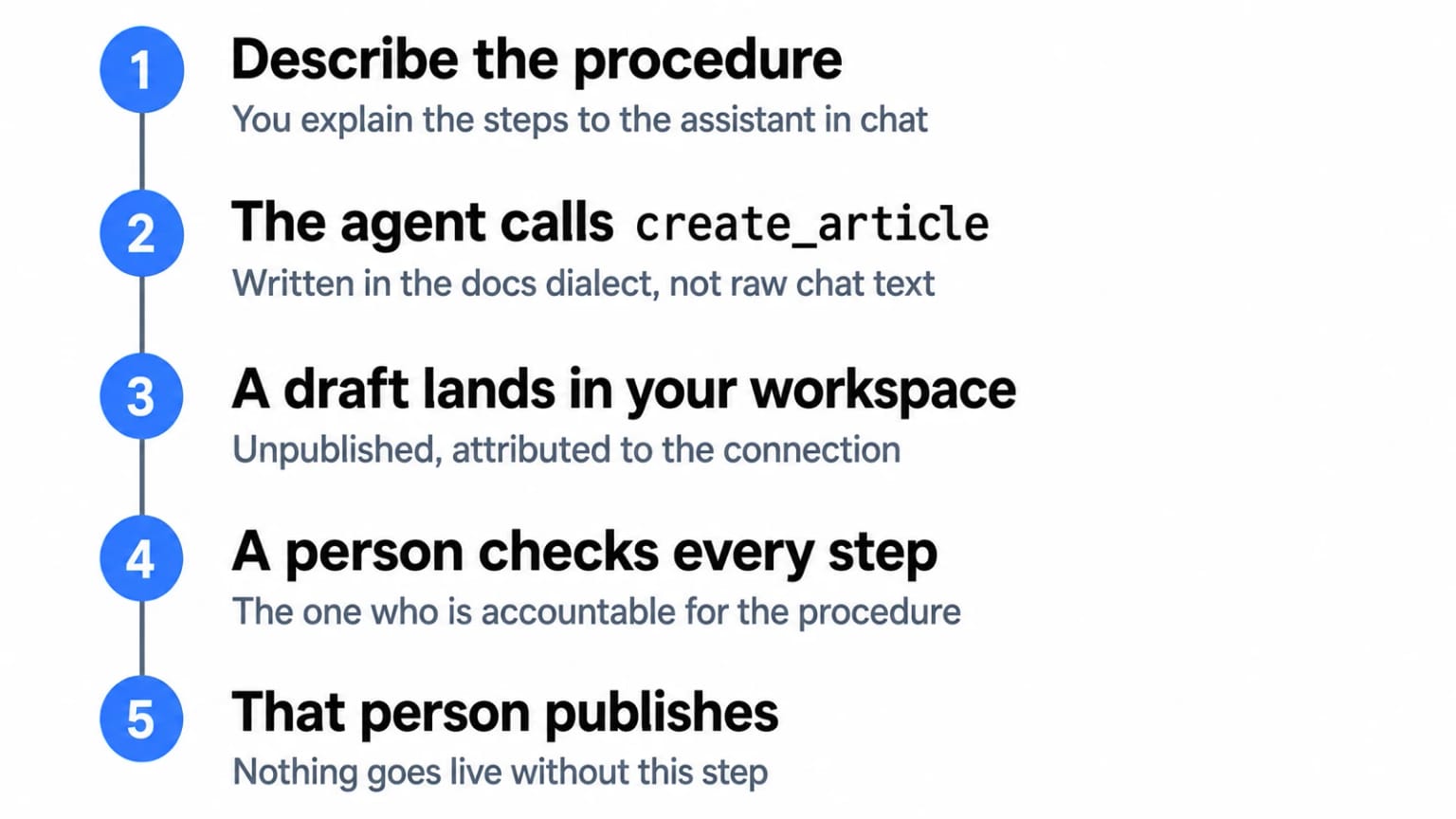
Once connected, the agent has three write tools. create_collection sets up a section, for example a Finance Procedures collection. create_article creates a page, always as a draft. update_article edits an existing draft, and the previous version goes to Page History before the change is written.
Two more tools tell you what to write next. list_content_gaps returns what readers searched for and did not find, plus the questions your assistant could not answer, with counts attached. For an SOP library that is the most honest backlog you will get: the refund escalation path that twelve people looked for last month is the SOP to write this week. list_stale_pages returns published pages that have gone untouched past a threshold you set, which is the closest thing to an automatic reminder that a procedure has drifted from practice.
In use it is unremarkable, which is the compliment. You describe the contractor offboarding process to Claude, or paste in the notes you took while walking someone through it, and ask for an SOP in the Operations collection. Agents receive Dewstack's docs dialect when they connect, so what arrives is not a wall of prose. It has numbered step blocks, callouts for the warnings, tables where a table belongs, and video embeds if the source material calls for one. You open the draft, read it, correct the two things the agent could not know, and publish it yourself.
The four rules, and why they matter more for SOPs
Agent write ships with four rules that hold without exception.
- Drafts only. An agent cannot publish, cannot unpublish, and cannot touch a page that is live. Everything it produces waits for a person.
- History first. The previous version is saved to Page History before any change is written, so nothing an agent does is unrecoverable.
- Sanitised on the way in. Script handlers and unsafe embeds are stripped from anything an agent writes.
- Visible and revocable. The connection appears under API keys like any other credential, and revoking it disconnects the agent immediately.
For most documentation, drafts-only reads as a constraint. For SOPs it reads as a control. If your procedures govern anything a regulator, an auditor, or an insurer cares about, then a system where automated tooling physically cannot alter the live procedure is easier to defend than a system where it can but is asked politely not to. The evidence trail is concrete rather than declarative. Page History attributes every agent edit to the connection's key name, for example "Claude connector - agent update", and one click restores the previous version. Every write, and every write that was refused, is recorded against the key.
The practical shape of this is worth stating plainly. To let an agent rework a procedure that is already published, a human unpublishes it first. The agent is refused otherwise. That is one deliberate human action standing between an automated system and a live procedure, and it is recorded.
A few limits to plan around: 500 writes per day per connection or key, which is far more than an SOP library will consume, and the workspace must be set to Public for write access to work at all.
How to Use AI to Create an SOP from Existing Documents
The most practical way to build an SOP from existing documents is to import the source material into a platform that can restructure it. Dewstack accepts content from 20+ sources, including Notion, Google Docs, Confluence, GitHub, Dropbox, and file uploads in PDF, Word, Markdown, and HTML. Once imported, AI Page Assist rewrites that raw content into a proper SOP format: numbered steps, clearly assigned roles, defined outcomes. You are not generating documentation from nothing. The AI works on what you already have, so the institutional knowledge locked in a Confluence page becomes a clean, publishable procedure in minutes. Teams migrating from legacy tools can use bulk import via ZIP or CSV (Pro and above) to bring dozens of documents across at once.
After import, the workflow is straightforward.
- Choose a smart template. Dewstack's AI-generated SOP templates give the restructuring process a scaffold: section order, step numbering, role labels, and outcome fields are in place before you touch the content.
- Run AI Page Assist. Select the imported content, choose restructure or adjust the tone, and the assistant reformats the material to fit the template. It can also summarise lengthy procedures into quick-reference versions.
- Translate for global teams. AI Page Assist supports multi-language output, so a single master SOP can be published for teams in different regions without maintaining separate source documents.
- Review version history. Every AI-assisted edit is tracked. Starter plans retain the last 50 revisions, Pro retains 100, and Premium keeps unlimited history. If a restructured SOP loses critical detail, rolling back takes seconds.
The result is a versioned, publishable SOP built from content your team already owns.
Publish and Host Your SOPs: From Draft to Live Knowledge Base
Once an SOP is drafted, getting it in front of the right people is where most teams lose momentum. Dewstack takes a draft from your editor to a live, branded documentation site in under 3 minutes, with no engineering involvement. Every paid plan includes free SSL hosting and a custom domain, so your SOP hub looks like a first-class product rather than an afterthought on a subdomain you did not choose.
Access controls let you decide exactly who sees what. Public SOPs for customers or partners publish openly and are discoverable without a login. Internal process documentation can be restricted to team members through collection-based access controls (Pro and above), or locked behind password protection on Premium. A single workspace serves both audiences with no duplication of content.
Organising a growing library is straightforward with drag-and-drop nested pages. Group procedures by department or workflow stage, nest sub-procedures under parent processes, and reorder pages as your operations evolve without touching a CMS.
Finding the right SOP under pressure matters as much as having it. Dewstack's advanced search uses AI ranking and typo tolerance, so a support agent searching "refund procedue" still lands on the refund procedure page. Search analytics (Pro and above) surface which queries return no results, flagging gaps before they become support tickets. Those are the same signals list_content_gaps hands to a connected agent, so the gap you spot in analytics is the gap you can ask an agent to draft against.
If your team lives inside other tools, SOPs do not have to pull people out of their workflow. Embed any documentation page inside an existing intranet, product dashboard, or customer portal using a script widget or iframe. Slack users on Pro and above can query SOPs with /smartdocs commands without leaving the channel. The landing page builder gives the whole library a branded front door with a custom header and navigation, no template files or HTML required.
Deploy SmartDocs AI So Your SOPs Answer Questions 24/7
A static SOP library answers questions only when someone knows to look. SmartDocs AI changes that. Train it on your published documentation and it becomes an assistant that reads your SOPs, understands the context, and responds to user questions with direct answers and source citations pointing back to the exact page. No invented steps. No "check with the team." Just referenced answers drawn from content you have already reviewed.
Deploying it takes minutes. Embed the widget on any website or internal portal using a script snippet or iframe. If your team lives in Slack, Pro and above includes a /smartdocs command so anyone can query the SOP library without switching tabs. Someone needs the offboarding checklist at 11 PM on a Friday, they ask Slack, SmartDocs answers, the ticket never gets filed.
Research consistently shows that well-structured self-service documentation reduces inbound support tickets by 20-70%. SmartDocs AI helps because it removes the friction of navigation. Users do not need to know which section covers their question.
What makes this particularly useful for SOP management is the conversation log. Every question your team or customers ask gets recorded, and over time those logs reveal which processes generate confusion, which steps produce follow-up questions, and which topics have no SOP at all. That is a direct feedback loop: open the analytics, find the gaps, write the missing content, republish. If you have a connected agent, the same signal is available to it directly, so the loop closes with a drafted page waiting for review rather than a note in a backlog.
For customer-facing deployments, Premium users can white-label the widget entirely, applying your brand colours, logo, and name so the assistant looks like a native part of your product.
Automate SOP Creation Online: Choosing the Right Tool
The right tool depends on where your SOP workflow breaks down. If the problem is only capturing steps, a standalone SOP generator like Scribe might be enough. Most teams discover the real bottleneck is downstream: SOPs live in a tool nobody checks, they go stale without version control, and support staff still answer the same questions because there is no way for users to query the docs themselves. That is where point solutions hit a ceiling.
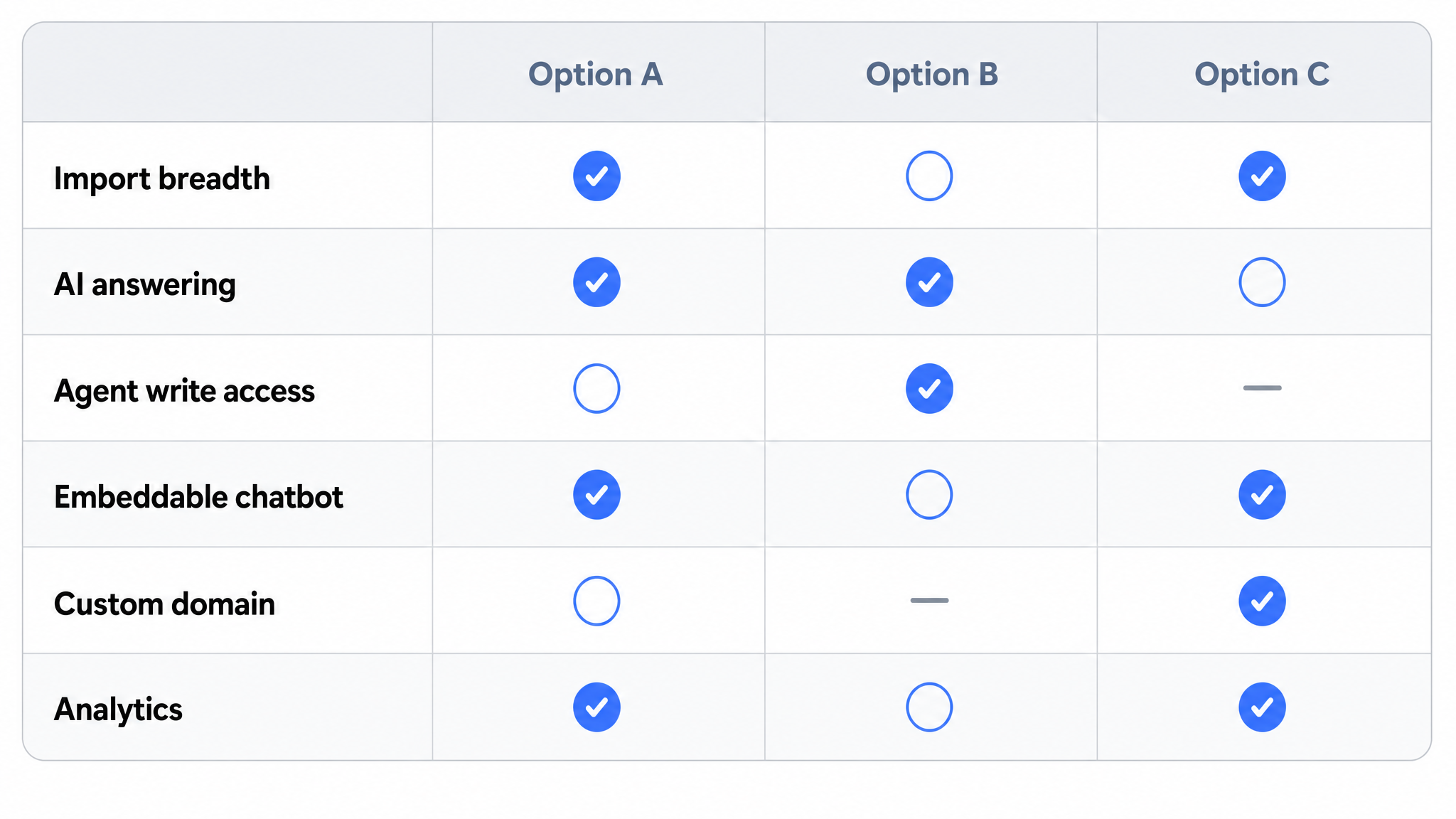
Five criteria separate adequate from genuinely useful. Workflow capture capability determines whether the tool can record a live process or whether you are still writing from memory. Import flexibility matters if your existing SOPs are scattered across Notion, Confluence, Google Docs, or sitting in PDF and Word files. Publishing options decide whether your docs live on a branded custom domain or inside a walled-off platform. AI chatbot support separates tools that store SOPs from tools that make SOPs answerable. Agent access is the newest criterion and the one most tools fail: can an assistant you already use write into the platform, under rules you can audit, or does every draft arrive via clipboard?
General-purpose workspace tools adapted for documentation, Notion and Confluence being the common examples, handle the writing part reasonably well and fall short on the rest: publishing to a custom domain requires workarounds, there is no chatbot trained on your content, and workflow capture does not exist natively.
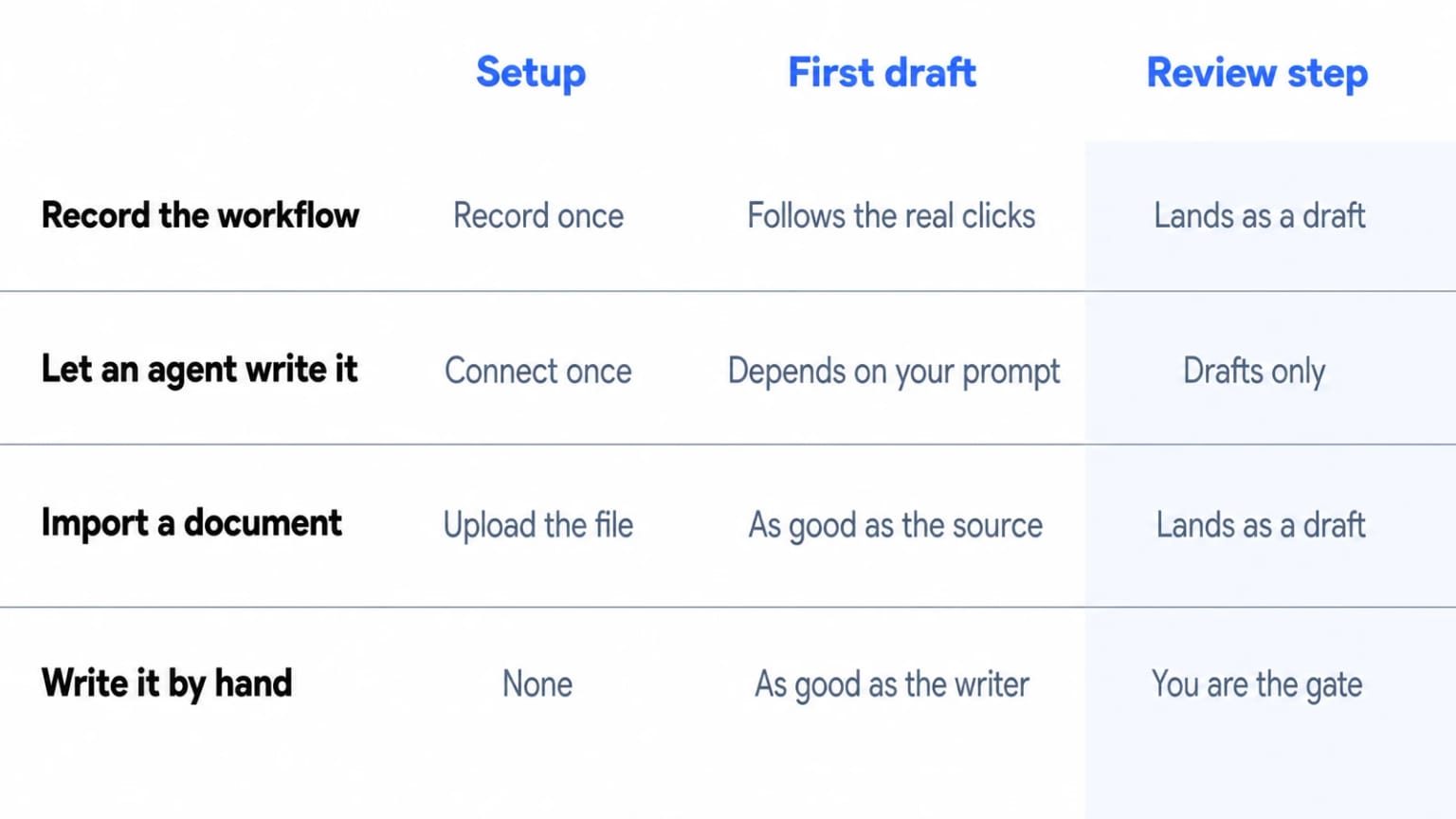
Dewstack is built specifically for documentation. FlowCapture records any browser workflow and AI generates the step-by-step SOP. Connected agents draft into the workspace under the drafts-only boundary. SmartDocs AI chatbots answer user questions with source citations. Content imports from 20+ sources. Published docs go live on your custom domain with free SSL.
A free template or spreadsheet approach makes sense for a solo operator with one or two processes and no external audience. Once you have a team, external users, or more than a handful of SOPs, the absence of version control, hosted search, and AI Q&A creates friction that compounds quickly.
SOP Automation in Excel vs. a Dedicated Documentation Platform
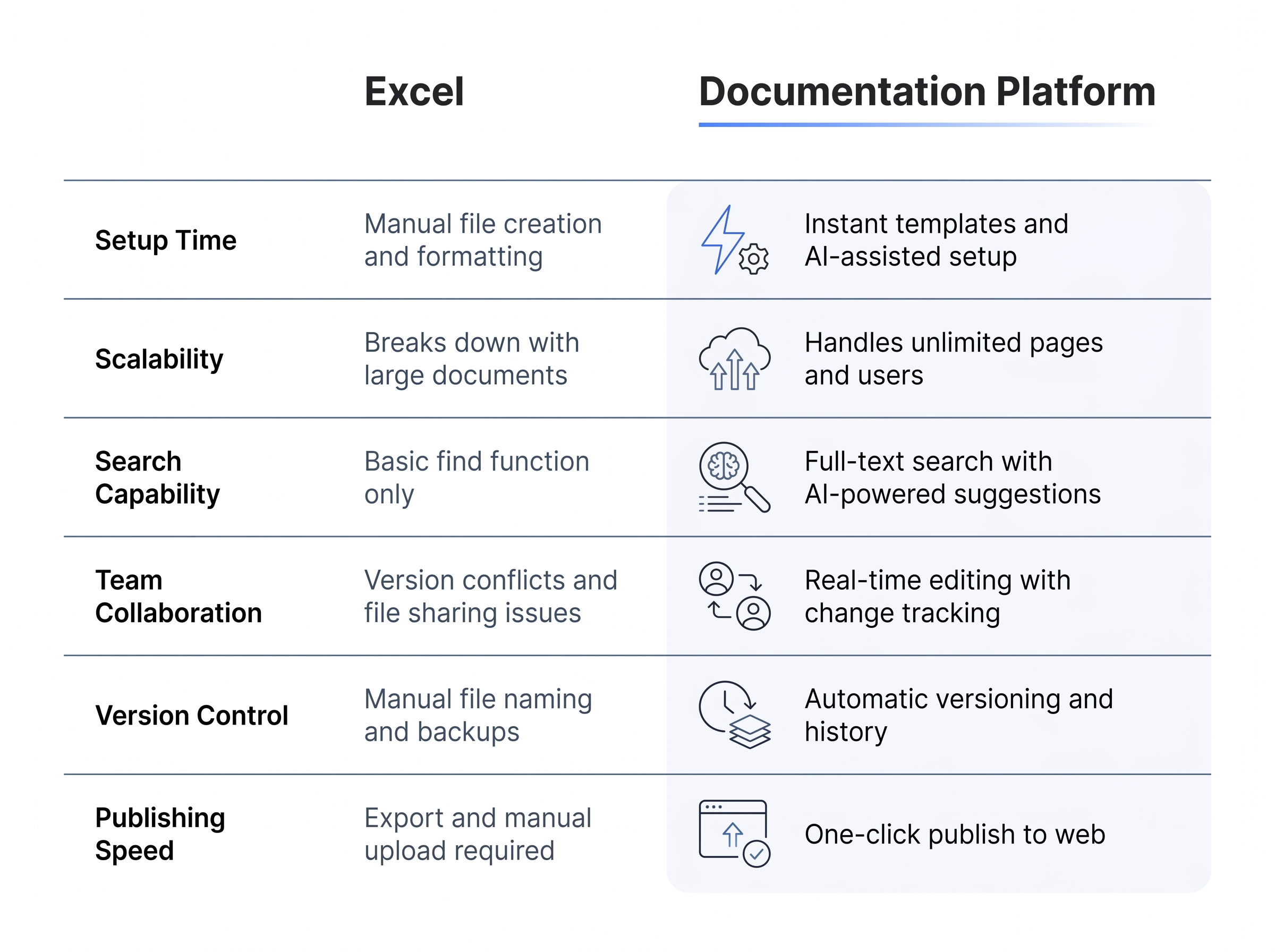 Dedicated platforms outpace spreadsheets as SOP complexity and team size grow.
Excel is a reasonable starting point for SOPs when a team is small, the processes are simple, and nobody needs to find anything quickly. A checklist in a spreadsheet is better than no checklist at all. But Excel was built for data analysis, not documentation management, and the cracks show fast.
Dedicated platforms outpace spreadsheets as SOP complexity and team size grow.
Excel is a reasonable starting point for SOPs when a team is small, the processes are simple, and nobody needs to find anything quickly. A checklist in a spreadsheet is better than no checklist at all. But Excel was built for data analysis, not documentation management, and the cracks show fast.
The core problem is maintenance. Excel SOPs have no meaningful version control. When someone edits a cell, the previous wording is gone unless a teammate remembered to duplicate the file first. There is no rollback, no audit trail of who changed what, and no way to compare versions side by side. For a process that governs something consequential, like an onboarding sequence or a compliance checklist, that gap is a liability.
Search is the next failure point. An Excel SOP library is a folder of files. Finding the right procedure means knowing which file to open, then scrolling or using Ctrl+F inside it. There is no cross-document search and no typo tolerance. There is also no publishing layer: an Excel file cannot be hosted on a branded domain, embedded in a product, or served to customers as self-service, and no agent can write into it under rules you can audit. Collaboration is limited in the same way, since anyone with file access can edit anything.
If your team is three people managing a handful of simple checklists, Excel is acceptable. The moment SOPs need to be searchable, versioned, shared externally, or maintained by more than two people, a dedicated platform is the right tool. The migration path is straightforward: export your spreadsheet content as CSV and bulk-import it into Dewstack on Pro or higher, restructure with drag-and-drop organisation, apply AI Page Assist to standardise the language, and publish with a SmartDocs AI chatbot ready to answer questions from the material.
SOP Automation Best Practices: Getting the Most from AI
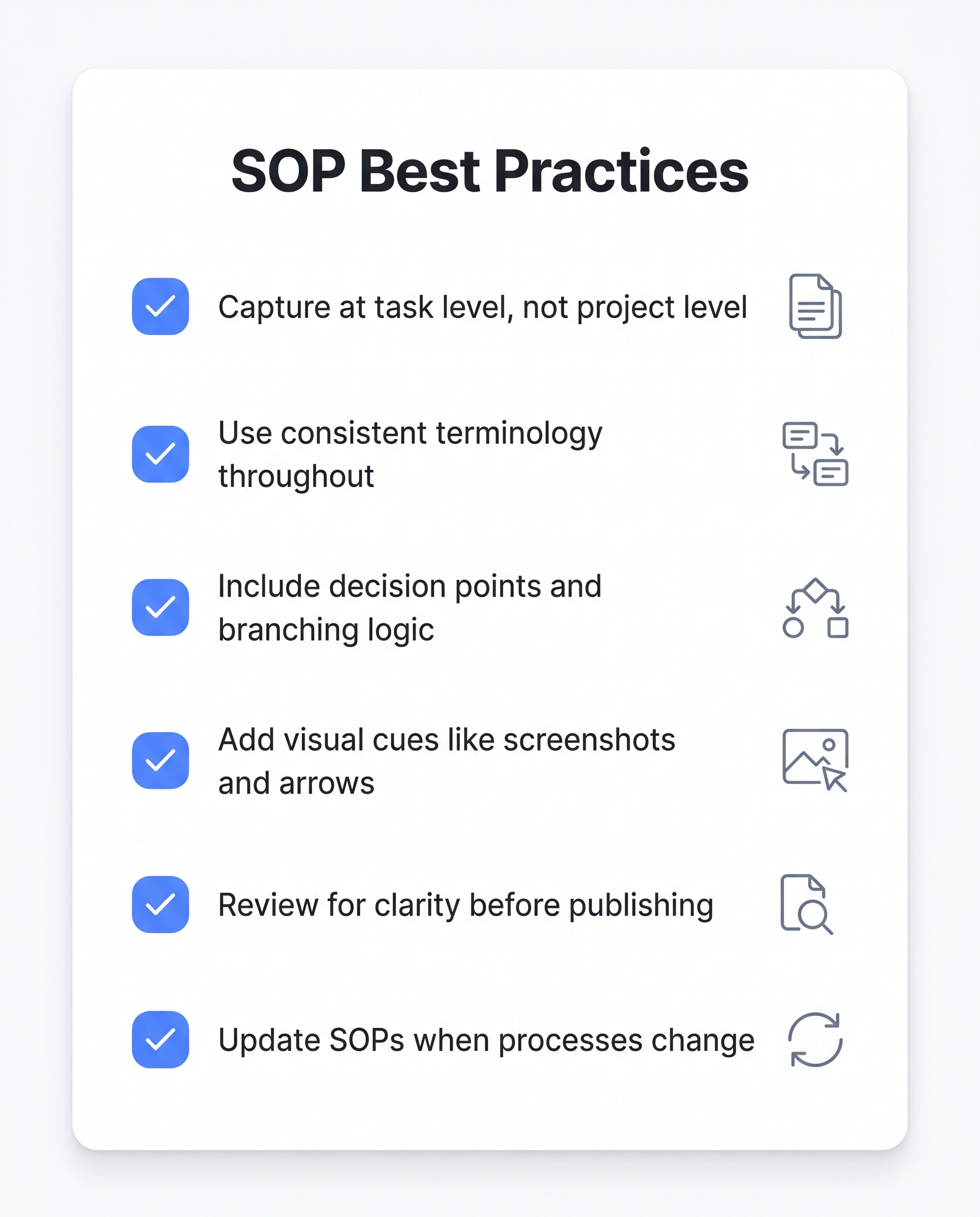 Better inputs and consistent review cycles yield higher-quality automated SOPs.
Getting the most from AI-generated SOPs comes down to one principle: better inputs produce better outputs. When you capture a workflow, record it at the task level, not the project level. A single SOP should cover one discrete action, such as processing a refund or onboarding a contractor, not an entire department workflow. FlowCapture follows this logic naturally, and the same rule applies when you brief an agent. Broad, vague input produces broad, vague SOPs. Tight task-level input produces documentation people actually follow.
Better inputs and consistent review cycles yield higher-quality automated SOPs.
Getting the most from AI-generated SOPs comes down to one principle: better inputs produce better outputs. When you capture a workflow, record it at the task level, not the project level. A single SOP should cover one discrete action, such as processing a refund or onboarding a contractor, not an entire department workflow. FlowCapture follows this logic naturally, and the same rule applies when you brief an agent. Broad, vague input produces broad, vague SOPs. Tight task-level input produces documentation people actually follow.
Review before you publish. AI Page Assist can rewrite, restructure, and adjust tone, but it works with the content you give it. The AI does not verify accuracy against your systems, policies, or edge cases. A human reviewer, ideally someone who performs the task regularly, should confirm every step before the SOP goes live. This is not a limitation to work around; it is the correct workflow. Agent write is built around exactly this assumption, which is why an agent can produce a draft but never a published page.
Standardise across the workspace. Once individual SOPs are reviewed, use AI Page Assist to normalise tone and format across your library. Consistent language reduces reader confusion and makes future edits faster. A customer-facing refund guide and an internal HR checklist should not read like they came from different companies.
Track what users actually do with your SOPs. On Pro and above, reader analytics show which pages get viewed, what users search for, and where they stop reading. That drop-off data tells you which SOPs need clarification before a support ticket does.
Schedule reviews, do not rely on memory. Page history with up to 100 revisions on Pro (unlimited on Premium) gives you a clear audit trail. Pair that with content health scoring to surface SOPs that have gone stale, or ask a connected agent for stale pages and have it draft the refresh for you to check.
Assign the right roles from the start. Dewstack's role structure (Owner, Admin, Creator, Editor) ensures the people responsible for a process are the ones updating its documentation. The same principle governs agent connections, which only Owners and Admins can approve.
Dewstack Plans for SOP Teams
Four plans cover the full range of SOP teams, from solo operators to enterprise documentation departments. Current prices are on the pricing page; what differs between tiers is below.
Starter suits individuals or very small teams building their first structured SOP library. You get 3 documentation projects, 2 SmartDocs AI assistants, and 2,000 AI queries per month, with one team member included. File uploads (PDF, Word, Markdown) are available, so you can import existing process documents and start organising immediately.
Pro is where SOP automation gets meaningfully more capable. The plan includes 10 projects, 5 AI assistants, 5,000 AI queries per month, and three team members. Pro adds direct integrations with Notion, Confluence, Google Docs, GitHub, Jira, and Dropbox, so teams with scattered process documentation can pull everything into one place. Slack integration is included, letting team members query SmartDocs AI with /smartdocs commands.
Premium fits operations teams managing large, multi-product SOP libraries. Unlimited projects, 10 AI assistants, 10,000 AI queries per month, and five team members remove the ceiling on scale. White-label AI widgets let you embed a branded chatbot on any internal portal or customer-facing site. Password-protected documentation keeps sensitive process content restricted.
Enterprise carries custom pricing and removes the limits: unlimited team members, custom AI query and training-character limits, and a dedicated success manager for onboarding and ongoing support.
Every tier is flat-rate rather than per-seat, with extra members priced per plan and the rate falling as you move up. All paid plans include free SSL hosting, a custom domain, and access to Dewstack FlowCapture for workflow recording. Annual billing saves roughly two months of cost across every tier. A 30-day money-back guarantee applies after the first billing cycle, and the 7-day free trial requires no credit card.
Ready to Elevate Your Documentation?
Try Dewstack free for 7 days. Create AI-powered documentation that answers questions instantly.
Start a free trialANSWERS TO
Frequently Asked Questions
Here are some common questions that might provide the information you're seeking.
Related Blogs
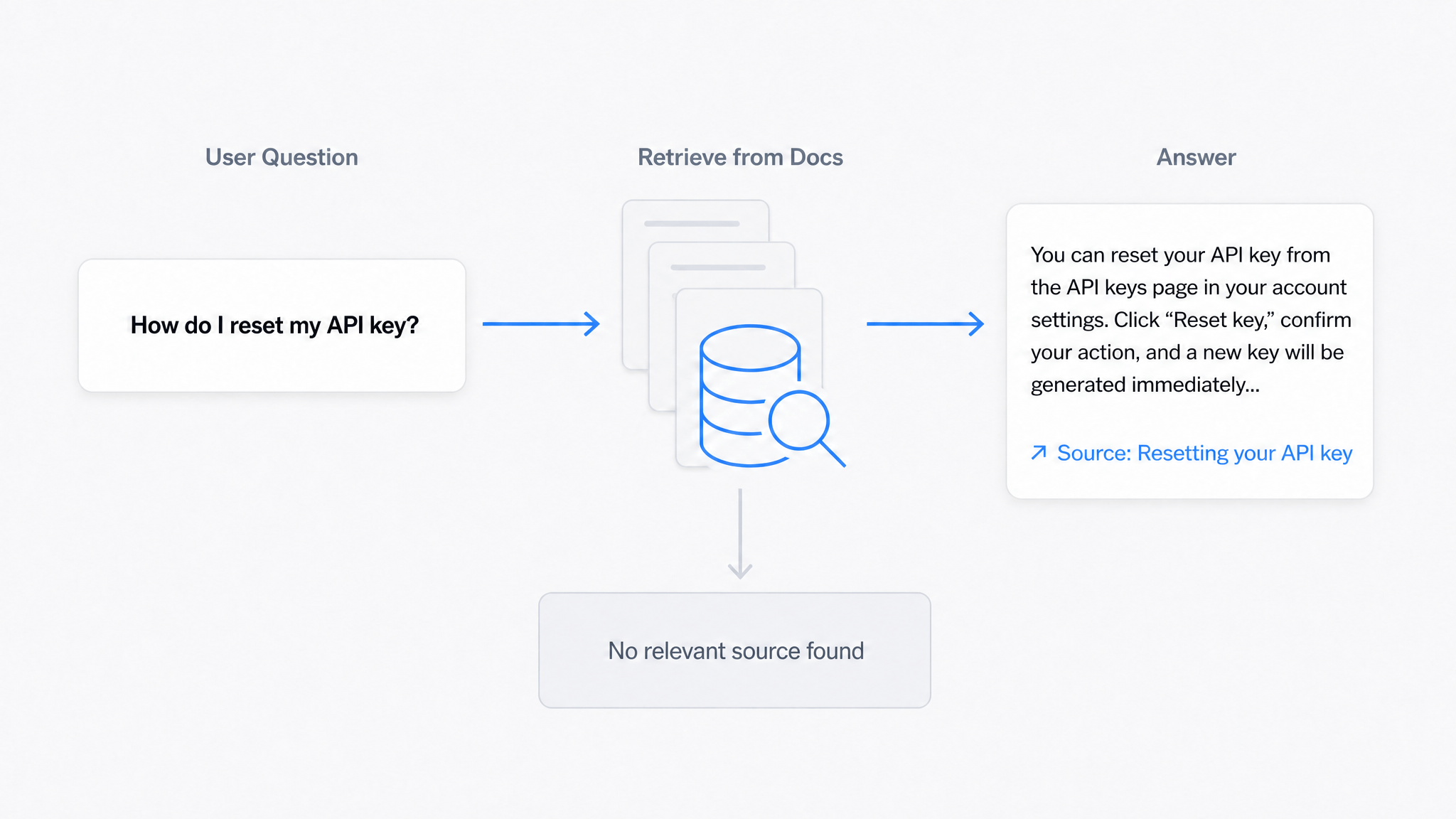
AI Answers From Your Docs: Grounded Answers, Citations & Hallucination Control
How an AI chatbot for technical documentation gives grounded answers with source citations, controls hallucinations, and turns unanswered questions into drafted pages.
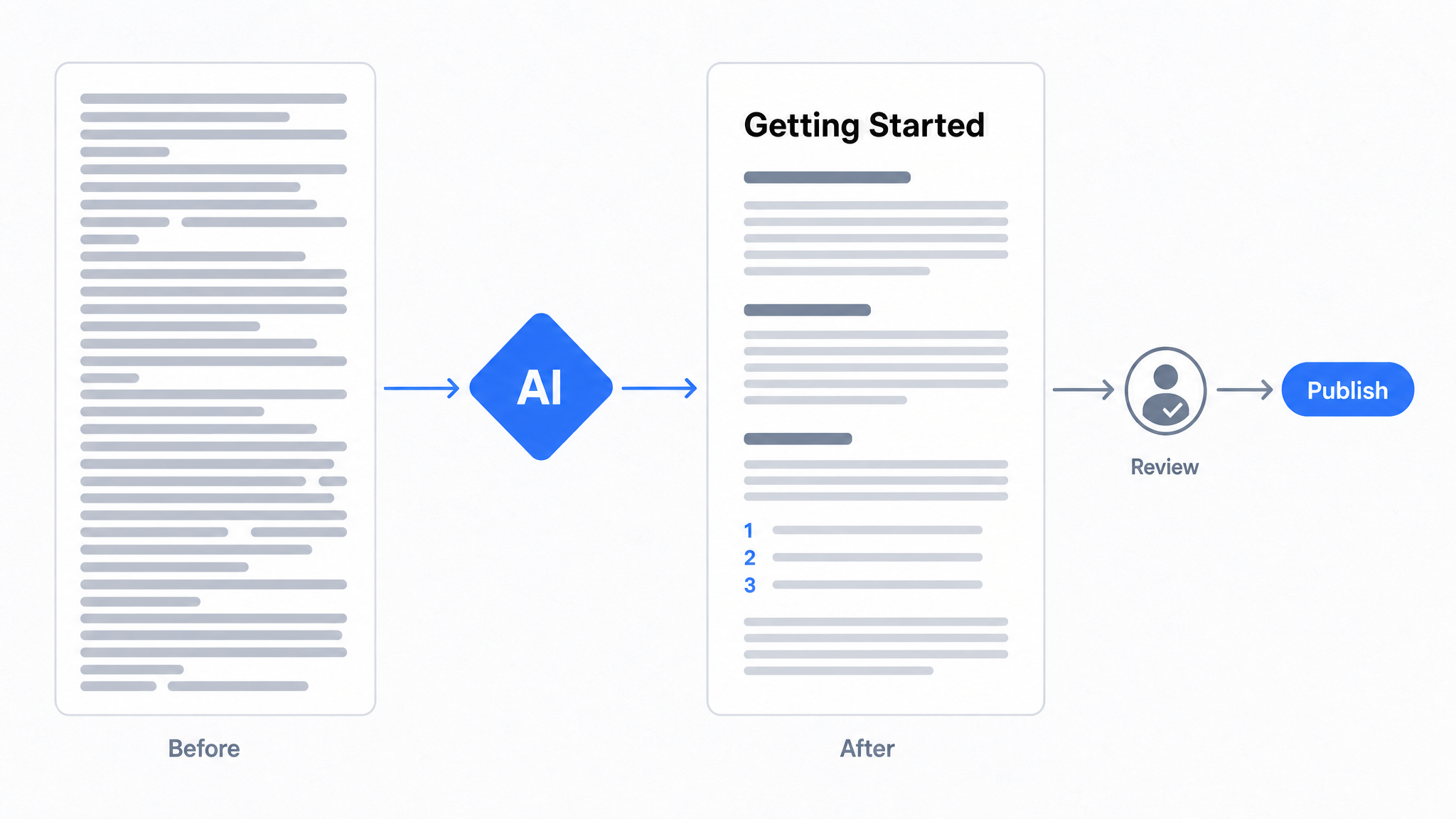
How to Use AI to Improve Existing Documentation
Use AI to audit, rewrite, and translate the documentation you already have, and let a connected agent draft improvements to stale pages for a human to publish.
Best Documentation Platform for SaaS Companies in 2026
Compare documentation platforms for SaaS teams. See how Dewstack's agent write path, SmartDocs AI, and 20+ imports cut support tickets. Start free today.
Ready to get started with Dewstack?
Try Dewstack free for 7 days. Create AI-powered documentation that answers questions instantly.
No credit card required.