Best Documentation Platform for SaaS Companies in 2026

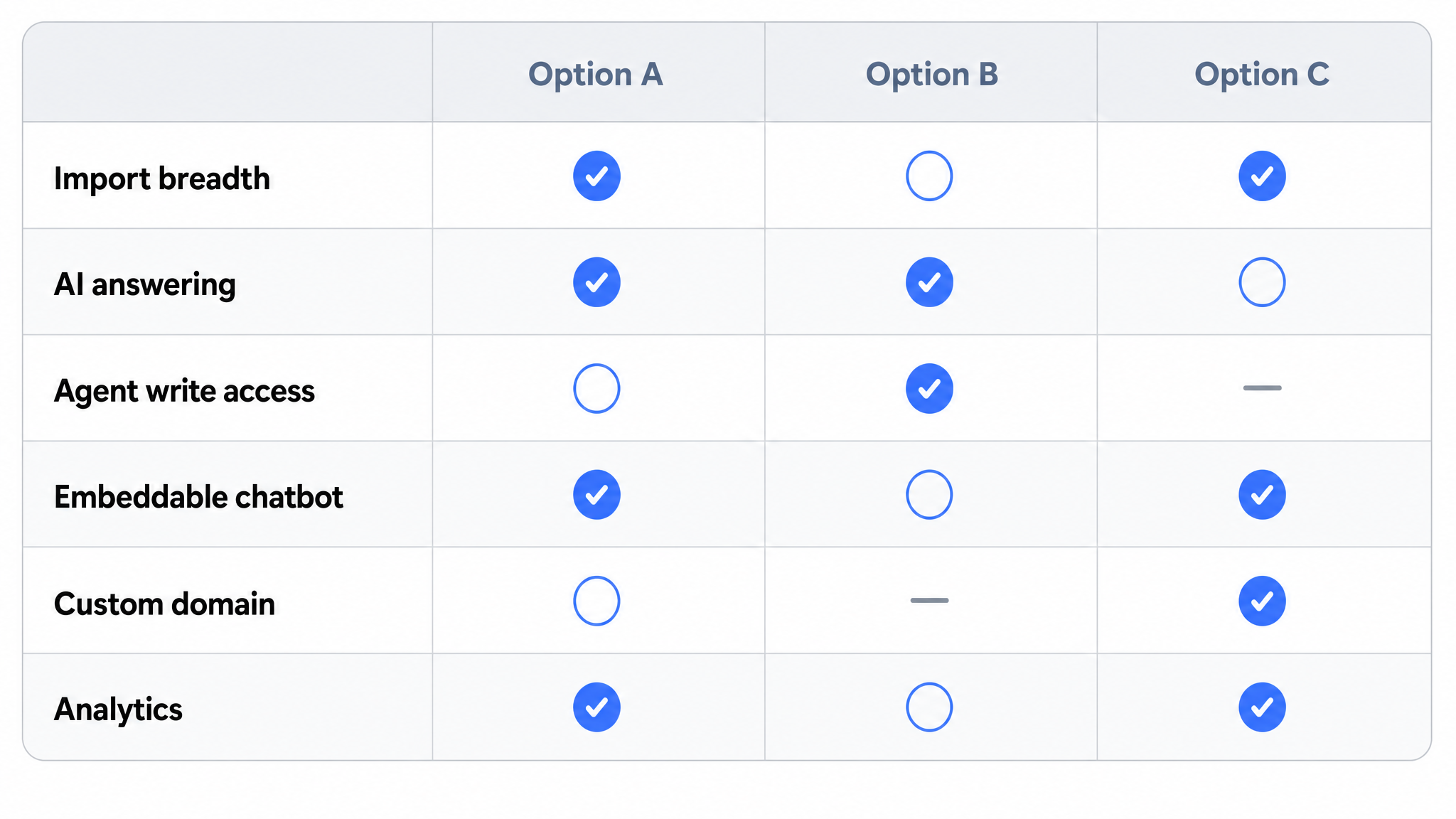
Best Documentation Platform for SaaS Companies in 2026
Most "best platform" lists compare feature checklists that any vendor can match within a quarter. So start with the thing that is harder to copy: where the writing happens. In August 2026 Dewstack shipped an agent write path. The assistant you already talk to, Claude, can write documentation directly into your Dewstack workspace, and it structurally cannot publish. It creates drafts. A human reviews and publishes. That boundary is enforced by the product, not by a policy document you have to trust.
Around that, Dewstack does the rest of the documentation lifecycle. It imports from 20+ sources including Notion, Google Docs, GitHub, Confluence, Jira, and Dropbox, publishes on your custom domain with free SSL, and deploys SmartDocs AI chatbots trained on your documentation that answer end-user questions with source citations. More than 1,000 teams use it across SaaS, healthcare, finance, and operations. Setup takes under 3 minutes, and the 7-day free trial needs no credit card.
Key Takeaways
What You'll Learn in This Article
- An agent you already use can write into a Dewstack workspace. Claude connects through a custom connector, ChatGPT through a developer mode connector, and coding agents such as Claude Code and Cursor through an API key.
- Agents write drafts only. They cannot publish, unpublish, or edit a live page. A human reviews and publishes, every time.
- Dewstack imports from 20+ sources (Notion, Google Docs, GitHub, Confluence, Jira, Dropbox, PDF, Word, Markdown) and publishes on custom domains with free SSL on all paid plans.
- SmartDocs AI chatbots are trained on your documentation and answer user questions with source citations, 24/7, reducing inbound support volume without additional headcount.
- Dewstack FlowCapture, the browser extension available on Chrome Web Store, records any workflow and auto-generates step-by-step SOPs with AI, capturing screenshots at each step rather than video.
- Every plan starts with a 7-day free trial and no credit card, and a 30-day money-back guarantee applies after the first billing. Annual billing saves roughly two months across every tier.
- Reader analytics, Slack integration, and embeddable AI widgets require Pro or above, so teams with those needs should factor that into plan selection.
What Is SaaS Documentation and Why Does It Matter?
SaaS documentation is the complete body of written content that helps users understand, adopt, and get value from a software product. It includes user manuals, knowledge bases, API references, standard operating procedures, onboarding guides, and FAQs. When documentation is accurate, findable, and well-structured, users answer their own questions without contacting support. When it is missing or scattered, the cost compounds fast: support queues grow, onboarding stalls, and users who cannot find answers churn rather than ask. Research consistently shows that companies with mature self-service documentation see 20-70% fewer support tickets. For SaaS companies specifically, where the product changes every sprint and the user base scales faster than the support team, documentation is the primary mechanism for delivering consistent customer education without proportionally increasing headcount.
The Hidden Cost of Using the Wrong Tool
Most SaaS teams start documenting in whatever tool they already have. Notion is good for internal notes. Confluence works for engineering wikis. Google Docs handles drafts. None of them were built to publish polished, branded, customer-facing documentation on a custom domain, track what readers search for, or answer user questions at 2 a.m. without a support agent.
The gap between "tool that can hold text" and "purpose-built documentation platform" shows up in predictable places: no reader analytics to tell you which pages confuse users, no AI chatbot trained on your content, no clean import path when you finally decide to migrate, and no way to control access at the collection level for internal versus external audiences.
What SaaS Teams Actually Evaluate
When documentation teams compare platforms seriously, six criteria dominate the shortlist:
- Agent write path: Can an agent your team already uses write into the workspace, and is there a hard boundary stopping it from publishing?
- AI capabilities for readers: Can the platform answer user questions from the docs, not just search them?
- Import flexibility: Can it pull content from Notion, Confluence, GitHub, or uploaded PDFs without manual copy-paste?
- Custom domain and branding: Does the published site look like your product, not the platform's?
- Setup speed: Can a non-technical team member have docs live in under a day?
- Pricing predictability: Does the cost scale reasonably as the team and content library grow?
The first criterion is the newest and the one most worth testing yourself. Ask each vendor two questions: can the agent I already use write into your product without me switching editors, and what stops it from putting something live by accident?
How to Choose the Right Documentation Platform for Your SaaS
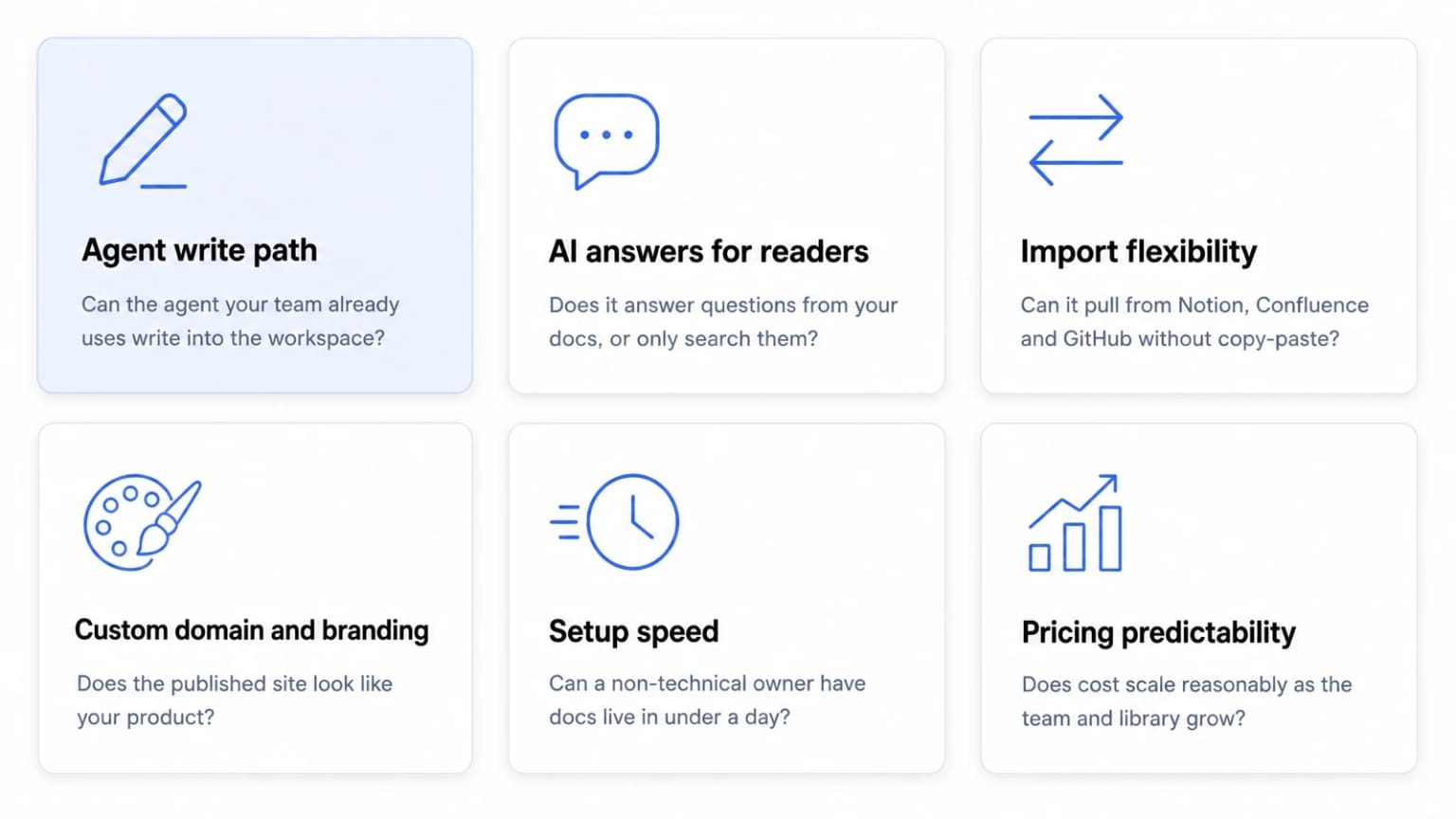 The agent write path is the newest of the six, and the one worth testing yourself.
The strongest platforms do not just store content. They answer end-user questions directly from that content, and they let the tools your team already works in put content in. Verify that custom domains and SSL are included on paid plans rather than sold as add-ons, and that a product manager or support lead can publish a complete knowledge base without filing an engineering ticket. Per-seat costs compound fast as teams grow, so flat-rate tiers with defined user limits are easier to budget. Time-to-live matters too. A platform that takes weeks to configure is a platform that never gets used.
The agent write path is the newest of the six, and the one worth testing yourself.
The strongest platforms do not just store content. They answer end-user questions directly from that content, and they let the tools your team already works in put content in. Verify that custom domains and SSL are included on paid plans rather than sold as add-ons, and that a product manager or support lead can publish a complete knowledge base without filing an engineering ticket. Per-seat costs compound fast as teams grow, so flat-rate tiers with defined user limits are easier to budget. Time-to-live matters too. A platform that takes weeks to configure is a platform that never gets used.
AI Capabilities: Does It Answer Questions, or Just Search?
Most knowledge base tools offer search. Fewer offer an AI layer that reads your documentation and answers a user's specific question with a cited source. That distinction matters for support ticket deflection.
Dewstack's SmartDocs AI is trained exclusively on your documentation. It does not pull from the open internet or hallucinate answers from unrelated sources. When a user asks a question, SmartDocs returns an answer drawn from your content, with a link back to the source page.
Import Flexibility: Bring Your Content, Don't Rebuild It
Migration friction kills adoption. If moving to a new platform means copy-pasting hundreds of pages, most teams abandon the project before launch.
Dewstack imports from 20+ sources. On Pro plans and above, direct OAuth integrations pull content from Notion, Google Docs, Confluence, GitHub, Jira, and Dropbox. All paid plans accept file uploads: PDF, Word, Markdown, and HTML. Bulk import via ZIP, PDF batch, or CSV is available on Pro and above. A team migrating off a legacy wiki or general-purpose workspace tool can pull its existing content into Dewstack and publish it on a custom domain without rebuilding the library page by page.
Custom Domain and Branding: Your Docs, Your Identity
A documentation site on a vendor subdomain signals to customers that documentation is an afterthought. Every Dewstack paid plan includes free SSL hosting and a custom domain. Theme customisation covers colours, fonts, logos, and layouts. For teams that need the AI chatbot widget to carry their own brand identity rather than Dewstack's, white-label branding is available on Premium and above.
Non-Technical Usability and Pricing Transparency
A documentation platform is only useful if the people responsible for content can actually operate it. Dewstack's editor is WYSIWYG with drag-and-drop page organisation and nested pages, so a support lead or product manager can restructure an entire knowledge base without touching code. Custom scripts and advanced integrations require Pro or above, but core publishing, theming, and AI chatbot deployment are accessible on every paid tier.
Dewstack also uses flat-rate tiers rather than per-seat billing for the base platform, with a set number of members included and additional users priced per plan. What each tier includes is below, and current prices are on the pricing page.
The Agent Write Path: The Part That Is Hard to Copy
This is the capability that separates Dewstack from a feature checklist, so it is worth being precise about what it does and what it refuses to do.
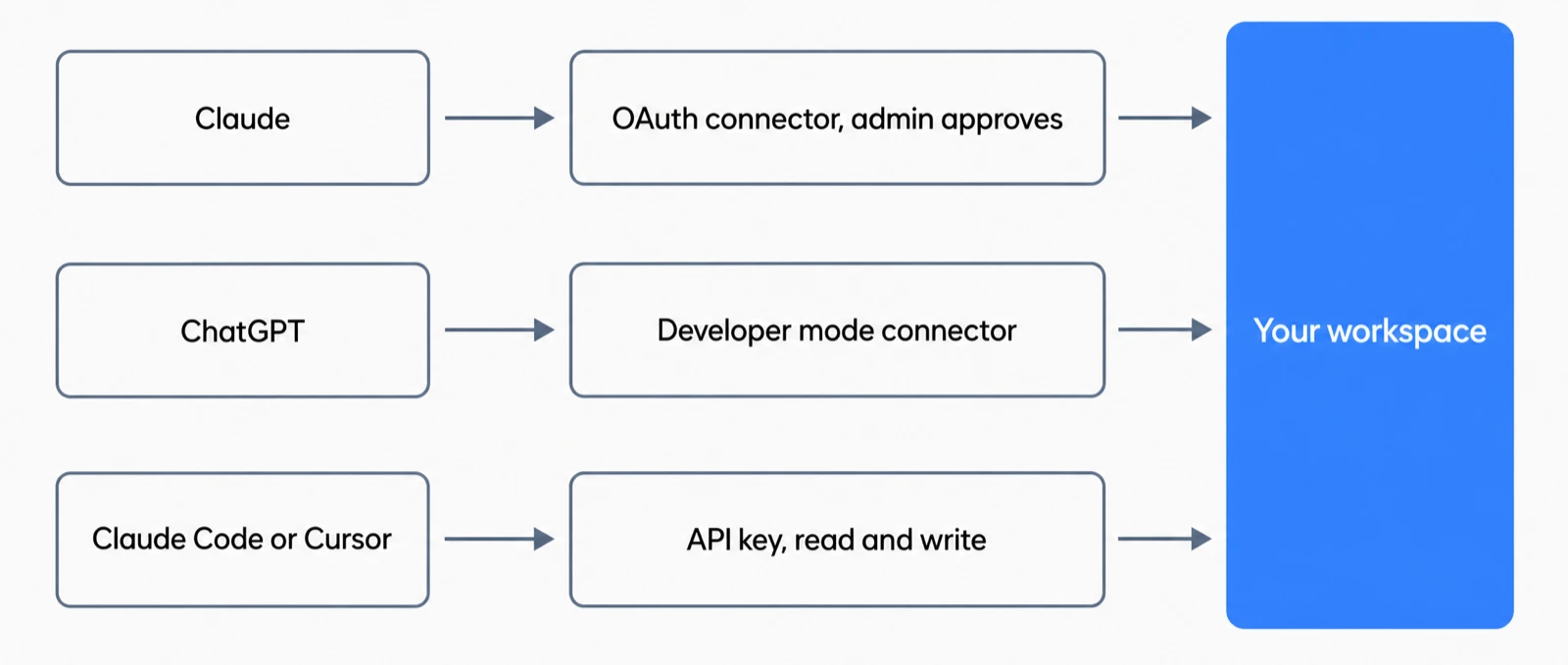
You connect Claude to a Dewstack workspace once. In Claude, go to Settings, then Connectors, then Add custom connector. Paste the Write connector URL, the one ending in /mcp-rw, sign in, and press Allow on an approval screen that names the workspace you are about to grant access to. No keys, no code, no engineering ticket. Only account Owners and Admins can approve a connection, so a writer cannot quietly wire an agent into your docs.
ChatGPT supports this as a developer mode connector only. OpenAI limits write-capable connectors to developer mode, so ChatGPT's regular connector surface can read your docs but cannot write to them. Coding agents such as Claude Code and Cursor take a different route: they use an API key with Read and write scope instead of OAuth, which suits an agent already running in a terminal or an IDE.
What the Agent Can Do
The write surface is deliberately small. There are three write tools: create_collection makes a new collection, create_article creates a page as a draft, and update_article edits an existing draft, saving the old version to Page History first.
There are also two signal tools, and they are the reason an agent session tends to produce useful work rather than generic filler. list_content_gaps returns what readers searched for and did not find, plus questions your assistant could not answer, with counts attached. list_stale_pages returns published pages that have not been touched past a threshold you set. An agent that starts from those two lists is writing against real reader demand instead of guessing.
Agents also receive Dewstack's docs dialect when they connect. That means the drafts come back with callouts, numbered step blocks, tables, and video embeds rather than a wall of prose, so review is editing rather than reformatting.
What the Agent Cannot Do
Four rules apply with no exceptions.
Drafts only. An agent cannot publish, cannot unpublish, and cannot touch a page that is already live. If you want an agent to rework a live page, a human unpublishes it first. Otherwise the agent is refused.
History first. The previous version is saved to Page History before any change is written.
Sanitised on the way in. Script handlers and unsafe embeds are stripped from incoming content.
Visible and revocable. The connection appears under API keys in your workspace. Revoking it disconnects the agent immediately.
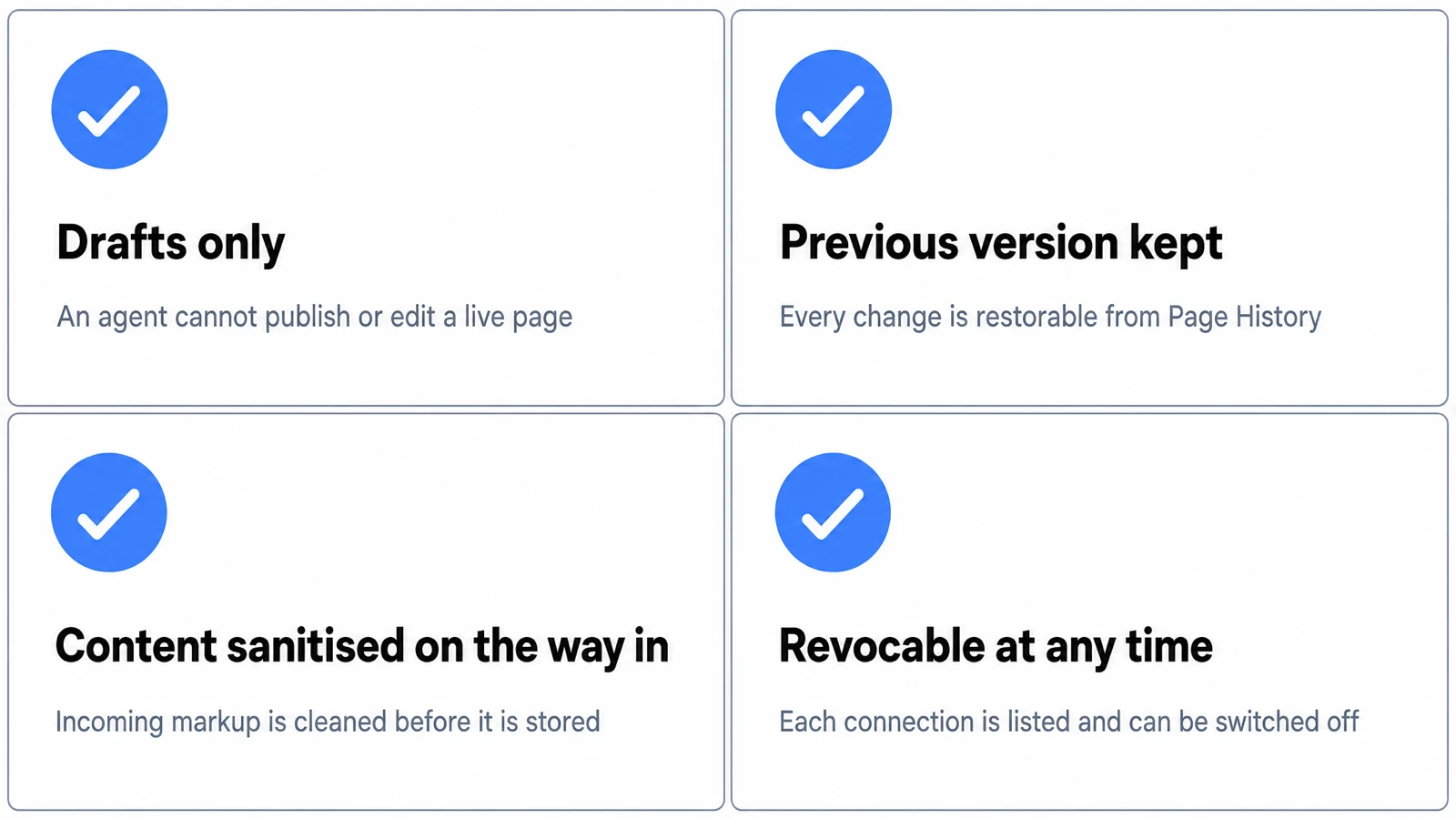
Attribution is concrete rather than abstract. Page History records agent edits against the connection's key name, for example "Claude connector - agent update", and one click restores the previous version. When a reviewer opens a page and sees an unfamiliar change, they can tell which connection made it and undo it without a support conversation.
Limits and Audit
Each connection or key is capped at 500 writes per day. Write access requires the workspace to be Public. Every write, and every refused write, is recorded against the key, so the audit trail includes the things the agent tried to do and was not allowed to do. That last detail matters more than it sounds: refusals are the evidence that the boundary is real.
Why This Is a Buying Criterion, Not a Feature
Two things make this different from an AI writing feature.
The first is whose agent it is. This is the assistant your team already talks to all day, holding the context of the incident you just debugged or the release you just shipped. You do not switch tools or learn a second editor. The documentation gets written where the knowledge already is.
The second is who enforces the safety. Plenty of workflows promise that AI-generated content will be reviewed before it goes live. Here, review is not a convention the team is asked to honour. The agent has no publish capability to misuse. That is the difference between a policy and a boundary.
Reading has been broadly available for a while: the pricing page advertises an MCP endpoint plus REST API on the Starter plan, described as making "your docs readable by Claude, ChatGPT and Cursor". Writing is the new part.
Dewstack: Purpose-Built Documentation for SaaS Teams
Dewstack is used by 1,000+ teams to create, host, and maintain customer-facing and internal docs without engineering help. Teams import from 20+ sources, then publish on a custom domain with free SSL hosting included on every paid plan.
SmartDocs AI: The Chatbot That Knows Your Product
Most documentation platforms publish content and stop there. SmartDocs AI is trained on your documentation and answers user questions in real time, citing the exact page it pulled the answer from. Teams embed it as a script widget or iframe on any website: inside your app, your marketing site, or your help centre. Starter includes 2 assistants and 2,000 AI queries per month, Pro 5 assistants and 5,000 queries, Premium 10 assistants and 10,000 queries. On Premium and above the widget is fully white-labeled, so users see your brand rather than Dewstack's.
The practical result is fewer support tickets without adding headcount. Users get answers at 2 a.m. without waiting for your team.
Dewstack FlowCapture: Turn Any Workflow Into a Documented SOP
Dewstack FlowCapture is a browser extension available on the Chrome Web Store. Record any workflow on any website and the extension captures a screenshot at each step. Dewstack's AI then writes the step-by-step SOP automatically. This is not screen recording video. It is screenshot-based workflow capture with AI-generated text, which means the output is immediately editable, searchable, and publishable alongside the rest of your docs.
For operations teams drowning in undocumented processes, this closes the gap between "how we do things" and "where it is written down". A process that previously took a technical writer an afternoon can be captured in minutes.
AI Page Assist: Improve Every Page You Already Have
AI Page Assist is a writing assistant built into the editor. It rewrites for clarity, translates, adjusts tone, optimises for SEO, and summarises long pages. It works on content you already have rather than generating documentation from nothing, which keeps your documentation accurate while reducing the time spent polishing it. It is available on all paid plans.
Rich docs are supported too. Embed content from 700+ platforms, including YouTube, Loom, Figma, and Airtable, directly into any page.
Dewstack Plans: What Each Tier Actually Gives You
Dewstack publishes four tiers, and the gap between them is mostly about scale: more projects, more AI assistants, more queries per month. Every paid plan includes free SSL hosting, a custom domain, SmartDocs AI, AI Page Assist, the Dewstack FlowCapture browser extension, and access to 700+ embeds. Current prices for each tier are on the pricing page; what follows is what you get.
Starter
Built for small teams or solo documentation owners. You get three documentation projects, two SmartDocs AI assistants, 2,000 AI queries per month, and one included team member. File imports (PDF, Word, Markdown, HTML) are available from day one. The MCP endpoint and REST API are included at this tier. Direct integrations with Notion, Confluence, and GitHub require Pro or above, so if migration from those tools is on your roadmap, factor that in before choosing Starter.
Pro
This is where most growing SaaS teams land. The plan expands to ten documentation projects, five SmartDocs AI assistants, 5,000 AI queries per month, and three included team members. Pro adds direct imports from Notion, Google Docs, Confluence, GitHub, Jira, and Dropbox, plus reader analytics (search insights, content health scoring, AI recommendations), Slack integration, embeddable AI widgets, and AI conversation logs.
Premium
Unlimited documentation projects, ten SmartDocs AI assistants, 10,000 AI queries per month, and five included team members. Premium adds white-label AI chatbot widgets, password-protected documentation, migration assistance, and a dedicated support SLA. For SaaS companies selling to enterprise buyers who expect polished, branded self-service portals, this tier removes the friction.
Beyond the members included at each tier, extra seats are priced per plan, and the per-seat rate falls as you move up.
Enterprise
Unlimited team members, custom AI query and training-character limits, a dedicated success manager, premier SLA, and custom contracts. Pricing is negotiated directly.
A note on annual billing
Paying annually saves roughly two months of cost across every tier: you pay for ten months and get twelve. That holds whether you are on Starter or Premium.
Every plan starts with a 7-day free trial, no credit card required. After your first billing date, a 30-day money-back guarantee applies.
Top Documentation Platforms for SaaS: Side-by-Side Comparison
Vendor feature sets change often, so treat the table below as a set of questions to ask rather than a verdict on any competitor. The Dewstack column states what the product does today. The other columns describe what each category of tool is designed for, and where you should check the vendor's current plan pages before deciding.
| Criterion | Dewstack | General-purpose workspace tools | Developer-focused platforms | Legacy wiki tools |
|---|---|---|---|---|
| Agent writes drafts into the workspace | Yes, Claude via connector, ChatGPT via developer mode connector, Claude Code and Cursor via API key | Check vendor | Check vendor; often a Git commit path instead | Check vendor |
| Agent blocked from publishing by the product | Yes, drafts only, no exceptions | Check vendor | Depends on your CI and review setup | Check vendor |
| AI chatbot trained on your docs | Yes (SmartDocs) | Check vendor | Check vendor | Check vendor |
| Custom domain + free SSL | All paid plans | Check vendor | Commonly included | Check vendor |
| Import sources | 20+ (Notion, Confluence, GitHub, PDF, Word, and more) | Varies | Git-based primarily | Varies |
| SOP workflow capture | Yes (FlowCapture) | Check vendor | Not a typical focus | Check vendor |
| Non-technical usability | High | High | Low to moderate | Varies |
| Pricing model | Flat tiers, members included per tier, extra seats priced per plan | Usually per seat | Varies | Usually per seat |
| White-label AI widget | Premium and above | Check vendor | Check vendor | Check vendor |
The two rows worth testing in a trial are the first two. They are easy to verify in an afternoon and hard for a vendor to overstate.
Key Features Every SaaS Documentation Platform Should Have
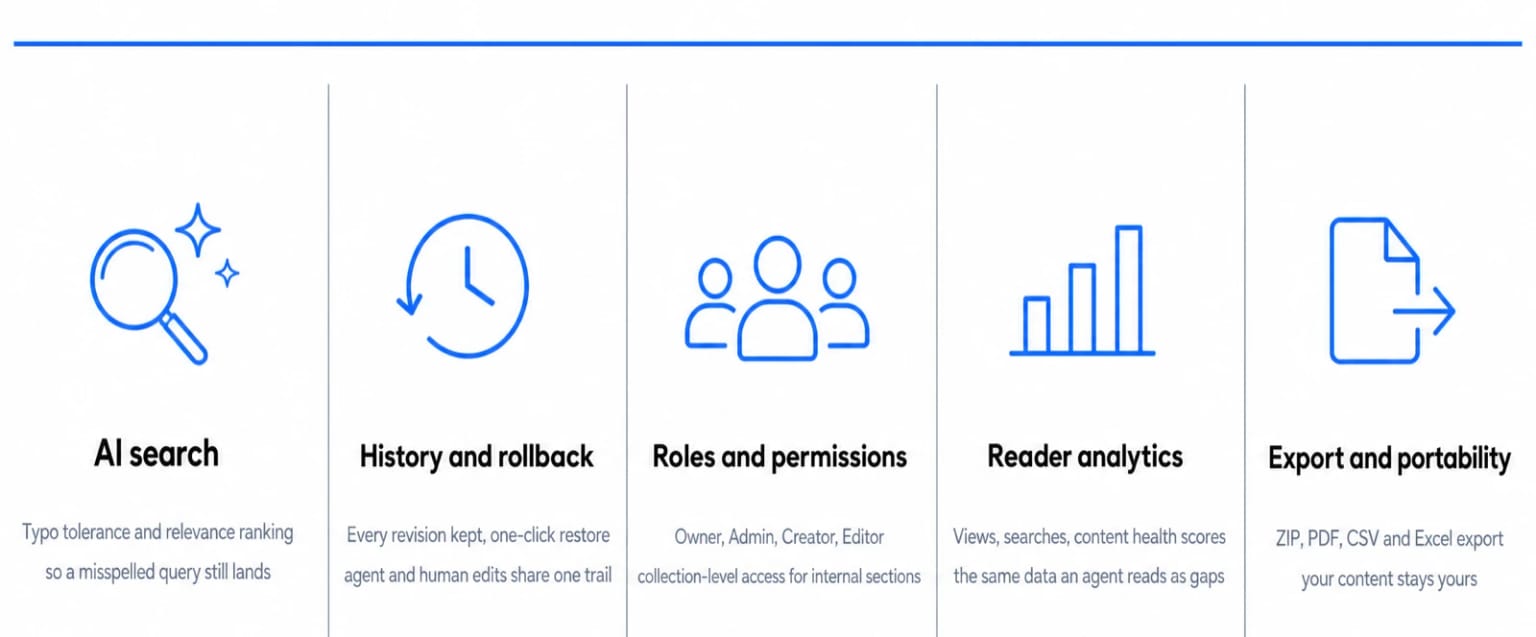 The five to verify before committing, and what each one should actually give you.
The features below are the baseline any SaaS team should verify before committing to a tool.
The five to verify before committing, and what each one should actually give you.
The features below are the baseline any SaaS team should verify before committing to a tool.
AI-powered search. Users who cannot find answers leave. Dewstack's search includes typo tolerance and AI-based relevance ranking, so a user typing "intergration setup" still finds the right page. That matters more than it sounds once your docs grow past a few dozen articles.
Version history and rollback. Compliance teams, legal reviewers, and anyone who has ever published the wrong content will ask about this immediately. Dewstack keeps 50 revisions on Starter, 100 on Pro, and unlimited on Premium, with full rollback available at any tier. Agent edits land in the same history, attributed to the connection's key name, so machine changes and human changes share one audit trail.
Roles and permissions. Dewstack supports four roles: Owner, Admin, Creator, and Editor. Each maps to a real workflow: writers draft, editors review, admins publish, owners control billing and access. Collection-based access controls (Pro and above) let you restrict specific sections to specific teams without exposing your entire workspace. Only Owners and Admins can approve an agent connection.
Reader analytics. Knowing which pages get read, which searches return no results, and which articles score poorly on content health is how you improve documentation systematically. Dewstack's analytics (Pro and above) include page views, search query data, content health scoring, and AI-driven recommendations. Retention runs 30 days on Starter, 60 on Pro, and 180 days on Premium. The same search-miss data is what list_content_gaps hands to a connected agent.
Export and portability. Vendor lock-in is a legitimate concern. Dewstack exports documentation as ZIP (HTML), PDF, CSV, or Excel, so your content stays yours regardless of what happens to your subscription.
SaaS Documentation Use Cases: From Onboarding to Support Deflection
Documentation work in SaaS rarely fits a single pattern. A product team needs versioned API references. Customer success needs a self-service portal that deflects tickets. Operations needs SOPs that do not live in someone's head. Dewstack handles all of these from one platform, without requiring engineering involvement to publish or maintain.
Closing gaps after a release. Ask your connected agent for the current content gaps. It returns what readers searched for and did not find, with counts, plus questions SmartDocs could not answer. The agent drafts pages against the highest-count gaps. You review the drafts and publish the ones that are right. Nothing goes live that a person did not read first.
Refreshing stale content. list_stale_pages surfaces published pages untouched past a threshold. Because agents cannot edit live pages, the workflow is explicit: a human unpublishes the page, the agent reworks the draft, and a human publishes the result. The extra step is the point. It keeps a person in the loop on every change that customers can see.
Migrating from another tool. Import your existing space directly (Pro and above for direct integrations), preserve the page structure, then use AI Page Assist to clean up tone and clarity during or after migration. Dewstack supports imports from 20+ sources, including GitHub for Markdown-based developer docs, and embeds from 700+ platforms including Figma, Airtable, and CodePen, so API references can include live code samples and interactive assets without leaving the platform.
Internal SOPs and onboarding. FlowCapture records a workflow on any website and turns the screenshots into a step-by-step SOP. With collection-level access controls and password protection (Premium and above), the same workspace serves both your public help centre and your internal runbooks.
How to Get Started with Dewstack in Under 3 Minutes
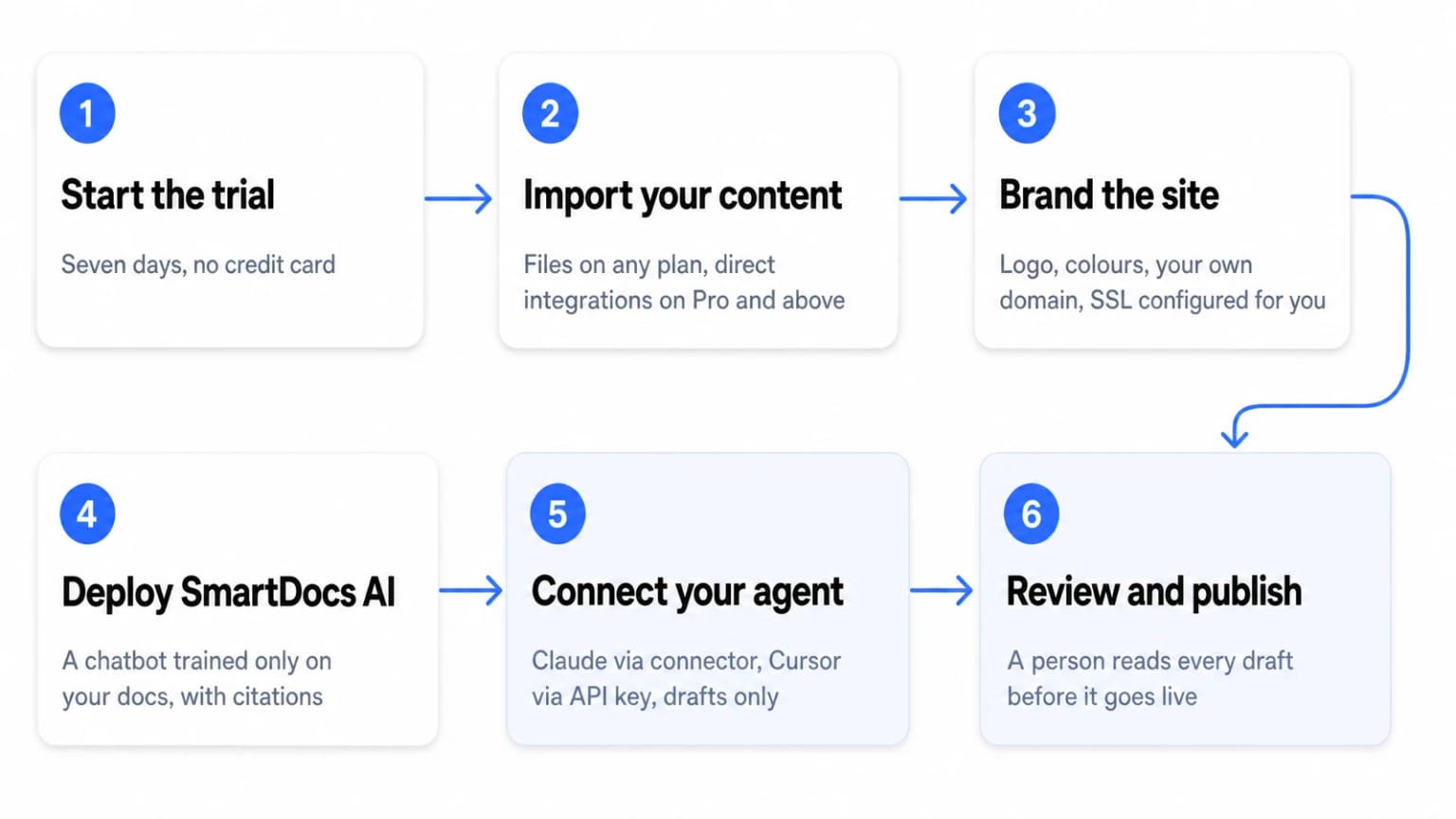 The last two steps are the ones this article is about: an agent drafts, a person publishes.
Getting a documentation site live on Dewstack takes less time than most team standups. The platform is built so that non-technical team members can go from zero to published, AI-powered docs without touching a line of code.
The last two steps are the ones this article is about: an agent drafts, a person publishes.
Getting a documentation site live on Dewstack takes less time than most team standups. The platform is built so that non-technical team members can go from zero to published, AI-powered docs without touching a line of code.
Step 1: Start your free trial. Go to Dewstack and start the 7-day free trial. No credit card required.
Step 2: Import your existing content. On any paid plan, upload PDF, Word, and Markdown files directly. On Pro and above, direct integrations pull from Notion, Confluence, Google Docs, GitHub, Jira, and Dropbox. Bulk import via ZIP, PDF, or CSV is also available on Pro and above. Premium and above include migration assistance for large moves.
Step 3: Customise your documentation site. Set your logo, choose colours and fonts, and point the site to your own domain. SSL is configured automatically on all paid plans. The theme editor is visual, so there is no stylesheet to write.
Step 4: Deploy your SmartDocs AI chatbot. Train a SmartDocs assistant on your imported content. It answers end-user questions with source citations around the clock. Embed it on your product, marketing site, or help centre using a script snippet or iframe. On Premium and above the widget can be white-labeled.
Step 5: Connect your agent. In Claude, open Settings, then Connectors, then Add custom connector. Paste the Write connector URL ending in /mcp-rw, sign in, and press Allow on the approval screen naming your workspace. An Owner or Admin has to approve it, and the workspace needs to be Public for write access. For ChatGPT, the same connector works in developer mode. For Claude Code or Cursor, generate an API key with Read and write scope instead. Then ask the agent what readers could not find, and let it draft.
Step 6: Invite your team and publish. Add team members, assign roles (Owner, Admin, Creator, Editor), and set access controls per collection. Review the drafts, whether a person or an agent wrote them, and publish. Docs can be public, private, or password-protected (password protection requires Premium and above).
The whole sequence, from account creation to a live branded documentation site with an AI chatbot, takes under 3 minutes for a basic setup. Connecting an agent adds about a minute. What it changes is who does the first draft, and what stays true either way is that a person decides what goes live.
Ready to Elevate Your Documentation?
Try Dewstack free for 7 days. Create AI-powered documentation that answers questions instantly.
Start a free trialANSWERS TO
Frequently Asked Questions
Here are some common questions that might provide the information you're seeking.
Related Blogs
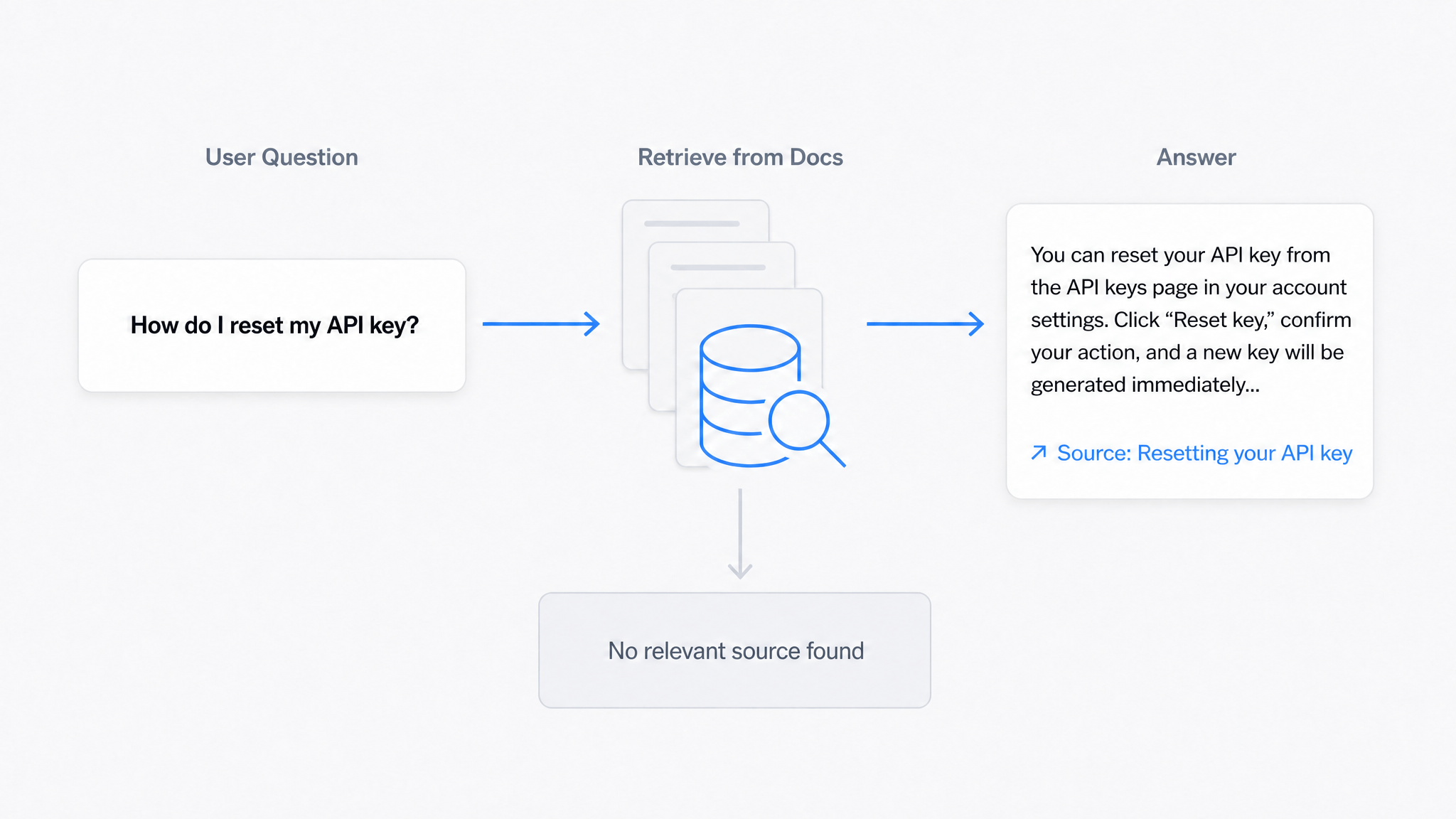
AI Answers From Your Docs: Grounded Answers, Citations & Hallucination Control
How an AI chatbot for technical documentation gives grounded answers with source citations, controls hallucinations, and turns unanswered questions into drafted pages.
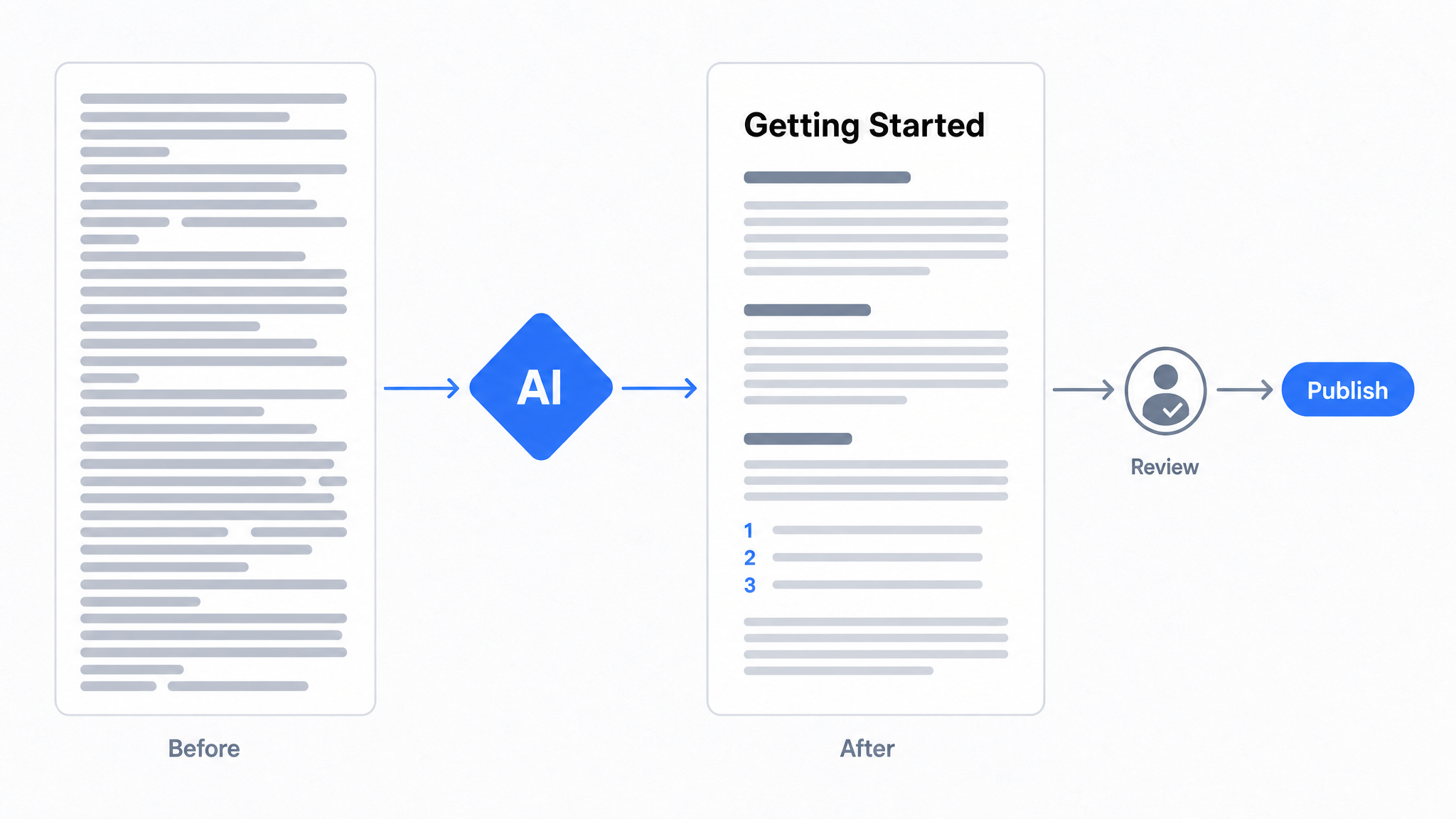
How to Use AI to Improve Existing Documentation
Use AI to audit, rewrite, and translate the documentation you already have, and let a connected agent draft improvements to stale pages for a human to publish.
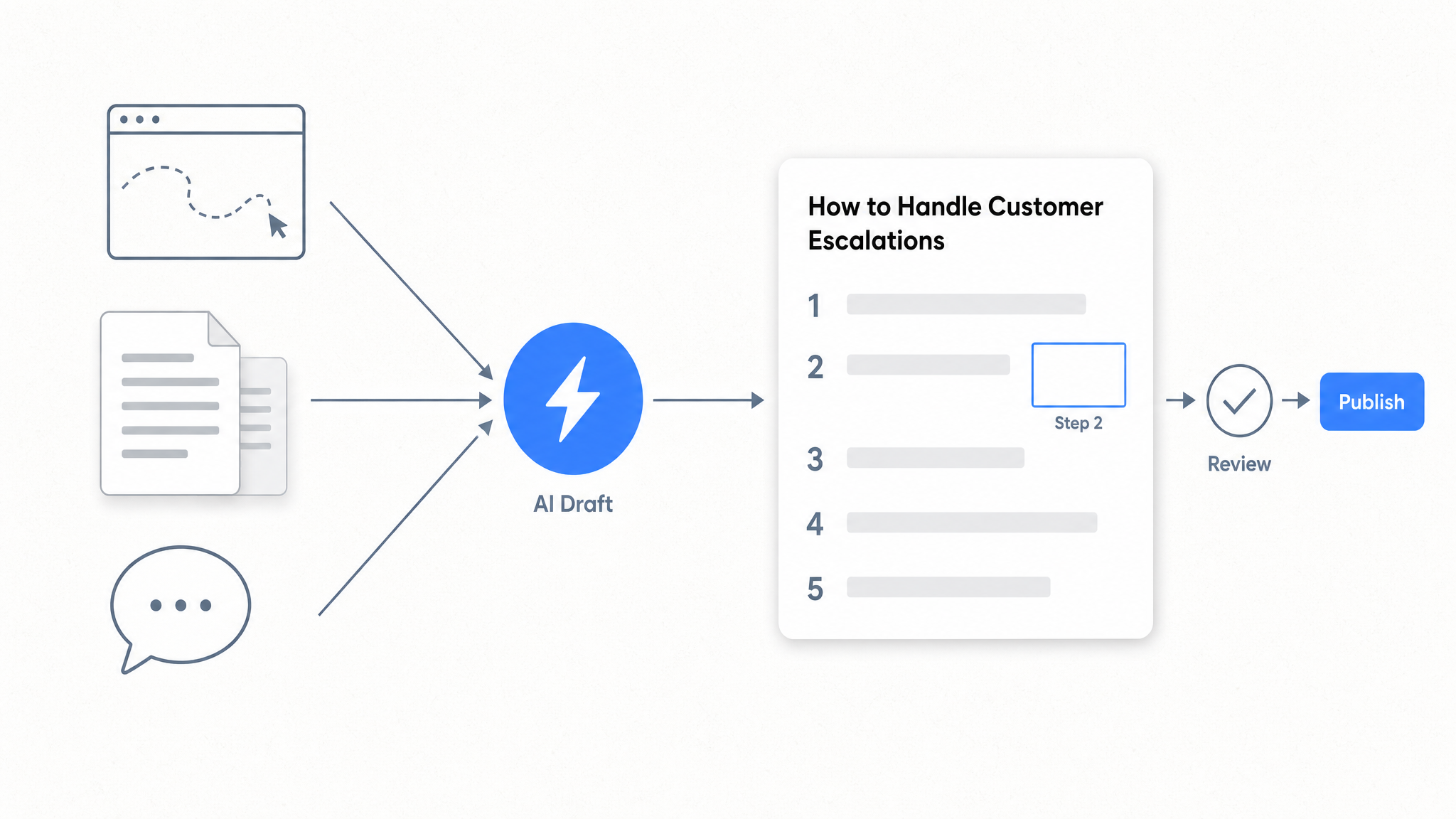
How to Automate SOP Creation with AI
Capture a workflow, let AI draft the SOP, review it, and publish it to a searchable knowledge base your team can query around the clock.
Ready to get started with Dewstack?
Try Dewstack free for 7 days. Create AI-powered documentation that answers questions instantly.
No credit card required.